

Life360: Live Location Sharing

100,000,000+
Installs
Life360
Developer
-
Lifestyle
Category
-
Rated for 3+
Content Rating
-
http://www.life360.com/mobile_privacy_policy
Privacy Policy
Screenshots
editor reviews
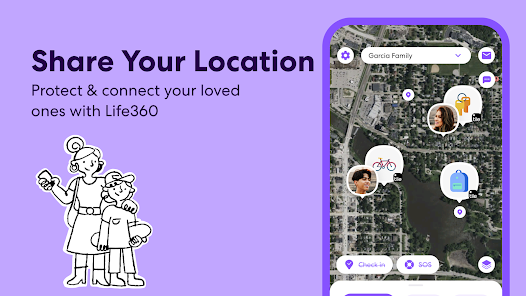
Life360 is essentially a family location-sharing and safety app, though it's evolved into a broader platform over the years. At its core, it uses GPS tracking to let family members or close friends see each other's real-time locations on a private map. The app also includes features like driving reports, crash detection, and even a digital wallet for teens. It's designed primarily for families, especially ones with teenagers who are driving or starting to gain independence, and for elderly relatives who might need extra safety monitoring. The main problem it solves is the anxiety of not knowing where your loved ones are, especially during commutes, late nights, or emergencies.
In my own experience, the core tracking function works reasonably well. The location updates are fairly frequent and accurate. I use it mainly to know when my daughter has left school and is heading home, which has given me peace of mind during her long bus commute. The app's additional features like checking driving speed and route history are good for teaching responsible driving habits, though I found my daughter less enthusiastic about being monitored. I've had a few instances where location data lagged by several minutes, which created some unnecessary worry. The app helped me personally stop texting my teenager asking "where are you?" every hour, which improved our relationship. It also alerted me when my elderly father wandered outside his usual neighborhood, which gave me time to check in with him.
I'd recommend Life360 most strongly to parents of new drivers, people caring for elderly parents who live independently, and families who frequently coordinate pickups and drop-offs. It's less useful for couples who need constant monitoring or for people in healthy, trusting relationships where location tracking would feel excessive. It's also not ideal for people extremely concerned about privacy because the entire point is constant visibility. If you struggle with anxiety about family safety and find yourself worrying during their commutes, this app will feel like a lifeline. If you value privacy and independence over constant check-ins, you'll want to pass on it.
features
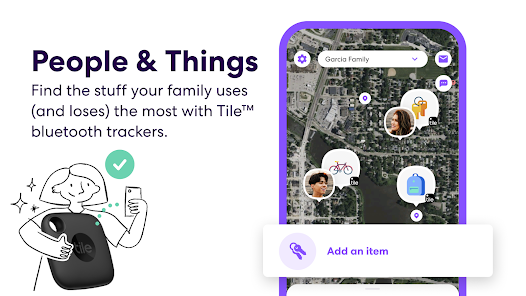
- 📍 Real-Time Location Tracking – The app shows the precise location of all family members on a private map that refreshes automatically. You can see exactly where everyone is without having to text or call. The map even shows location histories so you can see where someone was at a certain time. This is handy for confirming your teenager actually went to the library instead of a friend's house, though it does feel a bit invasive sometimes. I use it daily to coordinate dinner timing based on when my husband leaves work.
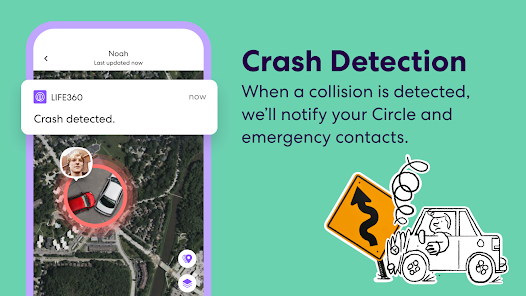
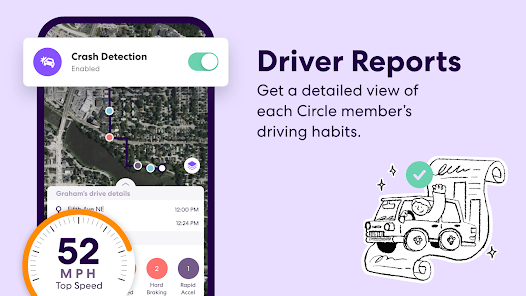
- 🚗 Driving Safety Features – This is where Life360 really shines. It monitors driving behavior, including speed, phone use, hard braking, and rapid acceleration. You get a driving report every time someone completes a trip, and it even detects car crashes automatically. When a crash is detected, the app pings the driver and if they don't respond, it contacts emergency services. This feature alone gave me enough peace of mind to let my daughter start driving to school by herself.
- 🆘 Emergency SOS – There's a panic button that family members can press to send an immediate alert with their location to everyone in the circle. Beyond just SOS, the app includes roadside assistance and location sharing with first responders during 911 calls. I tested the SOS feature once (accidentally, as it turns out) and it sent alerts to the whole family within seconds. The roadside assistance add-on costs extra but works through the app interface, which is convenient if you're stranded somewhere unfamiliar.
- 📱 Digital Communication Tools – Life360 has its own messaging system and a digital wallet feature called Life360 Wallet. The messaging is okay for coordinating arrivals or checking in, but most families probably won't switch from their usual texting apps. The wallet feature lets teens make purchases with a parent-funded card and gives parents transaction notifications. I haven't used the wallet feature personally, but it seems practical for families who want to teach financial responsibility with some oversight.
pros
- Peace of Mind – The biggest strength is the sheer relief it provides. Being able to glance at a map and know everyone is where they should be has cut down my worrying significantly.
- Driving Reports Work Well – The driving analysis is genuinely useful for coaching new drivers. My daughter has actually improved her braking habits because she knows I'll see the report.
- Battery Optimization – Despite running constant GPS, the app manages battery drain surprisingly well. I rarely notice it affecting my phone's battery life throughout the day.
cons
- Premium Features Get Expensive – The free version is basic, and the paid plans stack up quickly. You end up paying extra for useful things like crash detection and driving reports.
- Battery Issues for Older Phones – While newer phones handle it well, I've noticed older devices in my family tend to heat up and drain faster with the app running.
- Tick Mode Can Be Tricky – The feature to pause location sharing isn't always reliable. Sometimes it shows the "ticked" person still on the map, which defeats the purpose of needing a break from being tracked.
Recommended Apps
![]()
Cartoon Photo Editor
AZ Mobile Software4.5

![]()
Football Wallpaper HD 4K
Orange Infotech Studio4.6![]()
Cool Wallpapers HD Steampunk
Live Wallpapers and Emoji Keyboard Themes4.4![]()
Call Santa Claus - Prank Call
Bravestars Publishing4![]()
AnimalFace - face types test
Lucky Puzzle Team4![]()
SkinSAFE: Ingredient Scanner
SkinSAFE4.3![]()
Fake Chat WhatsMock Text Prank
Playfake4.4![]()
Air Horn Sounds : Siren Prank
AA Studio Game4.6![]()
Chatbot AI & Smart Assistant
Codespace Dijital4.5![]()
PicsApp Photo Editor & Collage
Lyrebird Studio4.2![]()
Sun Signs: Horoscopes
horoscope.com4.3![]()
NAMA: Flower language keyboard
Andromeda App3.7![]()
Doodle Master - Glow Art
Hydodo4.5![]()
QR Code Scanner & Scanner App
QR Code Scanner.4.7![]()
QR & Barcode Reader
TeaCapps4.7














You May Like
-
![]()
Translate- Language Translator
Office Lens: Android Tool, Translate, Scanner, PDF4.6 -
![]()
FalFal: Astrology, Tarot, Love
FalFal Team4.8 -
![]()
Pollo AI: AI Video Generator
COCOSOFT TECHNOLOGY PTE. LTD.4.4 -
![]()
Woofz - Puppy and Dog Training
nove84.4 -
![]()
Tattoo AI - Tattoo Design
HubX4.5 -
![]()
Alien Detector : Alien Radar,
Game Palette4.3 -
![]()
Faladdin: Tarot & Horoscopes
Arteria Yazilim Anonim Sirketi4.9 -
![]()
This Or That Test: Fun Filter
Braly JSC0 -
![]()
Ritmo: Face Aging Editor
Faceplay Reface Face Swap Video Editor4.2 -
![]()
Bugzz: Insect Prank Filters
Smart Utilities Hub3.8 -
![]()
Secret Crush Detector App
Hopeitz Software4.8 -
![]()
Emochi: Chat With Character
FlowGPT4.5 -
![]()
Ancestry: Family History & DNA
Ancestry.com4.1 -
![]()
AXS Tickets
AXS, LLC4.2 -
![]()
Cute Labubu Wallpaper
JJWall4.1















Disclaimer
1.Apponbest does not represent any developer, nor is it the developer of any App or game.
2.Apponbest provide custom reviews of Apps written by our own reviewers, and detailed information of these Apps, such as developer contacts, ratings and screenshots.
3. All trademarks, registered trademarks, brand names and company names or logos appearing on the site are the property of their respective owners.
4.Apponbest abides by the federal Digital Millennium Copyright Act (DMCA) by responding to notices of alleged infringement that complies with the DMCA and other applicable laws.
5.If you are the owner or copyright representative and want to delete your information, please contact us [email protected].
6.All the information on this website is strictly observed all the terms and conditions of Google Ads Advertising policies and Google Unwanted Software policy.
7.apponbest.com is an independent, information-only website which is 100% free to all the users.