Canva: AI Photo & Video Editor

500M+
Installs
Canva
Developer
-
Art & Design
Category
-
Everyone 10+
Content Rating
-
https://about.canva.com/privacy-policy/
Privacy Policy
Screenshots

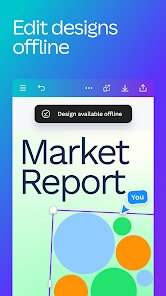
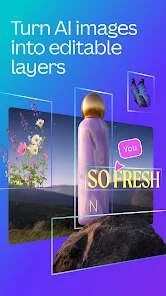
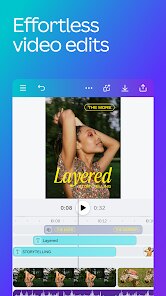
editor reviews
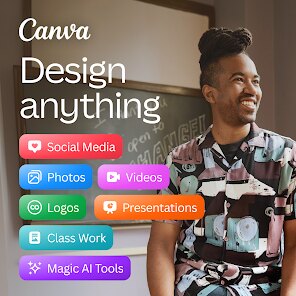
Canva has evolved far beyond its roots as a simple graphic design tool, and its mobile application, Canva: AI Photo & Video Editor, brings a substantial portion of that power directly to your fingertips. The app serves as a comprehensive creative suite for anyone who needs to produce visually appealing content on the go, whether for social media posts, marketing materials, presentations, or personal projects. Its primary purpose is to democratize design, making professional-looking output achievable for individuals without formal training. The core functionality revolves around an extensive template library, an intuitive drag-and-drop editor, and a suite of AI-powered tools that streamline complex tasks.
My own journey with this app began out of frustration. As someone who manages social media for a small business, I often found myself stuck at my desk waiting for a laptop to edit a simple story or create a quote graphic. The mobile app has eliminated that bottleneck. I can now create and publish content directly from my phone, wherever I happen to be. The Magic Grab feature, which lets me select and reposition subjects in a photo with a simple tap, was a particular revelation. It solved the immediate problem of cropping a photo that had an awkward composition, taking a task that would have previously required meticulous work in software like Photoshop down to a few seconds on my commute.
Beyond this, the app connects seamlessly with my Cloud storage, pulling in assets with no friction. Its value is not just in the editing tools but in its organization. The ability to quickly resize a single design into multiple formats for different platforms is a massive time-saver. I recommend this to a broad spectrum of users: students creating presentations, social media managers needing quick turnaround, small business owners crafting their own marketing, and even professional designers who need to make quick edits or mock-ups outside of their main workflow. For anyone who has ever said, "I don't know design," this is the tool to change that thinking. It simplifies the process to the point where creative blocks are overcome not by skill limitations, but by the sheer abundance of inspiration on offer.
features
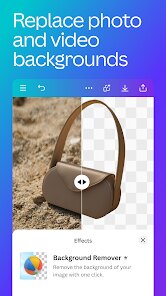
- 🎨 Magic Studio Tools: This suite represents the convergence of AI and accessible design. In my testing, the Magic Eraser is adept at removing unwanted objects from backgrounds with a quick brush stroke. Magic Grab is the standout; it automatically isolates a subject, allowing you to move, scale, or adjust its color with astonishing precision. The Magic Expand feature goes further by generating plausible content to fill empty space and extend your canvas, something I found surprisingly reliable for adding a watermark-free border around a portrait for print.
- 📱 Unified Brand Kit: For content creators and businesses, this is the hidden engine of the app. You can import your logo, brand colors (via hex codes), and fonts into a centralized space. When you start a new design, all of Canva's suggested templates are automatically re-themed to match your specific brand guidelines. This eliminates the guesswork and manual changing of fonts and colors for every piece of content. It ensures a consistent voice across every Instagram post, Facebook ad, or presentation, which otherwise takes a considerable amount of time to manage manually.
- 📲 Video and Audio Editing: The video tools go beyond simple trimming. You can add dynamic transitions, sync multiple video clips, and layer audio tracks directly from a library of licensed music and sound effects. What is remarkable is the speed at which it handles this on a mobile device; real-time previews are smooth. The AI-driven auto-captioning is not only accurate but offers extensive control over font style and pronunciation, which proved invaluable for creating accessible content and increasing engagement for my business's silent-on-view videos without needing a separate speech-to-text tool.
- ✨ Real-Time Collaboration: The mobile app is not an isolated island. I can share an editable link to a design, and colleagues can see the cursor and edits I am making in real-time, leaving comments and making tweaks as if we were in the same room. This functionality breaks down the geographical barriers of team projects, allowing for quick feedback loops on a design mock-up while I am out in the field, a feature that was essential during a recent campaign kickoff that required immediate approval from a client hundreds of miles away.
pros
- ⚡ Unrivaled Template Library: With over a hundred thousand templates, the app acts as a springboard, cutting the time to a final design from an hour to a few minutes, even when starting from a blank slate.
- 🚀 Impressive Performance and Stability: Across my weeks of testing on a mid-range Android device, the app remained fluid and rarely crashed, even when working with large, multi-layer compositions or 4K video exports.
- 🔒 The Depth of Free Tools: A significant amount of the core functionality, including a huge portion of the Magic Studio tools (with generous daily limits) and 5GB of cloud storage, is genuinely free, making its usefulness accessible to budget-constrained users.
cons
- 🐌 Slow Browsing of Stock Assets: Searching for photos and elements within the app can feel laggy compared to the web, with thumbnails taking a noticeable delay to load in high resolution, which can frustrate rapid design sessions.
- 💰 Aggressive Pro Tier Upsells: While the free tier is substantial, many of the newer, most potent AI features are locked behind a paywall, and pop-up prompts encourage upgrades at regular intervals, which disrupts creative flow.
- 📥 Heavy App and Data Cache: Standard usage builds a significant cache, consuming a large amount of device storage over time. I found myself regularly clearing its data to reclaim space on a 128GB phone, which is a usability concern for those with smaller devices.
Recommended Apps
![]()
Cartoon Photo Editor
AZ Mobile Software4.5

![]()
Football Wallpaper HD 4K
Orange Infotech Studio4.6![]()
Cool Wallpapers HD Steampunk
Live Wallpapers and Emoji Keyboard Themes4.4![]()
Call Santa Claus - Prank Call
Bravestars Publishing4![]()
AnimalFace - face types test
Lucky Puzzle Team4![]()
SkinSAFE: Ingredient Scanner
SkinSAFE4.3![]()
Fake Chat WhatsMock Text Prank
Playfake4.4![]()
Air Horn Sounds : Siren Prank
AA Studio Game4.6![]()
Chatbot AI & Smart Assistant
Codespace Dijital4.5![]()
PicsApp Photo Editor & Collage
Lyrebird Studio4.2![]()
Sun Signs: Horoscopes
horoscope.com4.3![]()
NAMA: Flower language keyboard
Andromeda App3.7![]()
Doodle Master - Glow Art
Hydodo4.5![]()
QR Code Scanner & Scanner App
QR Code Scanner.4.7![]()
QR & Barcode Reader
TeaCapps4.7















You May Like
-
![]()
Translate- Language Translator
Office Lens: Android Tool, Translate, Scanner, PDF4.6 -
![]()
FalFal: Astrology, Tarot, Love
FalFal Team4.8 -
![]()
Pollo AI: AI Video Generator
COCOSOFT TECHNOLOGY PTE. LTD.4.4 -
![]()
Woofz - Puppy and Dog Training
nove84.4 -
![]()
Tattoo AI - Tattoo Design
HubX4.5 -
![]()
Alien Detector : Alien Radar,
Game Palette4.3 -
![]()
Faladdin: Tarot & Horoscopes
Arteria Yazilim Anonim Sirketi4.9 -
![]()
This Or That Test: Fun Filter
Braly JSC0 -
![]()
Ritmo: Face Aging Editor
Faceplay Reface Face Swap Video Editor4.2 -
![]()
Bugzz: Insect Prank Filters
Smart Utilities Hub3.8 -
![]()
Secret Crush Detector App
Hopeitz Software4.8 -
![]()
Emochi: Chat With Character
FlowGPT4.5 -
![]()
Ancestry: Family History & DNA
Ancestry.com4.1 -
![]()
AXS Tickets
AXS, LLC4.2 -
![]()
Cute Labubu Wallpaper
JJWall4.1











Disclaimer
1.Apponbest does not represent any developer, nor is it the developer of any App or game.
2.Apponbest provide custom reviews of Apps written by our own reviewers, and detailed information of these Apps, such as developer contacts, ratings and screenshots.
3. All trademarks, registered trademarks, brand names and company names or logos appearing on the site are the property of their respective owners.
4.Apponbest abides by the federal Digital Millennium Copyright Act (DMCA) by responding to notices of alleged infringement that complies with the DMCA and other applicable laws.
5.If you are the owner or copyright representative and want to delete your information, please contact us [email protected].
6.All the information on this website is strictly observed all the terms and conditions of Google Ads Advertising policies and Google Unwanted Software policy.
7.apponbest.com is an independent, information-only website which is 100% free to all the users.