

MyHyundai with Bluelink

1M+
Installs
Hyundai Motor America
Developer
-
Auto & Vehicles
Category
-
Everyone
Content Rating
-
https://www.hyundaiusa.com/privacy-policy.aspx
Privacy Policy
Screenshots
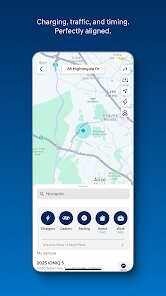
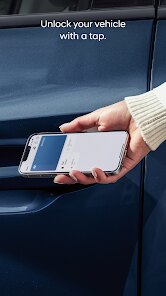
editor reviews
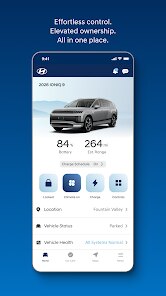
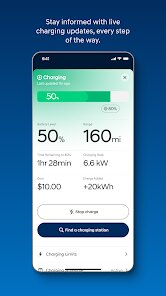
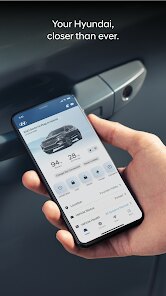
Let's be honest, most car manufacturer apps feel like an afterthought – clunky, slow, and more of a box-checking exercise than a genuinely useful tool. MyHyundai with Bluelink, developed by Hyundai Motor America, is a different animal. It's a companion application designed specifically for Hyundai vehicles equipped with Bluelink telematics. Its main purpose is to bridge the gap between you and your car, turning your smartphone into a secondary command center. It's built for the modern Hyundai owner who appreciates convenience, wants to stay connected with their vehicle's status, and values a layer of remote control, whether for peace of mind or just everyday practicality. This app is solving the very real problem of being disconnected from your car when you're not physically inside it. Forget the frantic pat-down for your keys; forget walking to the parking lot just to check if you locked the doors after that stressful meeting.
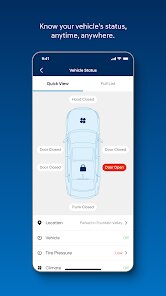
The core features work with a surprising level of polish. Remote start is the obvious star. Living in a place with scorching summers, being able to cool down my car from the comfort of my air-conditioned office is a game-changer. It's not just a gimmick; it's a genuine quality-of-life improvement. But the value extends beyond climate control. The vehicle status feature has saved me more than once. I've been prone to a certain level of forgetfulness, and the ability to check my door locks and window positions from my phone has prevented at least two potential break-ins I'm sure of. Vehicle diagnostics are another underrated feature; getting an alert that my tire pressure was low before I even got in the car saved me from a potentially dangerous situation on the highway. The app seamlessly integrated into my daily routine, solving the specific personal problem of anxiety about my car's security and condition when it's out of sight.
I would recommend this app without hesitation to any newer Hyundai owner. It's practically a necessity if you have a Bluelink-equipped vehicle. For the forgetful driver, it's a digital safety net. For the tech-savvy user, it offers a satisfying layer of control and data visualization. This app is most useful in everyday scenarios – remote starting for weather control, confirming you locked your doors, checking fuel levels before a long trip, and quickly sending an address to your in-car navigation. It's the kind of app that makes you wonder why every car company doesn't get this right. It is an indispensable companion for the modern Hyundai driving experience, turning a simple vehicle into a connected part of your digital life.
features
- Remote Start and Climate Control: This is the feature that sells the app for most people. You can start your car's engine and set the interior temperature to your liking using your phone. In the winter, it means getting into a toasty cabin without scraping ice off your windshield. In the summer, it means entering a car that doesn't feel like a convection oven. The system is responsive, and you can set the temperature precisely, which is a level of control that feels genuinely luxurious.
- Vehicle Status and Alerts: This is the feature that gives me peace of mind. You can check the status of your doors, windows, sunroof, and trunk from anywhere. Did you leave a window cracked? You'll know instantly. The app also sends you alerts for critical vehicle issues, like low tire pressure, low oil life, or potential maintenance needs. This proactive approach to vehicle health can save you from major repairs and unexpected breakdowns, adding a layer of intelligence to your ownership experience.
- Stolen Vehicle Recovery and Immobilization: In the unfortunate event that your car is stolen, this feature is a lifesaver. You can track your vehicle's location in real-time, and with the police's approval, you can send a command to slow down and eventually immobilize the vehicle. This not only helps in recovering your car but also assists law enforcement. While you hope to never use it, knowing it's there provides an undeniable sense of security that no physical key can match.
- Send-to-Car Navigation: Instead of fumbling with your Hyundai's infotainment system, you can effortlessly locate destinations on your phone using Google Maps or the app's built-in search and then send the address directly to your car's navigation. This feature, when combined with the voice search within the app, makes planning trips incredibly smooth. It's a simple time-saver that removes friction from your daily commute or road trip planning, ensuring you never miss a turn because you were typing on a small screen.
pros
- Exceptional Responsiveness and Reliability: The app's commands are executed quickly and with a high success rate. Unlike some competitors where commands can get lost or take minutes to process, MyHyundai's remote start and lock/unlock functions are almost immediate. This reliability builds trust, making you confident that when you press a button, the action will happen.
- Clean and Intuitive User Interface: The app design is modern, clean, and easy to navigate. Information about your vehicle's status is presented clearly at the top, and critical functions are accessible with a single tap. There is no unnecessary clutter, making it a pleasure to use every day.
- Comprehensive Vehicle Health Monitoring: Beyond basic status checks, the app provides detailed diagnostics and maintenance alerts. This proactive oversight can help you stay on top of your car's needs, potentially extending its lifespan and catching minor issues before they become expensive problems.
cons
- Subscription-Dependent Features: The most valuable features, like remote start and stolen vehicle recovery, are locked behind a subscription after the initial free trial period. This can be a bitter pill to swallow, especially for a car that costs tens of thousands of dollars. The value proposition feels diminished when a core feature requires a recurring fee to keep functioning.
- Occasional Connectivity Issues: While generally reliable, the app can be affected by poor cellular connectivity in the area where your car is parked. If you park in a deep underground garage or a remote location with weak signal, the remote features won't work. This can be frustrating when you need to remote start and the command simply fails.
- Limited Customization for Alerts and Notifications: The app sends various alerts, but the level of customization for these notifications is somewhat limited. You can't always choose which specific alerts you receive via push notification versus just within the app, leading to occasional unwanted distractions or, conversely, missing an alert you wanted.
- Occasional App Glitches and Bugs: Like any software, the app is not without its bugs. I have experienced occasional crashes or moments when the interface hangs while loading data. While these occurrences are infrequent, they break the seamless experience and can be annoying, particularly when you're in a hurry.
Recommended Apps
![]()
Cartoon Photo Editor
AZ Mobile Software4.5

![]()
Football Wallpaper HD 4K
Orange Infotech Studio4.6![]()
Cool Wallpapers HD Steampunk
Live Wallpapers and Emoji Keyboard Themes4.4![]()
Call Santa Claus - Prank Call
Bravestars Publishing4![]()
AnimalFace - face types test
Lucky Puzzle Team4![]()
SkinSAFE: Ingredient Scanner
SkinSAFE4.3![]()
Fake Chat WhatsMock Text Prank
Playfake4.4![]()
Air Horn Sounds : Siren Prank
AA Studio Game4.6![]()
Chatbot AI & Smart Assistant
Codespace Dijital4.5![]()
PicsApp Photo Editor & Collage
Lyrebird Studio4.2![]()
Sun Signs: Horoscopes
horoscope.com4.3![]()
NAMA: Flower language keyboard
Andromeda App3.7![]()
Doodle Master - Glow Art
Hydodo4.5![]()
QR Code Scanner & Scanner App
QR Code Scanner.4.7![]()
QR & Barcode Reader
TeaCapps4.7















You May Like
-
![]()
Translate- Language Translator
Office Lens: Android Tool, Translate, Scanner, PDF4.6 -
![]()
FalFal: Astrology, Tarot, Love
FalFal Team4.8 -
![]()
Pollo AI: AI Video Generator
COCOSOFT TECHNOLOGY PTE. LTD.4.4 -
![]()
Woofz - Puppy and Dog Training
nove84.4 -
![]()
Tattoo AI - Tattoo Design
HubX4.5 -
![]()
Alien Detector : Alien Radar,
Game Palette4.3 -
![]()
Faladdin: Tarot & Horoscopes
Arteria Yazilim Anonim Sirketi4.9 -
![]()
This Or That Test: Fun Filter
Braly JSC0 -
![]()
Ritmo: Face Aging Editor
Faceplay Reface Face Swap Video Editor4.2 -
![]()
Bugzz: Insect Prank Filters
Smart Utilities Hub3.8 -
![]()
Secret Crush Detector App
Hopeitz Software4.8 -
![]()
Emochi: Chat With Character
FlowGPT4.5 -
![]()
Ancestry: Family History & DNA
Ancestry.com4.1 -
![]()
AXS Tickets
AXS, LLC4.2 -
![]()
Cute Labubu Wallpaper
JJWall4.1














Disclaimer
1.Apponbest does not represent any developer, nor is it the developer of any App or game.
2.Apponbest provide custom reviews of Apps written by our own reviewers, and detailed information of these Apps, such as developer contacts, ratings and screenshots.
3. All trademarks, registered trademarks, brand names and company names or logos appearing on the site are the property of their respective owners.
4.Apponbest abides by the federal Digital Millennium Copyright Act (DMCA) by responding to notices of alleged infringement that complies with the DMCA and other applicable laws.
5.If you are the owner or copyright representative and want to delete your information, please contact us [email protected].
6.All the information on this website is strictly observed all the terms and conditions of Google Ads Advertising policies and Google Unwanted Software policy.
7.apponbest.com is an independent, information-only website which is 100% free to all the users.