
Simple Calendar - easy planner

5M+
Installs
Komorebi Inc.
Developer
-
Productivity
Category
-
Everyone
Content Rating
-
https://komorebi-studio.com/policyredirect.html
Privacy Policy
Screenshots
editor reviews
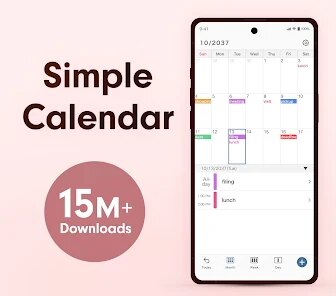
Simple Calendar from Komorebi Inc. is essentially a minimalist planner designed for people who find today's calendar apps overly complicated and cluttered. The app focuses on providing a clean, intuitive interface for managing daily schedules without the noise of endless widgets, syncing options, or social features. Its main purpose is to let you see your day at a glance and add events quickly, solving the problem of information overload that plagues many mainstream calendar tools.
The target audience includes students, busy professionals, and anyone who prefers a straightforward approach to time management. I found the core functionality works surprisingly well. Adding an event takes just two taps, and the color-coded entries make it easy to distinguish between work tasks, personal appointments, and deadlines. The additional features like recurring events and a simple reminder system add real value without bloating the experience. For me, it solved a persistent frustration: I used to spend more time navigating Google Calendar's menus than actually planning my day. Simple Calendar streamlined this, reducing friction and helping me stick to my schedule more consistently.
Based on my experience, I'd recommend this app to users who need a no-fuss daily planner. It's perfect for people who just want to see their appointments clearly and add events quickly, without any of the extra bells and whistles. If you're someone who gets distracted by too many options or just wants a digital version of a paper planner, this is the right tool. However, if you rely on complex integrations, multiple calendar syncing, or advanced project management features, you might find it too basic.
features
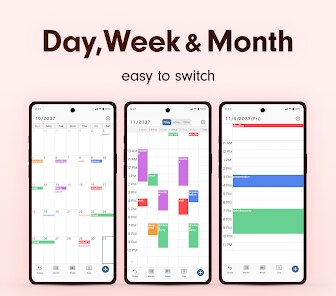
- 📅 The app's core feature is its ultra-clean daily view. You open it and immediately see your entire day laid out in a simple vertical timeline. No tabs, no nested menus, no scrolling through months first. This direct approach saved me so much mental energy. I no longer felt overwhelmed looking at my schedule; instead, I could actually process and plan my day.
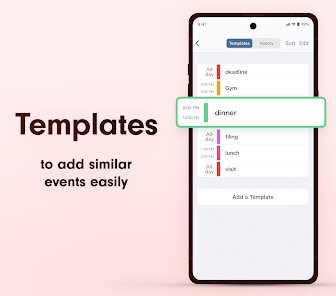
- ⏰ Quick event creation is another standout. You tap a plus icon or simply double-tap a time slot. A minimal form appears asking only for the event name and duration. That's it. No fields for location, notes, or repeat options unless you want them. This reduced the friction of adding appointments to almost zero, which meant I actually started using the calendar to plan minor tasks I used to skip.
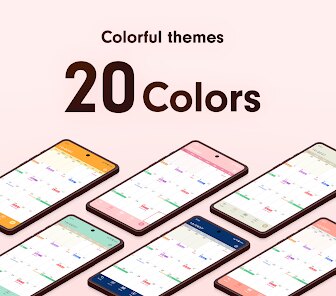
- 🎨 Color coding is elegantly implemented. You can assign colors to events based on categories you define. The palette is carefully chosen to be distinct yet soft on the eyes. I created categories for work, personal, health, and family. At a glance, I could see the balance of my day. It helped me spot if one area was taking over, which was something I never noticed with more cluttered apps.
- 🔔 Simple reminders come built-in without any extra setup. When you create an event, you can optionally set a reminder for minutes, hours, or a day before. The notification arrives as a clean pop-up, not a long notification chain. This minimalism prevented notification fatigue, yet ensured I never missed important appointments.
pros
- 🌱 The learning curve is virtually nonexistent. Because the app strips away every unnecessary feature, you can master it in under five minutes. This instant usability is rare and valuable for people who just want a tool that works.
- ⚡ Performance is exceptionally smooth. The app launches instantly, scrolls without lag, and handles thousands of events without slowing down. Komorebi Inc. clearly optimized the underlying code well.
- 📱 The design follows modern mobile UX principles perfectly. Touch targets are properly sized, spacing is generous, and the typography is crisp. It genuinely feels pleasant to use daily.
cons
- 🔗 There is no integration with other calendar services like Google Calendar or Outlook. If you manage multiple calendars, you cannot sync them here. This is the biggest dealbreaker for power users.
- 📝 Event customization is very limited. You cannot add notes, attachments, or custom recurrence patterns. For complex scheduling needs, the app feels too restrictive.
- 🌙 A proper dark mode is missing. The white background can be harsh in low-light environments. A dark theme toggle would greatly improve nighttime usability.
Recommended Apps
![]()
Cartoon Photo Editor
AZ Mobile Software4.5

![]()
Football Wallpaper HD 4K
Orange Infotech Studio4.6![]()
Cool Wallpapers HD Steampunk
Live Wallpapers and Emoji Keyboard Themes4.4![]()
Call Santa Claus - Prank Call
Bravestars Publishing4![]()
AnimalFace - face types test
Lucky Puzzle Team4![]()
SkinSAFE: Ingredient Scanner
SkinSAFE4.3![]()
Fake Chat WhatsMock Text Prank
Playfake4.4![]()
Air Horn Sounds : Siren Prank
AA Studio Game4.6![]()
Chatbot AI & Smart Assistant
Codespace Dijital4.5![]()
PicsApp Photo Editor & Collage
Lyrebird Studio4.2![]()
Sun Signs: Horoscopes
horoscope.com4.3![]()
NAMA: Flower language keyboard
Andromeda App3.7![]()
Doodle Master - Glow Art
Hydodo4.5![]()
QR Code Scanner & Scanner App
QR Code Scanner.4.7![]()
QR & Barcode Reader
TeaCapps4.7














You May Like
-
![]()
Translate- Language Translator
Office Lens: Android Tool, Translate, Scanner, PDF4.6 -
![]()
FalFal: Astrology, Tarot, Love
FalFal Team4.8 -
![]()
Pollo AI: AI Video Generator
COCOSOFT TECHNOLOGY PTE. LTD.4.4 -
![]()
Woofz - Puppy and Dog Training
nove84.4 -
![]()
Tattoo AI - Tattoo Design
HubX4.5 -
![]()
Alien Detector : Alien Radar,
Game Palette4.3 -
![]()
Faladdin: Tarot & Horoscopes
Arteria Yazilim Anonim Sirketi4.9 -
![]()
This Or That Test: Fun Filter
Braly JSC0 -
![]()
Ritmo: Face Aging Editor
Faceplay Reface Face Swap Video Editor4.2 -
![]()
Bugzz: Insect Prank Filters
Smart Utilities Hub3.8 -
![]()
Secret Crush Detector App
Hopeitz Software4.8 -
![]()
Emochi: Chat With Character
FlowGPT4.5 -
![]()
Ancestry: Family History & DNA
Ancestry.com4.1 -
![]()
AXS Tickets
AXS, LLC4.2 -
![]()
Cute Labubu Wallpaper
JJWall4.1













Disclaimer
1.Apponbest does not represent any developer, nor is it the developer of any App or game.
2.Apponbest provide custom reviews of Apps written by our own reviewers, and detailed information of these Apps, such as developer contacts, ratings and screenshots.
3. All trademarks, registered trademarks, brand names and company names or logos appearing on the site are the property of their respective owners.
4.Apponbest abides by the federal Digital Millennium Copyright Act (DMCA) by responding to notices of alleged infringement that complies with the DMCA and other applicable laws.
5.If you are the owner or copyright representative and want to delete your information, please contact us [email protected].
6.All the information on this website is strictly observed all the terms and conditions of Google Ads Advertising policies and Google Unwanted Software policy.
7.apponbest.com is an independent, information-only website which is 100% free to all the users.