

LINE Sticker Maker

5M+
Installs
LINE (LY Corporation)
Developer
-
Video Players & Editors
Category
-
Rated for 3+
Content Rating
-
https://line.me/terms/policy/
Privacy Policy
Screenshots
editor reviews
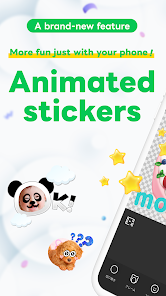
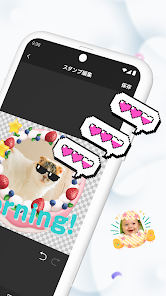
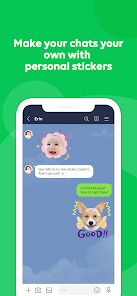
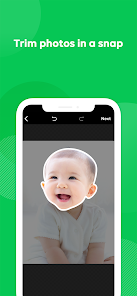
LINE Sticker Maker is a fun and creative app that allows users to create their own personalized stickers, adding a touch of individuality to their messages. As a long-time LINE user, I found this app to be a great way to express my emotions through custom stickers rather than relying on the default ones. The interface is user-friendly and intuitive, even for beginners, which made the sticker creation process a breeze. One of the reasons I chose this app over others is its seamless integration with the LINE messaging platform. Once my stickers are created, I can easily share them with friends or even sell them on the LINE Store. Whether you want to create a cute, funny, or even artistic sticker, this app provides all the tools you need, from simple drawing tools to advanced editing options. I especially appreciate the ability to draw freehand or use templates to start from, which makes the creative process more flexible. Additionally, the app offers a variety of exporting options, meaning you can use your stickers across other platforms as well. In this review, I'll walk you through some of the key features that make LINE Sticker Maker a standout choice in a crowded marketplace. Ready to turn your sketches into digital masterpieces? Download LINE Sticker Maker today and let your creativity shine! 🎨😄📱🎉🖼️✂️📸
features
- 🎨 Customizable Tools for Creativity The app provides a range of customizable drawing tools that cater to both beginner and experienced designers. Whether you prefer freehand drawing or need precision with shapes and lines, it offers all the essential tools, including pen, brush, and even text options. With various colors and brush sizes at your disposal, you can bring your ideas to life exactly as you envision them.
- 📐 Ready-to-Use Templates LINE Sticker Maker offers a library of templates to help kickstart your sticker-making process. These pre-designed templates allow you to add personal touches and make the design process faster and more efficient. Ideal for those who want to create something quickly without starting from scratch.
- 🚀 Instant Sharing and Publishing Once your sticker is ready, the app enables you to upload and share your creation directly to the LINE Store for others to use, or simply share it privately with friends. This seamless integration with the LINE app makes it easy to get your stickers into your chats without any hassle.
- 🔧 Advanced Editing Features For more advanced creators, the app provides a set of powerful editing tools. You can add effects, adjust transparency, and use layers to fine-tune your designs. The ability to zoom in for precise detailing makes it perfect for users looking to create intricate artwork.
- 🌍 Exporting to Other Platforms Beyond LINE, the app also allows you to export your stickers to other platforms, ensuring that your creations can be used wherever you communicate. This flexibility gives users the freedom to share their designs with a larger audience.
pros
- 💡 Intuitive Interface The app's interface is incredibly easy to navigate. Even if you're new to graphic design or sticker-making, the tools are straightforward and don't overwhelm you. The learning curve is minimal, allowing you to focus on your creativity rather than technicalities.
- 🎉 Fun and Engaging Making custom stickers is a fun experience, and the app provides an enjoyable platform for you to express your unique personality. Whether you're making stickers for personal use or as a fun gift for friends, this app keeps the process entertaining.
- ⚡ Speed and Efficiency The app works quickly and efficiently, from loading the editing screen to finalizing and sharing your stickers. There's very little lag, even when using detailed designs, so you can get your stickers ready in no time.
- 💰 Free-to-Use with Optional Premium Features While the app is free to use, it also offers premium features for those who want access to more advanced tools. For most users, the free version is more than enough to create high-quality stickers. The flexibility to upgrade is also a plus for those looking to expand their design capabilities.
cons
- 🛠️ Limited Sticker Sizes One drawback is the limited size of stickers, which can sometimes feel restrictive, especially for users who want to create larger, more detailed stickers. The app does provide a standard size, but it may not accommodate all creative ideas.
- 🔄 Limited Animation Options While you can create static stickers with ease, animation options are not as robust. This can be a disadvantage for users who want to create dynamic stickers with moving elements or effects.
- 🔒 Export Restrictions Although you can export stickers to other platforms, there are some restrictions on file types and resolution. This may limit your ability to use stickers across all messaging apps without having to resize or reformat them.
Recommended Apps
![]()
Cartoon Photo Editor
AZ Mobile Software4.5

![]()
Football Wallpaper HD 4K
Orange Infotech Studio4.6![]()
Cool Wallpapers HD Steampunk
Live Wallpapers and Emoji Keyboard Themes4.4![]()
Call Santa Claus - Prank Call
Bravestars Publishing4![]()
AnimalFace - face types test
Lucky Puzzle Team4![]()
SkinSAFE: Ingredient Scanner
SkinSAFE4.3![]()
Fake Chat WhatsMock Text Prank
Playfake4.4![]()
Air Horn Sounds : Siren Prank
AA Studio Game4.6![]()
Chatbot AI & Smart Assistant
Codespace Dijital4.5![]()
PicsApp Photo Editor & Collage
Lyrebird Studio4.2![]()
Sun Signs: Horoscopes
horoscope.com4.3![]()
NAMA: Flower language keyboard
Andromeda App3.7![]()
Doodle Master - Glow Art
Hydodo4.5![]()
QR Code Scanner & Scanner App
QR Code Scanner.4.7![]()
QR & Barcode Reader
TeaCapps4.7













You May Like
-
![]()
Translate- Language Translator
Office Lens: Android Tool, Translate, Scanner, PDF4.6 -
![]()
FalFal: Astrology, Tarot, Love
FalFal Team4.8 -
![]()
Pollo AI: AI Video Generator
COCOSOFT TECHNOLOGY PTE. LTD.4.4 -
![]()
Woofz - Puppy and Dog Training
nove84.4 -
![]()
Tattoo AI - Tattoo Design
HubX4.5 -
![]()
Alien Detector : Alien Radar,
Game Palette4.3 -
![]()
Faladdin: Tarot & Horoscopes
Arteria Yazilim Anonim Sirketi4.9 -
![]()
This Or That Test: Fun Filter
Braly JSC0 -
![]()
Ritmo: Face Aging Editor
Faceplay Reface Face Swap Video Editor4.2 -
![]()
Bugzz: Insect Prank Filters
Smart Utilities Hub3.8 -
![]()
Secret Crush Detector App
Hopeitz Software4.8 -
![]()
Emochi: Chat With Character
FlowGPT4.5 -
![]()
Ancestry: Family History & DNA
Ancestry.com4.1 -
![]()
AXS Tickets
AXS, LLC4.2 -
![]()
Cute Labubu Wallpaper
JJWall4.1











Disclaimer
1.Apponbest does not represent any developer, nor is it the developer of any App or game.
2.Apponbest provide custom reviews of Apps written by our own reviewers, and detailed information of these Apps, such as developer contacts, ratings and screenshots.
3. All trademarks, registered trademarks, brand names and company names or logos appearing on the site are the property of their respective owners.
4.Apponbest abides by the federal Digital Millennium Copyright Act (DMCA) by responding to notices of alleged infringement that complies with the DMCA and other applicable laws.
5.If you are the owner or copyright representative and want to delete your information, please contact us [email protected].
6.All the information on this website is strictly observed all the terms and conditions of Google Ads Advertising policies and Google Unwanted Software policy.
7.apponbest.com is an independent, information-only website which is 100% free to all the users.