
Easy Clean Pro

5M+
Installs
Limtech Developers
Developer
-
Productivity
Category
-
Everyone
Content Rating
-
https://sites.google.com/view/ecpprivacy
Privacy Policy
Screenshots
editor reviews
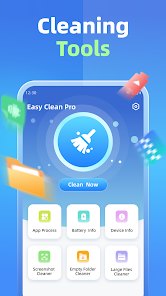
Easy Clean Pro is a utility app built by Limtech Developers to help Android users reclaim storage space and keep their phones running smoothly. At its core, the app scans for junk files, leftover cache, duplicate photos, and large media files that quietly pile up over time. It also offers a one-tap boost that clears background processes and memory, plus a file manager for tracking down oversized downloads or forgotten screenshots. The target audience is broad: anyone with a mid-range phone that fills up quickly, parents juggling thousands of family photos, or casual users who simply do not want to dig through system folders themselves. The problem it addresses is real—storage anxiety and sluggish performance—and it aims to solve both without requiring technical know-how.
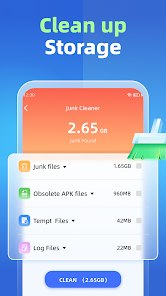
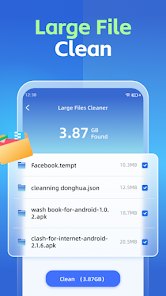
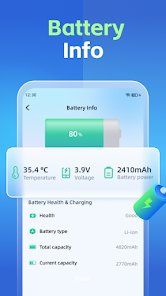
In daily use, the core cleaning function works reliably. A full scan on my device surfaced roughly 3 GB of cache and obsolete files, and the cleanup took under a minute. The duplicate photo finder was the standout: it caught several burst shots and WhatsApp copies I had no idea existed, which personally saved me from buying extra cloud storage. The one-tap boost is less impressive—memory frees up briefly, but apps reload almost immediately—though it does help before launching a game. Additional tools like the large-file finder and app uninstaller add genuine value rather than feeling like filler. Not every module is equally polished; the battery saver is mostly a shortcut to system settings.
I would recommend Easy Clean Pro to users who want a straightforward, set-and-forget maintenance tool, especially those on budget handsets with limited internal storage. It suits weekly housekeeping routines, pre-trip cleanups before downloading offline maps, and moments when a "storage full" warning appears at the worst time. If you enjoy granular control or prefer open-source tools, this app may feel too automatic, but for everyone else it is a practical companion.
features
- 🧹 Junk Cleaner: Scans cache, residual files, and empty folders in one pass, then lets you review results before deleting, so nothing important disappears by accident.
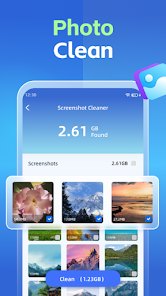
- 🖼️ Duplicate and Similar Photo Detection: Groups near-identical images side by side, making it easy to keep the sharpest shot and clear the rest without endless scrolling.
- ⚡ One-Tap Boost: Frees RAM by stopping background tasks; effective in short bursts, particularly before heavy gaming or video calls.
- 📁 Large File Manager: Sorts files by size and age, which is ideal for finding that forgotten 1 GB video buried in Downloads.
pros
- ✅ Fast, lightweight scans that finish quickly even on older devices.
- ✅ Clear previews before deletion reduce the risk of accidental data loss.
- ✅ Clean, ad-light interface that is easy for non-technical users to navigate.
- ✅ Regular updates from the developer keep the cleaning database current.
cons
- ❌ The memory boost effect is short-lived, as cleared apps restart almost at once.
- ❌ Some modules, like the battery saver, merely redirect to system settings.
- ❌ Occasional ads in the free version interrupt the cleaning flow.
- ❌ No cloud backup option before bulk deletion, which risks permanent loss.
Recommended Apps
![]()
Find Your Phone By Clap
Trusted App Global4.5

![]()
Manco - Cartoon Avatar Maker
Jessica Rendon4.2![]()
Dog Prank Call & Chat
GOBEEZ YAZILIM TİCARET3.4![]()
Drone App: Forecast for UAV
Go Dreams4.4![]()
Palm Secret - Aging&Cartoon
Palm Horoscope3.8![]()
Get FFF Daily Diamonds Tips
Reallust Softech0![]()
Diamond Zipper Lock Screen
Prometheus Interactive LLC3.7![]()
Star Idol: Animated 3D Avatar
HK Wecut International Ltd4.4![]()
Co–Star Personalized Astrology
Co–Star Astrology Society4.7![]()
4D Live Wallpaper–HD Wallpaper
ZERO Tech4.5![]()
Learn English, Spanish: Learna
Deep Flow Apps4.6![]()
AstroSoul: Astro Palm Reader
Appmaking LTD4.5![]()
HotPads Rent Apartments
HotPads (Owned by ZillowGroup)4.6![]()
Monster High Fangtastic Life
Budge Studios4.1![]()
PND AI Photo Enhancer HD
PND AI 3604.8












You May Like
-
![]()
Find my Phone - Clap, Whistle
FunGear inc4.4 -
![]()
SuperMe - Avatar Maker Creator
THE.DEMON3.7 -
![]()
Prank App - Funny Prank Sounds
Trusted Apps & Utilities Tools 20244.4 -
![]()
4D Live Wallpaper–HD Wallpaper
ZERO Tech4.5 -
![]()
Get Robux Gift Card RedeemCode
Pradeep Harsoor DEVs4.5 -
![]()
ArtistA: Cartoon Photo Editor
Lyrebird Studio4.6 -
![]()
Astrolink: Birth Chart
Astrolink Orbe4.2 -
![]()
Neku: OC character creator
Neku Avatar Studio4.6 -
![]()
Moises: The Musician's AI App
Moises Systems4.5 -
![]()
Love Detector - Fingerprints
KOSHINA APPS0 -
![]()
Who Love You? Personality Test
BuzzForFun0 -
![]()
Clue Cycle & Period Tracker
Clue Period Tracker by BioWink4.4 -
![]()
Prisma3D - Animation, Modeling
Prisma3D2.8 -
![]()
Prank Call
MyPhoneRobot4.2 -
![]()
Club Cooee - 3D Avatar Chat
cooee GmbH3.6













Disclaimer
1.Apponbest does not represent any developer, nor is it the developer of any App or game.
2.Apponbest provide custom reviews of Apps written by our own reviewers, and detailed information of these Apps, such as developer contacts, ratings and screenshots.
3. All trademarks, registered trademarks, brand names and company names or logos appearing on the site are the property of their respective owners.
4.Apponbest abides by the federal Digital Millennium Copyright Act (DMCA) by responding to notices of alleged infringement that complies with the DMCA and other applicable laws.
5.If you are the owner or copyright representative and want to delete your information, please contact us [email protected].
6.All the information on this website is strictly observed all the terms and conditions of Google Ads Advertising policies and Google Unwanted Software policy.
7.apponbest.com is an independent, information-only website which is 100% free to all the users.