

Muse from Meta

500K+
Installs
Meta Platforms, Inc.
Developer
-
Generative AI
Category
-
Teen
Content Rating
-
https://muse.ai/privacy
Privacy Policy
Screenshots
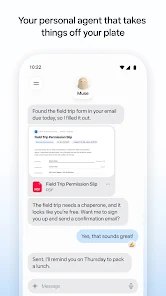




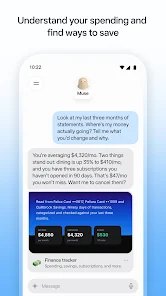
editor reviews
Muse from Meta is a creative AI application developed by Meta Platforms, Inc. Its primary function centers on generating images and visual content from text prompts, allowing users to describe what they want to see and receive AI-rendered results directly within the app. The tool is built for people who want to experiment with AI-generated art without needing technical skills or access to separate image-generation software.
The app targets casual creators, social media users, designers seeking quick concept visuals, and anyone curious about AI image generation. It solves the problem of turning abstract ideas into visual form quickly. Instead of searching endlessly for stock images or struggling with complex design tools, users can type a prompt and get a unique image in seconds. That simplicity is the main appeal.
In my own use, I tried Muse to create a few images for a personal project. The text-to-image feature worked smoothly, and the results were surprisingly detailed. I typed something like "a quiet coffee shop on a rainy afternoon, warm lighting, watercolor style," and the app produced an image that captured most of what I described. It saved me time because I did not need to learn Photoshop or hunt through stock photo sites. The additional features, such as style variations and the ability to refine prompts, added real value. I found the variation tool especially helpful when the first result was not quite right.
However, the app is not perfect. Sometimes the generated images had odd proportions or missed details in the prompt. The app also requires a Meta account, which may not sit well with users who are cautious about data privacy. Still, for quick creative exploration, it works well.
I would recommend Muse to social media content creators, hobbyist artists, and people who need fast visual inspiration. It suits scenarios where speed matters more than pixel-perfect accuracy, such as brainstorming sessions, mood boards, or casual posts. If you need precise, professional-grade images for commercial work, this app may feel limited. But for everyday creative fun, it delivers a satisfying experience without a steep learning curve.
features
- 🎨 Text-to-image generation: Users type a description, and the app produces an image that matches the prompt. This is the core function and it works reliably for most simple and moderately detailed requests.
- 🖌️ Style options: Muse offers different visual styles, from realistic to illustrated. This helps users get closer to the look they want without rewriting the prompt multiple times.
- 🔄 Image variations: After generating an image, users can request variations. This is useful when the first result is close but not perfect, and it encourages experimentation.
- 📱 In-app sharing: Generated images can be shared directly to Meta platforms. This makes the app convenient for social media users who want to post content quickly.
pros
- ⚡ Fast results: Images generate in seconds, which keeps the creative flow going and reduces waiting time.
- 🧠 Simple interface: The app is easy to navigate, even for users with no prior experience with AI tools.
- 🎯 Decent prompt accuracy: For common subjects and scenes, the app captures the main elements of the prompt well.
- 🔗 Meta integration: Sharing to Meta platforms is seamless, which adds convenience for active social media users.
cons
- ⚠️ Inconsistent details: Some images have strange proportions, extra limbs, or missed elements from the prompt.
- 🔒 Account requirement: A Meta account is needed, which may deter privacy-conscious users.
- 📉 Limited fine control: There are few advanced settings for adjusting composition, lighting, or specific elements.
- 🌐 Connectivity dependent: The app requires an internet connection, so it is not useful offline.
Recommended Apps
![]()
Sprout - AI Job Search
Magnifex4.4
![]()
Doodle Art: Magic Drawing App
Peaksel Games4.4![]()
Gopuff - Grocery Delivery
Gopuff4.5
![]()
How I will die - Predict death
Bimdu3.2![]()
Google Calendar
Google LLC4.5![]()
Plant App - Plant Identifier
ScaleUp4.6![]()
Prediction 2026: Savage Reveal
LKPixel0![]()
FOX Sports: Watch Live Games
Fox Digital Services, LLC3.7![]()
Time Warp Scan Cam&Face Filter
HDY Apps4.4![]()
TouchTunes: Live Bar JukeBox
Touchtunes Interactive Networks3.2![]()
GPS, Maps, Voice Navigation
AppStar Studios3.9![]()
Girly Lock Screen Wallpaper
Prometheus Interactive LLC3.9![]()
PixVerse: AI Video Generator
PixVerse4.5![]()
ToonMe - Cartoon Face Maker
Otis Clare3![]()
Yuka - Food & cosmetic scan
Yuka App4.7












You May Like
-
![]()
DeepArtEffects AI Photo Editor
Deep Art AI GmbH4.6 -
![]()
FunVid: Funny Face Filters
Vibe Filter Club0 -
![]()
Fake video call - Prank call
HiddenScreen.NET0 -
![]()
Funny Gay Test
Test Master Lab4.2 -
![]()
Face Shape - Pretty Scale
GlintTec Apps3.9 -
![]()
Japan Timetable & Route Search
NAVITIME JAPAN CO., LTD.4.3 -
![]()
GroupMe
GroupMe4.5 -
![]()
Sam's Club: Shopping & Savings
Sam's Club4.8 -
![]()
Lie Detector Test Prank (Joke)
Neko Soft3.9 -
![]()
Google Voice
Google LLC4.3 -
![]()
AI Fusion - AI Merge Character
Braly JSC0 -
![]()
Reverse Voice: Flip Singing
NindaFuit0 -
![]()
Naughty or Nice Photo Scanner
Droidheads4.2 -
![]()
Walli - HD, 4K Wallpapers
Tap AI4.4 -
![]()
SafeAllergy - Allergen Scanner
MedCoderX0












Disclaimer
1.Apponbest does not represent any developer, nor is it the developer of any App or game.
2.Apponbest provide custom reviews of Apps written by our own reviewers, and detailed information of these Apps, such as developer contacts, ratings and screenshots.
3. All trademarks, registered trademarks, brand names and company names or logos appearing on the site are the property of their respective owners.
4.Apponbest abides by the federal Digital Millennium Copyright Act (DMCA) by responding to notices of alleged infringement that complies with the DMCA and other applicable laws.
5.If you are the owner or copyright representative and want to delete your information, please contact us [email protected].
6.All the information on this website is strictly observed all the terms and conditions of Google Ads Advertising policies and Google Unwanted Software policy.
7.apponbest.com is an independent, information-only website which is 100% free to all the users.