
Version AI: AI Photo Generator

100K+
Installs
Apptribe Dijital
Developer
-
Generative AI
Category
-
Everyone
Content Rating
-
https://sites.google.com/view/version-ai-privacy-policy/home
Privacy Policy
Screenshots
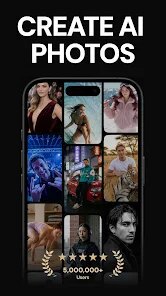

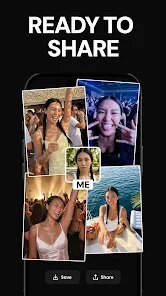
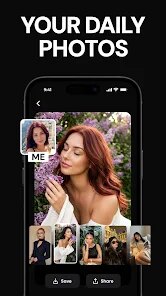
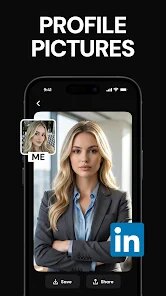
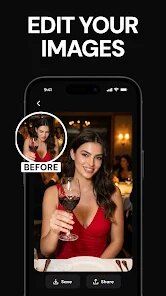
editor reviews
Version AI positions itself as a photo editing tool that leverages artificial intelligence to transform ordinary pictures into something more visually striking. I found its main purpose revolves around allowing users to apply artistic filters, modify backgrounds, and enhance facial features with minimal effort. The target audience appears to be social media enthusiasts, casual photographers, and anyone looking to improve their selfies without needing professional editing skills.
The core functionality worked reasonably well in my testing. Background replacement felt smooth and the AI-based enhancement tools did manage to sharpen details and balance lighting in most shots. I particularly found the style transfer feature interesting, though results varied depending on the original photo quality. When I needed a quick headshot for a profile update, the app saved me time by cleaning up the image and adjusting the composition automatically. It solved the specific problem of not having access to a professional photographer for day-to-day visual content needs.
However, the extra features like the avatar generator and themed templates feel somewhat limited unless you upgrade to the paid version. For someone who posts frequently on Instagram or TikTok and wants consistent visual quality without spending hours tweaking sliders, this app offers a solid shortcut. I would recommend it to users who prioritize speed and convenience over manual control and who don't mind working within the boundaries of AI-generated results. It works best in well-lit conditions and with face-focused images, where the algorithms have enough data to produce reliable output.
features
- 🤖 AI Face Enhancement: The app automatically detects facial features and applies subtle corrections smoothing out skin tones, reducing blemishes, and enhancing eye clarity. I noticed it handled different lighting conditions reasonably well, though extreme shadows could confuse the algorithm. For a quick polish before posting, this feature alone makes the app worthwhile.
- ✨ Background Changer: You can remove or replace backgrounds with a single tap. The edge detection surprised me with its accuracy on simple shots, though complex hair details sometimes needed manual refinement. The library of preset backgrounds includes urban, nature, and abstract options, which I found useful for giving product shots a cleaner look.
- 🎭 Artistic Style Transfer: This applies filters that mimic painting styles or cinematic looks. Not every filter worked well on every photo, but the oil painting and sketch effects produced some genuinely impressive results. I used this to turn travel photos into what looked like custom artwork, which got positive reactions on social media.
- 🖼️ Template-Based Edits: Pre-made templates allow quick edits for specific platforms like Instagram stories or YouTube thumbnails. These saved me time when I needed a consistent visual theme, though the free selection is limited and many appealing templates sit behind the paywall.
pros
- ⚡ Speed and Simplicity: The app processes edits almost instantly, which is great when you need results fast. I appreciated not waiting around for filters to apply like I do with some desktop software.
- 🎯 User-Friendly Interface: Navigation feels straightforward even for beginners. Tools are labeled clearly and the layout reduces confusion, making the editing process feel less intimidating.
- 📸 Decent Output Quality: For a mobile app, the final images hold up well on social media. Colors remain accurate most of the time and the AI rarely introduces obvious artifacts.
cons
- 🔒 Aggressive Paywall: Many useful features remain locked behind a subscription. The free version feels more like an extended demo than a usable tool, which can be frustrating if you just want to test before committing.
- 🎨 Inconsistent AI Results: The performance drops significantly with low-light or heavily angled photos. The face enhancement can sometimes make skin look unnaturally smooth, which defeats the purpose of looking natural.
- 📉 Limited Manual Control: If you prefer fine-tuning specific aspects like shadow depth or color curves, this app probably won't satisfy you. The AI makes many decisions for you, leaving little room for precise adjustments.
Recommended Apps
![]()
Google Meet (original)
Google LLC3.9

![]()
YouVersion Bible App + Audio
Life.Church4.9![]()
Lie Detector Test Prank - Scan
SOKAR4.4![]()
Tarot Card Psychic Reading
Innovana Techlabs Limited4.5![]()
Neon Love Theme
Delicate theme for Android App4.6![]()
GhostTube SLS Camera Alternate
GhostTube4![]()
Anime Shimeji Screen Pets
NovaSoftLC Labs3.9![]()
Poe - Fast AI Chat
Quora, Inc.4.7![]()
Bible Chat - Holy Bible Study
Book Vitals Inc.4.8![]()
Plant App - Plant Identifier
ScaleUp4.6![]()
Halloween Call: Monster
TeH Software0![]()
FWC2026 Mobile Tickets
FIFA2.1![]()
Linky AI: Chat, Play, Connect
Skywork AI Pte. Ltd.4.3![]()
Sprout - AI Job Search
Magnifex4.4![]()
GPS Maps Voice Navigation
Green Lines4.8










You May Like
-
![]()
Opera Mini: Fast Web Browser
Opera4.3 -
![]()
Canva: AI Photo & Video Editor
Canva4.8 -
![]()
Filters for pictures - FaceArt
VysionApps2.8 -
![]()
Anime Avatar: Couple Maker
MegaMod Studio3 -
![]()
GPS, Maps, Voice Navigation
AppStar Studios3.9 -
![]()
3D My Name Live Wallpaper
My Name Cube Apps4.4 -
![]()
Call Santa Claus & Prank Call
WELLY GLOBAL PUBLISHING3.5 -
![]()
Meta AI
Meta Platforms, Inc.4.7 -
![]()
Photoshop Express Photo Editor
Adobe4.5 -
![]()
GPS Speedometer: Speed Tracker
SM Infotech3.2 -
![]()
Face Swap
Wombatica Software3.4 -
![]()
Prank Call
MyPhoneRobot4.2 -
![]()
Fake video call - Prank call
HiddenScreen.NET0 -
![]()
AI Video Art Creator - Livensa
FERASET4.5 -
![]()
Mirror App: Magic Photo Editor
Lyrebird Studio4.2








Disclaimer
1.Apponbest does not represent any developer, nor is it the developer of any App or game.
2.Apponbest provide custom reviews of Apps written by our own reviewers, and detailed information of these Apps, such as developer contacts, ratings and screenshots.
3. All trademarks, registered trademarks, brand names and company names or logos appearing on the site are the property of their respective owners.
4.Apponbest abides by the federal Digital Millennium Copyright Act (DMCA) by responding to notices of alleged infringement that complies with the DMCA and other applicable laws.
5.If you are the owner or copyright representative and want to delete your information, please contact us [email protected].
6.All the information on this website is strictly observed all the terms and conditions of Google Ads Advertising policies and Google Unwanted Software policy.
7.apponbest.com is an independent, information-only website which is 100% free to all the users.