

GoFan: Buy Tickets to Events

500K+
Installs
GoFan
Developer
-
Sports
Category
-
Everyone
Content Rating
-
https://gofan.co/privacy-policy
Privacy Policy
Screenshots


editor reviews
GoFan positions itself as a digital ticketing platform specifically designed for high school and community sports events. If you have ever found yourself standing in a long line outside a Friday night football game, fumbling for cash at the gate, or wondering why a school event still uses paper stubs in 2025, this app is for you. It solves a straightforward problem: moving ticketing for school athletics, performing arts, and local events into a modern, cashless, and contactless workflow. The target user is pretty clear parents, grandparents, students, alumni, and community members who just want to get into the game without hassle.
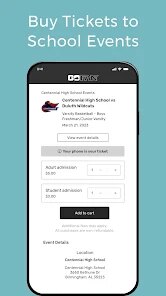
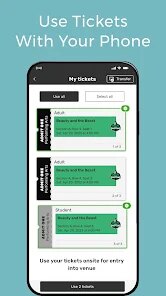
Core functionality works exactly as you would expect. You create a free account, search for an event by school name or location, select your tickets, pay with a card, and receive a scannable QR code. The ticket appears immediately in your wallet inside the app, and there is also an option to add it to your phone's native wallet. I have used it for several high school basketball games and one regional playoff. In every case, entry was smooth, and the gate staff scanned the code without any issues. One feature I genuinely appreciated was the ability to buy tickets for multiple events in advance and have them all stored in one place. It kept me from having to dig through emails or screenshots to find a ticket from last week.
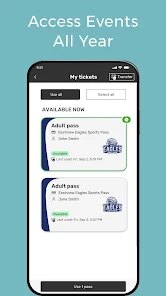
The app also offers a season pass option and merchandise bundles tied to specific events, though these are set by the individual schools or districts. In my experience, not every school uses that option, so availability varies. Still, when it is available, it simplifies life for regular attendees. For anyone regularly attending high school sports, theater productions, or district-level tournaments, GoFan is probably the most efficient way to handle entry. It will feel less relevant for major professional events or concerts, but for its intended space, it does the job well.
features
- 🎫 The event search function allows you to look up games and performances by school name, location, or date. I have found it particularly useful when a school posts a last-minute schedule change, and the app updates the event listing instantly. You are never left wondering whether a game is still on.
- 🎫 Digital tickets store directly inside the app wallet after purchase. This means you do not need to print anything or remember a confirmation number. When I bought tickets for two different games in one week, both stayed accessible without any extra steps. The app also supports adding tickets to Apple Wallet and Google Wallet for even faster access.
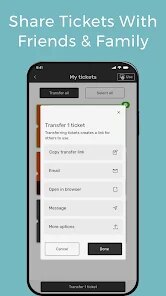
- 🎫 The sharing feature lets you transfer a ticket to someone else by sending a link. This came in handy when my sister needed to pick up a ticket I had bought for her but could not meet me beforehand. The recipient does not even need a GoFan account to claim it, which removes a common friction point in digital ticketing platforms.
- 🎫 Ticket forwarding and resale are built in, but only when the event organizer enables them. Some schools allow you to resell a ticket directly through the app at the original price, which prevents scalping while still giving you an out if your plans change. I have used it once, and the refund appeared in my account within a few days.
pros
- ✅ The app works consistently. I have never encountered a crash during a purchase or at the gate, which is more than I can say for some major event platforms.
- ✅ Customer support responds within a reasonable timeframe. When I had a question about a refund policy, I received a clear answer in under 24 hours.
- ✅ No hidden fees. The price shown during checkout is what you pay, which is refreshing compared to platforms that add service charges at the last second.
cons
- ❌ The app does not offer ticket bundling for multiple games in a season unless the school explicitly sets it up. For regular attendees, that means buying one ticket at a time.
- ❌ No push notifications for event start reminders. If you buy a ticket weeks in advance, the app does not nudge you when the event is about to start.
- ❌ The user interface can feel a bit flat. While it is functional, it lacks the polish of major ticketing apps, which may matter to users who expect a more modern visual experience.
Recommended Apps
![]()
Allergy Plus by Pollen.com
IQVIA Inc.3.9

![]()
Lightleap by Lightricks
Lightricks Ltd.4.3![]()
Labyrinthos Tarot Cards
Labyrinthos Academy4.7![]()
Luvy: My 2025 Prediction
TechStar Utilities0![]()
Anime Avatar Creator
Beauty Mania Apps and Games3.6![]()
How I will die - Predict death
Bimdu3.2![]()
Truth or Dare Game - Party App
Chouic4.8![]()
Silly Sounds: Prank Sounds App
Zenspin by Mindscape Applab llc0![]()
Dress Up Games
Dress Up Makeover Girls Games4.1![]()
Deepcheck AI Search Assistant
rohe.ai4![]()
DIY Battery: 3D Charge & Emoji
Braly JSC0![]()
Anime Shimeji Screen Pets
NovaSoftLC Labs3.9![]()
Snapmint: Buy Now, Pay in EMIs
Snapmint4.5![]()
Kissing Test Calculator
We Love pranks3![]()
Photo Effects, Photo Editor
Lyrebird Studio4.1















You May Like
-
![]()
My Horoscope
ID Mobile SA4.2 -
![]()
Alien Detector : Alien Radar,
Game Palette4.3 -
![]()
Lie Detector Test Prank - Scan
SOKAR4.4 -
![]()
Google Drive
Google LLC4.3 -
![]()
eBay online shopping & selling
eBay Mobile4.6 -
![]()
Persona: Beauty Camera
TICKET TO THE MOON, INC.4.5 -
![]()
BFF Test: Quiz Your Friends
Happy-verse4.6 -
![]()
Emoji background changer
Judi Studio4.4 -
![]()
My AI Sweetheart
IEC Games Australia4.2 -
![]()
Face Swap Gender Swap&Changer
Energy apps2.8 -
![]()
Call Santa Claus: Prank Call
Jaadoo Studio0 -
![]()
Zodiac Palm Reader: MagicWay
Reatility Media4.6 -
![]()
AI Voice Changer - Prankster
Vasundhara Infotech LLC3.7 -
![]()
FamilySearch Tree
FamilySearch International4.1 -
![]()
Japevox - Funny Prank Sound
SecureTool4.3













Disclaimer
1.Apponbest does not represent any developer, nor is it the developer of any App or game.
2.Apponbest provide custom reviews of Apps written by our own reviewers, and detailed information of these Apps, such as developer contacts, ratings and screenshots.
3. All trademarks, registered trademarks, brand names and company names or logos appearing on the site are the property of their respective owners.
4.Apponbest abides by the federal Digital Millennium Copyright Act (DMCA) by responding to notices of alleged infringement that complies with the DMCA and other applicable laws.
5.If you are the owner or copyright representative and want to delete your information, please contact us [email protected].
6.All the information on this website is strictly observed all the terms and conditions of Google Ads Advertising policies and Google Unwanted Software policy.
7.apponbest.com is an independent, information-only website which is 100% free to all the users.