

Kling AI: AI Image&Video Maker

10M+
Installs
Lohas Games Pte. Ltd.
Developer
-
Generative AI
Category
-
Teen
Content Rating
-
https://klingai.com/docs/privacy-policy
Privacy Policy
Screenshots

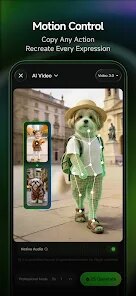
editor reviews
Kling AI positions itself as a versatile tool for generating both images and videos from text prompts, essentially acting as a creative partner for those who lack traditional artistic skills but have vivid ideas. The app targets a broad audience: content creators, social media marketers, graphic designers looking for quick mockups, or just about anyone curious about AI-generated visuals. It tries to solve the fundamental problem of transforming an abstract concept into a concrete, visible asset without needing to learn complex software like Photoshop or After Effects.
Having spent considerable time with it, I found the core text-to-image function to be surprisingly responsive. The AI does a decent job interpreting descriptive language, though it occasionally struggles with very specific anatomical details or complex compositions. What I personally found more useful is the text-to-video feature. It is still in an early stage, but the ability to generate short, looping clips from a sentence is quite something. For example, I needed a background video of "a neon-lit alleyway in a cyberpunk city during rain." The result was not perfect, but it captured the mood and the lighting well enough that I could use it in a short social media post. That saved me hours of searching stock footage or attempting to film something myself. The additional features, like the image-to-video option (animating a static picture), add nice flexibility but the results are less predictable.
The app crashes occasionally when processing complex video generation requests, which is a significant drawback when you are on a deadline. The free tier is also very restrictive, pushing you toward a subscription rather quickly. That said, for casual experimentation or rapid prototyping, it is a solid choice. I would recommend Kling AI to anyone who needs visual content fast and does not have the budget or time for a professional designer. It is less suited for projects requiring high precision or photorealistic output, but for getting a visual concept off the ground, it works.
features
- 🎨 The core text-to-image engine is the primary draw. You type a description, choose a style (like realistic, anime, or digital art), and it generates four variations. The processing speed is surprisingly quick for a mobile app, often returning results in under thirty seconds. While the outputs are not always perfect, the variety offered in a single generation gives you a good starting point for iteration.
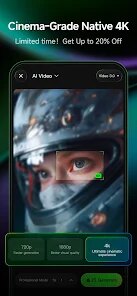
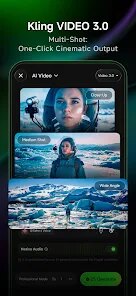
- 🎬 The text-to-video feature is where Kling AI differentiates itself. It turns a prompt into a short video clip. The quality is not cinematic, but for social media content, background loops, or quick visualizations, it is incredibly efficient. It handles motion and simple scene transitions reasonably well, though complex actions like a person walking naturally still look somewhat robotic.
- 🔗 The image-to-video function allows you to upload a static image and add motion to it. You can specify elements you want to move, like "make the water flow" or "animate the leaves in the wind." This is great for breathing life into existing artwork or photographs. However, the AI can misinterpret which object should move, leading to some comically unintended results.
- 🖌️ The application includes basic editing sliders for aspects like prompt "creativity" and "CFG scale," giving users slightly more control over how strictly the AI follows the prompt. For experienced users, these controls are a welcome addition, offering a way to push beyond the default, often more conservative, results. For beginners, they are mostly ignorable.
pros
- 👍 Speed and efficiency are its main strengths. Generating an image or short video takes seconds, which is invaluable for rapid brainstorming and iteration.
- 👍 The user interface is clean and intuitive. It is easy to understand, even for someone with no prior experience with AI tools. The learning curve is practically nonexistent.
- 👍 The diversity of artistic styles available is impressive, covering a wide range of aesthetics from photorealistic to highly stylized illustrations, giving users plenty of room for creative experimentation.
cons
- ❌ The biggest weakness is the frustratingly restrictive free tier. You get a very limited number of credits, and generating a single video can consume a huge chunk of them, making serious use impossible without a subscription.
- ❌ App stability is a problem. The app has crashed on me several times, particularly during heavy video generation tasks, causing me to lose my prompt and progress entirely.
- ❌ The AI struggles with anatomical accuracy, especially with hands and faces. Detailed prompts often result in distorted features or extra fingers, which ruins the realism for close-up shots or portrait requests.
Recommended Apps
![]()
Hiface - Face Shape Detector
Hiface2.5

![]()
Depression Test
Inquiry Health LLC4.5![]()
Blossom - Plant Identifier
Conceptiv Apps4.6![]()
Colliz - DIY Wallpaper Craft
Braly JSC2.9![]()
Who were you in past life? Tes
Hemisoft2.6![]()
Subway®
SUBWAY Restaurants4.2![]()
Notes - Notepad, Secure Notes
PANCHHI SOLUTION3.9![]()
Bug Filter - Bug on Face Prank
Hades Bit0![]()
Prank Call & Funny Video
TeH Software0![]()
IQ & brain test: Triviascapes
Quiz & Trivia Games by Mno Go Apps4.8![]()
DoorDash - Food Delivery
DoorDash4.6![]()
Truecaller: Caller ID & Block
Truecaller4.2![]()
Fingerprint Scan
T-Bridge Technologies2![]()
Celebs - Celebrity Look Alike
Sociaaal LLC4![]()
Daily Horoscope
KADO Apps4.2













You May Like
-
![]()
Walgreens
Walgreen Co.4.7 -
![]()
Software Update for my phone
Art & Tool Studio4.1 -
![]()
Lyft
Lyft, Inc.4 -
![]()
Anime Girl Wallpapers
Wallpaper World Designs4.7 -
![]()
Live football TV
Findy360 Software LLC3.7 -
![]()
Who Is Thinking About Me
ExceptionTeam174.2 -
![]()
ReelShort
NewLeaf Publishing4.3 -
![]()
Mivo: Face swap video bride
Mivo studio4.3 -
![]()
Lip Fall Challenge: Fun Filter
Braly JSC0 -
![]()
Microsoft Teams
Microsoft Corporation4.6 -
![]()
Reverse Voice - Voice Changer
Hammad670 -
![]()
Kling AI: AI Image&Video Maker
Lohas Games Pte. Ltd.4.4 -
![]()
iCut: Video Editor & Maker
iCut -Video Editor & Video Maker App3.8 -
![]()
Shazam: Find Music & Concerts
Apple Inc.4.8 -
![]()
Recovery Pro - File Recovery
Makes Your Life Easier4.3












Disclaimer
1.Apponbest does not represent any developer, nor is it the developer of any App or game.
2.Apponbest provide custom reviews of Apps written by our own reviewers, and detailed information of these Apps, such as developer contacts, ratings and screenshots.
3. All trademarks, registered trademarks, brand names and company names or logos appearing on the site are the property of their respective owners.
4.Apponbest abides by the federal Digital Millennium Copyright Act (DMCA) by responding to notices of alleged infringement that complies with the DMCA and other applicable laws.
5.If you are the owner or copyright representative and want to delete your information, please contact us [email protected].
6.All the information on this website is strictly observed all the terms and conditions of Google Ads Advertising policies and Google Unwanted Software policy.
7.apponbest.com is an independent, information-only website which is 100% free to all the users.