
myChevrolet

5M+
Installs
General Motors (GM)
Developer
-
Lifestyle
Category
-
Everyone
Content Rating
-
https://www.gm.com/privacy-statement?evar25=onstar_legal_privacy
Privacy Policy
Screenshots
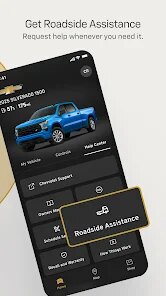
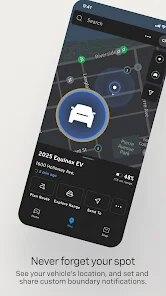
editor reviews
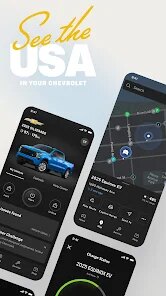
myChevrolet is General Motors' official companion app designed specifically for Chevy owners and drivers. At its core, this application serves as a digital command center that connects you directly to your vehicle, giving you remote access, real-time diagnostics, and maintenance tracking all from your smartphone. The app aims to simplify the ownership experience by putting essential controls at your fingertips, eliminating the need to be physically present in your car for routine checks or basic operations.
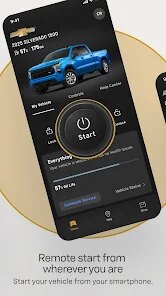
The target audience is pretty straightforward - anyone who owns or leases a Chevrolet vehicle. Whether you're driving a 2024 Silverado or a 2018 Equinox, this app speaks directly to you. It solves the recurring headache of wondering if you locked your doors, remembering when your next oil change is due, or wanting to start your car on a freezing morning without stepping outside. For me personally, the remote start feature was a game-changer during last winter. I could warm up my Malibu from my office desk, saving those brutal five minutes of scraping ice off the windshield. The vehicle locator also saved me twice in crowded parking lots when I completely blanked on where I parked.
The core functionality works reliably for the most part. Remote commands like door lock/unlock and engine start typically execute within seconds. The tire pressure monitoring and oil life indicators update punctually, giving you accurate readings. The roadside assistance button is a nice touch for emergencies, though I haven't needed to use it yet. I would recommend this app to any Chevy owner who wants more convenience in their daily driving routine, especially if you live in an area with extreme weather where remote start can make a real difference. It's most useful for commuting scenarios, parking in large lots, and staying on top of maintenance schedules without visiting the dealer.
features
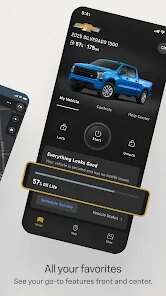
- 🚗 Remote Vehicle Commands - You can lock or unlock doors, start the engine, and even activate the horn or lights from anywhere with cellular coverage. This feature works surprisingly well, though response time can vary depending on your signal strength. I've found it especially handy when my hands are full with groceries and I need to pop the trunk from twenty feet away.
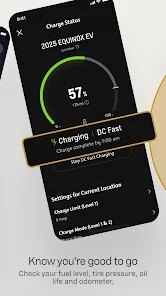
- 🔧 Vehicle Health Dashboard - The app displays real-time information about your tire pressure, oil life percentage, fuel level, and remaining battery range for hybrid models. You get notifications when something needs attention, which beats waiting for a warning light on your dashboard. Over the past six months, I've noticed the tire pressure readings match my manual gauge within 1-2 PSI, which is accurate enough for daily monitoring.
- 📍 Navigation and Location Services - You can send destinations from the app directly to your vehicle's built-in navigation system before you even get behind the wheel. The park finder feature marks your parking spot on a map and gives you walking directions back to it. It also tracks your recent trips with starting and ending points, which is useful for logging business mileage or checking where your teenager drove the family car.
- 🛠 Service and Maintenance Scheduling - The app lets you book appointments at participating Chevrolet dealers directly. It shows your vehicle's service history and reminds you when maintenance is due based on actual mileage and driving patterns. I scheduled my last oil change through the app and was able to drop off my car without waiting in line - they already had my information ready when I arrived.
pros
- 👍 Consistent User Interface - The layout is clean and intuitive with clearly labeled sections. Navigation feels natural, and most features are reachable within two taps. The dark gray scheme with Chevy's signature gold accents gives it a polished, brand-consistent look that doesn't feel cluttered.
- 👍 Reliable Notification System - Push alerts for low tire pressure, approaching maintenance intervals, and unauthorized movement alerts actually work. I've received timely warnings that helped me avoid potential issues, like catching a slow leak before it became a flat tire on the highway.
- 👍 Multi-Vehicle Support - If your household has multiple Chevys, you can switch between them easily in the app. Each vehicle's information stays separate and organized, making it simple to manage a family fleet from one login.
cons
- 👎 Slow Loading Times - The app sometimes takes 15-20 seconds to load the main dashboard, especially after not using it for a few days. The splash screen hangs, and you're left staring at the Chevrolet logo longer than you'd like. This gets frustrating when you need quick access.
- 👎 Frequent Login Requirements - Even with the "stay signed in" option enabled, the app periodically forces you to re-enter your credentials. This happens roughly once a week, which adds unnecessary friction when you're just trying to remote start your car on a cold morning.
- 👎 Limited Third-Party Integration - The app doesn't connect with popular smart home platforms like Alexa or Google Home. You cannot start your Chevy with a voice command through your smart speaker, which feels like a missed opportunity given how common this feature is becoming in competitors' apps.
- 👎 Occasional Command Failures - Remote commands sometimes time out without any clear feedback. You might tap "lock doors" and see a spinning wheel for 30 seconds only to receive a "request failed" message, leaving you unsure whether your doors actually locked or not.
Recommended Apps
![]()
Google Calendar
Google LLC4.5

![]()
Photo Collage - Pic Grid Maker
Magic Photo Collage & Photo Editor - CollageArt4.7![]()
GPS Speedometer: Speed Tracker
SM Infotech3.2![]()
Ticketmaster UK Event Tickets
Ticketmaster L.L.C.2.6![]()
Horoscope For Today
KaApps4.2![]()
Question.AI - Chatbot&Math AI
D3 DIMENSION TECHNOLOGY PTE.LTD.4.5![]()
Get RBX Counters : RBX Pro
SS Corp Fam0![]()
Tarot Card Reading
Astroyogi.com4.2![]()
Cat & Dog Translator Simulator
Notebook & Notepad & CV & Resume Example & Piano4![]()
ToonMe - Cartoon Face Maker
Otis Clare3![]()
Funny Prank Sounds: Fart, Horn
Lite Media4.6![]()
Fake video call - Prank call
HiddenScreen.NET0![]()
Fingerprint Scanner Personalit
Zabirko4.3![]()
Who were you in past life? Tes
Hemisoft2.6![]()
GhostTube SLS Camera Alternate
GhostTube4













You May Like
-
![]()
Walli - HD, 4K Wallpapers
Tap AI4.4 -
![]()
Genie - AI Chat & AI Chatbot
APPNATION AS4.2 -
![]()
Christmas Photo Frames
PhotoFramesApps4.6 -
![]()
Name Meaning
Dexati4.1 -
![]()
TeraBox: 1TB Cloud & AI Space
Flextech Inc.4.4 -
![]()
PayPal - Send, Shop, Manage
PayPal Mobile4.3 -
![]()
Neon Love Theme
Delicate theme for Android App4.6 -
![]()
Yousician: Learn & Play Guitar
Yousician Ltd.4.5 -
![]()
Luvy: My 2025 Prediction
TechStar Utilities0 -
![]()
NewProfilePic: Profile Picture
Linerock Investments LTD4.4 -
![]()
Google One
Google LLC4.1 -
![]()
Astrotalk - Talk to Astrologer
Astrology & Horoscope4.7 -
![]()
Tarot
Vázquez Software4.8 -
![]()
AI Chat Ask Assistant - NowAI
Now Tech4.3 -
![]()
Magnifier Plus with Flashlight
Digitalchemy, LLC4.6















Disclaimer
1.Apponbest does not represent any developer, nor is it the developer of any App or game.
2.Apponbest provide custom reviews of Apps written by our own reviewers, and detailed information of these Apps, such as developer contacts, ratings and screenshots.
3. All trademarks, registered trademarks, brand names and company names or logos appearing on the site are the property of their respective owners.
4.Apponbest abides by the federal Digital Millennium Copyright Act (DMCA) by responding to notices of alleged infringement that complies with the DMCA and other applicable laws.
5.If you are the owner or copyright representative and want to delete your information, please contact us [email protected].
6.All the information on this website is strictly observed all the terms and conditions of Google Ads Advertising policies and Google Unwanted Software policy.
7.apponbest.com is an independent, information-only website which is 100% free to all the users.