
Tuya- Smart Life, Smart Living

10M+
Installs
Tuya Smart Inc.
Developer
-
Lifestyle
Category
-
Everyone
Content Rating
-
https://developerapp.tuyaus.com/protocol/1a81698945002037?lang=en
Privacy Policy
Screenshots
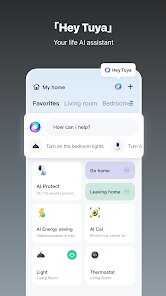
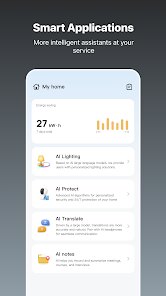
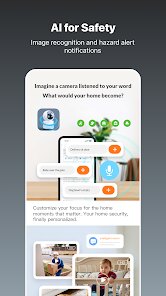
editor reviews
Smart Life is a home automation platform that acts as a central command center for all your compatible smart devices. Rather than juggling multiple apps for different brands of smart plugs, lights, or sensors, this app brings everything under one roof. It's designed for anyone looking to simplify their daily routines through automation, from tech enthusiasts wanting to fine-tune every aspect of their home to busy parents seeking convenience and peace of mind. The app addresses the problem of fragmented smart home ecosystems, where devices from different manufacturers often refuse to talk to each other.
In practice, the core functionality works remarkably well. Pairing new devices is usually just a matter of plugging them in, opening the app, and tapping a few buttons. The app recognizes most Tuya-compatible gadgets quickly. Beyond basic on/off controls, the scene and automation features are where it really shines. You can create a "Good Morning" scene that turns on the coffee maker, raises the blinds, and adjusts the thermostat with a single tap or a scheduled time. I personally use it to automate my plant grow lights based on sunrise times, which has been a game-changer for keeping my indoor garden alive without remembering to flip a switch. While the sheer number of options can initially feel overwhelming, the core tasks are intuitive enough for a beginner to master in an afternoon.
I'd recommend this app to anyone starting their smart home journey, especially if they're budget-conscious and plan to mix and match brands like Gosund, Feit Electric, or other Tuya-based devices. It's most useful for people who want reliable, scheduled automation rather than complex, multi-layered routines. If you just want to turn your porch light on at sunset or set your living room lights to a warm dim at bedtime, Smart Life does the job cleanly without a monthly subscription fee, which is a huge plus.
features
- 🌐 Universal Device Hub: The app's core strength is its broad compatibility with thousands of devices across hundreds of brands, all using the Tuya platform. This means you aren't locked into a single manufacturer. I've mixed a Feit smart switch with a Gosund plug and a random brand of aqara-like temperature sensor, and the app picked them all up without complaint. The initial setup process guides you step-by-step, usually requiring you to put the device into pairing mode and confirm your Wi-Fi network. It's not always instant; sometimes it takes two or three tries to find a stubborn device, but the success rate is high once you get the hang of it.
- ⚙️ Intelligent Automation & Scenes: This is where the app transforms from a simple remote control into a real smart home brain. You can create automations based on time, sunrise/sunset, device status, or even local weather conditions (humidity, temperature). For example, I have an automation that turns on a fan if the indoor temperature exceeds 78 degrees Fahrenheit and it's after 10 AM. Scenes allow you to group multiple actions together; my "Movie Time" scene dims the lights to 20 percent, closes the smart blinds, and turns on the TV's power strip. The logic builder is visual and uses if/and/or conditions, which is surprisingly powerful for a free app.
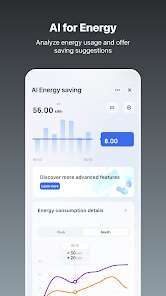
- 📊 Detailed Energy Monitoring & History: For smart plugs that support it, the app provides very granular energy usage data. You can see real-time wattage, daily consumption in kWh, and even estimated cost based on your electricity rate (which you can set manually). This has helped me identify which appliances in my home are the biggest power hogs. The device history log also shows every time a device turned on or off, who triggered it (tap, schedule, or automation), which is invaluable for troubleshooting why the lights turned on in the middle of the night without a logical reason.
- 🗣️ Voice Assistant Integration: The app bridges seamlessly with Amazon Alexa, Google Assistant, and even Siri Shortcuts. Setting up the skills is straightforward, and once linked, voice commands work almost instantly. Saying "Alexa, turn on the kitchen lights" feels natural and reliable. The latency is low, usually under a second, which is a significant improvement over some competing platforms. You can also create routines within Alexa or Google Home that include your Smart Life devices, allowing for cross-platform automations that mix, say, a Tuya bulb with a Nest thermostat.
pros
- 🆓 No Subscription Model: This is a breath of fresh air in the smart home market. You get full access to automations, scenes, voice assistant controls, and energy monitoring without paying a monthly fee. Many competitors lock advanced features behind a paywall, but Smart Life is truly freeware.
- 🔄 Even for a free app, the developers push updates fairly regularly. New device firmware updates are also pushed through the app, improving stability and adding features to your hardware over time without you having to do anything extra. Bugs are patched quietly and quickly.
- 🏗️ The app's server infrastructure is quite robust. Push notifications for motion alerts or device status changes arrive promptly. I've rarely experienced a "device offline" error that wasn't a legitimate Wi-Fi issue. The cloud connectivity feels reliable and fast for remote control when away from home.
cons
- ⏳ The setup process can occasionally be frustrating. While most devices pair easily, some "Smart Life compatible" gadgets from lesser-known brands require you to search for the specific brand name rather than using the standard QR scan. The pairing mode sometimes fails silently, forcing you to restart the process.
- 🗄️ The user interface, while functional, feels a bit dated. The layout hasn't seen a major visual overhaul in years. There's a lot of scrolling involved if you have many devices, and the widget on iOS/Android is minimal and not very interactive compared to Home Assistant or Apple Home widgets.
- 🔒 The automatic grouping feature can be confusing. Sometimes the app will auto-group multiple bulbs in the same room together as a single device, which is fine for control but can be a headache when you want to set different brightness levels or colors for individual bulbs. You have to manually ungroup them in a menu that isn't immediately obvious.
Recommended Apps
![]()
Google Calendar
Google LLC4.5

![]()
Photo Collage - Pic Grid Maker
Magic Photo Collage & Photo Editor - CollageArt4.7![]()
GPS Speedometer: Speed Tracker
SM Infotech3.2![]()
Ticketmaster UK Event Tickets
Ticketmaster L.L.C.2.6![]()
Horoscope For Today
KaApps4.2![]()
Question.AI - Chatbot&Math AI
D3 DIMENSION TECHNOLOGY PTE.LTD.4.5![]()
Get RBX Counters : RBX Pro
SS Corp Fam0![]()
Tarot Card Reading
Astroyogi.com4.2![]()
Cat & Dog Translator Simulator
Notebook & Notepad & CV & Resume Example & Piano4![]()
ToonMe - Cartoon Face Maker
Otis Clare3![]()
Funny Prank Sounds: Fart, Horn
Lite Media4.6![]()
Fake video call - Prank call
HiddenScreen.NET0![]()
Fingerprint Scanner Personalit
Zabirko4.3![]()
Who were you in past life? Tes
Hemisoft2.6![]()
GhostTube SLS Camera Alternate
GhostTube4









You May Like
-
![]()
Walli - HD, 4K Wallpapers
Tap AI4.4 -
![]()
Genie - AI Chat & AI Chatbot
APPNATION AS4.2 -
![]()
Christmas Photo Frames
PhotoFramesApps4.6 -
![]()
Name Meaning
Dexati4.1 -
![]()
TeraBox: 1TB Cloud & AI Space
Flextech Inc.4.4 -
![]()
PayPal - Send, Shop, Manage
PayPal Mobile4.3 -
![]()
Neon Love Theme
Delicate theme for Android App4.6 -
![]()
Yousician: Learn & Play Guitar
Yousician Ltd.4.5 -
![]()
Luvy: My 2025 Prediction
TechStar Utilities0 -
![]()
NewProfilePic: Profile Picture
Linerock Investments LTD4.4 -
![]()
Google One
Google LLC4.1 -
![]()
Astrotalk - Talk to Astrologer
Astrology & Horoscope4.7 -
![]()
Tarot
Vázquez Software4.8 -
![]()
AI Chat Ask Assistant - NowAI
Now Tech4.3 -
![]()
Magnifier Plus with Flashlight
Digitalchemy, LLC4.6













Disclaimer
1.Apponbest does not represent any developer, nor is it the developer of any App or game.
2.Apponbest provide custom reviews of Apps written by our own reviewers, and detailed information of these Apps, such as developer contacts, ratings and screenshots.
3. All trademarks, registered trademarks, brand names and company names or logos appearing on the site are the property of their respective owners.
4.Apponbest abides by the federal Digital Millennium Copyright Act (DMCA) by responding to notices of alleged infringement that complies with the DMCA and other applicable laws.
5.If you are the owner or copyright representative and want to delete your information, please contact us [email protected].
6.All the information on this website is strictly observed all the terms and conditions of Google Ads Advertising policies and Google Unwanted Software policy.
7.apponbest.com is an independent, information-only website which is 100% free to all the users.