
Ghost Photo Prank

5M+
Installs
Nachosware Prank Games
Developer
-
Entertainment
Category
-
Rated for 12+
Content Rating
-
http://freeandroidappsprank.blogspot.com.es/2013/04/privacy-policy-politica-de-privacidad.html
Privacy Policy
Screenshots
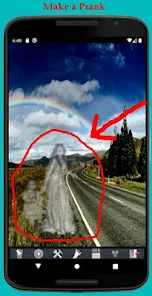
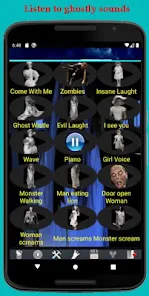
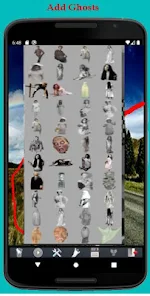
editor reviews
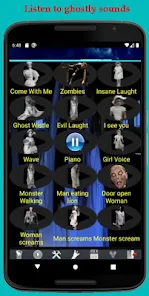
Ghost Photo Prank, developed by Nachosware Prank Games, is a mobile application designed to create humorous and spooky photo manipulations. Its core purpose is to allow users to superimpose realistic-looking ghostly figures, eerie glows, and spectral effects onto their existing photos or live camera feed. The main features include a library of transparent ghost images, customizable opacity and shadow settings, and tools for blending the apparition seamlessly into the background. The app is tailored for a specific user group: pranksters, social media enthusiasts, and anyone looking to create lighthearted, supernatural-themed content for fun. It solves the problem of needing advanced photo editing skills to create convincing ghost images, offering a quick, one-tap solution.
The core features function adequately for their intended purpose. The ghost overlays are varied and can look surprisingly convincing when placed carefully. Additional features, like the ability to adjust the ghost's size and rotation, add value by allowing for more creative and context-specific pranks. In my own usage, I found the app straightforward. I used it to prank a friend by sending a "haunted" picture of their living room. The process was intuitive: select a photo, choose a ghost from the gallery, position it, adjust the blending, and share. It successfully created a moment of surprise and laughter, solving my need for a quick, no-fuss prank tool.
I would recommend this app primarily to casual users and teenagers who enjoy creating and sharing prank content on platforms like Instagram or WhatsApp. It is most useful in scenarios where you want to inject some Halloween-style fun into a conversation, create a themed post for a party, or simply have a laugh with friends. For professional content creators or those seeking high-fidelity edits, it is less suitable, but as a dedicated tool for its niche, it serves its purpose well for playful, social interactions.
features
- 👻 Extensive Ghost Library: The app provides a diverse collection of transparent PNG ghost images, ranging from classic white-sheet figures to more detailed, shadowy specters. This variety allows users to pick a ghost that best fits the mood and setting of their base photo, enhancing the prank's believability and comedic effect.
- 🖼️ Live Camera & Gallery Integration: You can capture a prank photo in real-time using your phone's camera or select an existing image from your gallery. This flexibility is crucial for planning the perfect prank, as you can either stage a scene on the spot or use a familiar photo to maximize the surprise factor for your target.
- 🎚️ Simple Editing Controls: While basic, the editing suite is effective. Sliders for opacity, shadow intensity, and a simple rotate/resize function let you blend the ghost into the scene. The controls are not overly complex, which keeps the app accessible and fast to use, aligning perfectly with its goal of quick prank creation.
- 📤 Instant Sharing: Once your spooky creation is complete, the app facilitates direct sharing to major social media platforms, messaging apps, or your device's gallery. This streamlined sharing process is a key feature, as the entire value of the prank lies in its delivery and the recipient's reaction.
pros
- ✅ Instant Gratification: The app delivers exactly what it promises with minimal friction. You can go from idea to a shared prank photo in under a minute, which is perfect for spontaneous fun.
- ✅ High 'Prank Value': The ghost images are well-designed and can look genuinely unsettling in the right context. This high potential for a convincing scare or laugh is the app's greatest strength.
- ✅ User-Friendly Interface: The layout is intuitive and uncluttered. Even users with no photo editing experience can navigate the tools and create a result without a tutorial.
cons
- ⚠️ Limited Creative Depth: The editing tools are very basic. There's no fine-tuning of lighting, color matching, or advanced blending modes, which can make the final composite look obviously fake in some lighting conditions.
- ⚠️ Ad-Supported Experience: The free version is interrupted by frequent video ads, which can disrupt the creative flow. This is a common model but can be frustrating when you're trying to quickly put a prank together.
- ⚠️ Niche and Repetitive Use: The app's functionality is a one-trick pony. Once you've created a few ghost photos, the novelty can wear off quickly, as there's little incentive or new content to encourage prolonged, repeated use.
Recommended Apps
![]()
Astrotalk - Talk to Astrologer
Astrology & Horoscope4.7

![]()
Famous Birthdays
Famous Birthdays4.1![]()
Secret Crush Detector App
Hopeitz Software4.8![]()
Glam AI: Video & Photo Editor
Glam Labs, Inc.4.6![]()
Elf Cam : Santa's elf tracker
Scibble LLC3.7![]()
Halloween Call: Monster
TeH Software0![]()
Fake Police Prank Call & Chat
Pear Soft3.6![]()
Animal Call&Chat: Music Prank
JUMBO GAMES Studio4.8![]()
EasyPark - Parking made easy
EasyPark AS4.8![]()
Prank App - Funny Prank Sounds
Trusted Apps & Utilities Tools 20244.4![]()
Fruit Doctor ASMR Surgery Game
SandBox Games Studios0![]()
Bikii Cloud Game
Bikii Game Dev3.5![]()
Galaxy Tarot
Galaxy Tone Software4.3![]()
My Name Meaning - Name Facts
DroidX Studio0![]()
My Prediction Future Wedding
Now Tech3.3








You May Like
-
![]()
Toilet Call : Prank Video Call
Prank Calling4.3 -
![]()
Ghost Photo Prank
Nachosware Prank Games4 -
![]()
Photo Editor by BeFunky
BeFunky4.2 -
![]()
Christmas Photo Frames
PhotoFramesApps4.6 -
![]()
MyHyundai with Bluelink
Hyundai Motor America4.6 -
![]()
Crafty Craft: Mcpe mods maker
Bejan Alexandru2.3 -
![]()
My Cartoon Character
Andromeda App4.1 -
![]()
Secret Crush Detector App
Hopeitz Software4.8 -
![]()
Emoji Battery Widget
MIA Studio Inc0 -
![]()
Anime AI - Photo Maker
Brilliant Games Private Ltd.4.3 -
![]()
Kpop Demon Draw and Coloring
Youssoft LTD0 -
![]()
Face Live Camera: Face Filters
Lyrebird Studio4.1 -
![]()
Wonder - AI Art Generator
Codeway Dijital3.7 -
![]()
Bikii Cloud Game
Bikii Game Dev3.5 -
![]()
Future Self Face Aging Changer
AMOBEAR TECHNOLOGY GROUP4






Disclaimer
1.Apponbest does not represent any developer, nor is it the developer of any App or game.
2.Apponbest provide custom reviews of Apps written by our own reviewers, and detailed information of these Apps, such as developer contacts, ratings and screenshots.
3. All trademarks, registered trademarks, brand names and company names or logos appearing on the site are the property of their respective owners.
4.Apponbest abides by the federal Digital Millennium Copyright Act (DMCA) by responding to notices of alleged infringement that complies with the DMCA and other applicable laws.
5.If you are the owner or copyright representative and want to delete your information, please contact us [email protected].
6.All the information on this website is strictly observed all the terms and conditions of Google Ads Advertising policies and Google Unwanted Software policy.
7.apponbest.com is an independent, information-only website which is 100% free to all the users.





























