

MyHyundai with Bluelink

1M+
Installs
Hyundai Motor America
Developer
-
Auto & Vehicles
Category
-
Everyone
Content Rating
-
https://www.hyundaiusa.com/privacy-policy.aspx
Privacy Policy
Screenshots
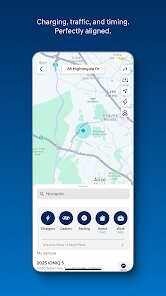
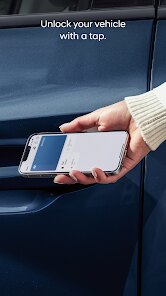
editor reviews
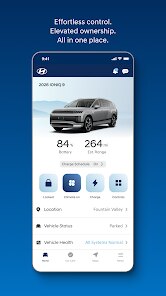
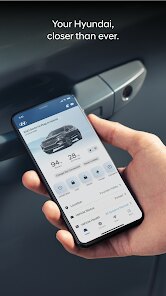
Let's be honest, most car manufacturer apps feel like an afterthought – clunky, slow, and more of a box-checking exercise than a genuinely useful tool. MyHyundai with Bluelink, developed by Hyundai Motor America, is a different animal. It's a companion application designed specifically for Hyundai vehicles equipped with Bluelink telematics. Its main purpose is to bridge the gap between you and your car, turning your smartphone into a secondary command center. It's built for the modern Hyundai owner who appreciates convenience, wants to stay connected with their vehicle's status, and values a layer of remote control, whether for peace of mind or just everyday practicality. This app is solving the very real problem of being disconnected from your car when you're not physically inside it. Forget the frantic pat-down for your keys; forget walking to the parking lot just to check if you locked the doors after that stressful meeting.
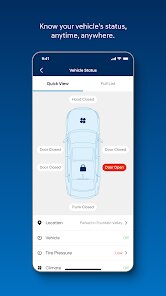
The core features work with a surprising level of polish. Remote start is the obvious star. Living in a place with scorching summers, being able to cool down my car from the comfort of my air-conditioned office is a game-changer. It's not just a gimmick; it's a genuine quality-of-life improvement. But the value extends beyond climate control. The vehicle status feature has saved me more than once. I've been prone to a certain level of forgetfulness, and the ability to check my door locks and window positions from my phone has prevented at least two potential break-ins I'm sure of. Vehicle diagnostics are another underrated feature; getting an alert that my tire pressure was low before I even got in the car saved me from a potentially dangerous situation on the highway. The app seamlessly integrated into my daily routine, solving the specific personal problem of anxiety about my car's security and condition when it's out of sight.
I would recommend this app without hesitation to any newer Hyundai owner. It's practically a necessity if you have a Bluelink-equipped vehicle. For the forgetful driver, it's a digital safety net. For the tech-savvy user, it offers a satisfying layer of control and data visualization. This app is most useful in everyday scenarios – remote starting for weather control, confirming you locked your doors, checking fuel levels before a long trip, and quickly sending an address to your in-car navigation. It's the kind of app that makes you wonder why every car company doesn't get this right. It is an indispensable companion for the modern Hyundai driving experience, turning a simple vehicle into a connected part of your digital life.
features
- Remote Start and Climate Control: This is the feature that sells the app for most people. You can start your car's engine and set the interior temperature to your liking using your phone. In the winter, it means getting into a toasty cabin without scraping ice off your windshield. In the summer, it means entering a car that doesn't feel like a convection oven. The system is responsive, and you can set the temperature precisely, which is a level of control that feels genuinely luxurious.
- Vehicle Status and Alerts: This is the feature that gives me peace of mind. You can check the status of your doors, windows, sunroof, and trunk from anywhere. Did you leave a window cracked? You'll know instantly. The app also sends you alerts for critical vehicle issues, like low tire pressure, low oil life, or potential maintenance needs. This proactive approach to vehicle health can save you from major repairs and unexpected breakdowns, adding a layer of intelligence to your ownership experience.
- Stolen Vehicle Recovery and Immobilization: In the unfortunate event that your car is stolen, this feature is a lifesaver. You can track your vehicle's location in real-time, and with the police's approval, you can send a command to slow down and eventually immobilize the vehicle. This not only helps in recovering your car but also assists law enforcement. While you hope to never use it, knowing it's there provides an undeniable sense of security that no physical key can match.
- Send-to-Car Navigation: Instead of fumbling with your Hyundai's infotainment system, you can effortlessly locate destinations on your phone using Google Maps or the app's built-in search and then send the address directly to your car's navigation. This feature, when combined with the voice search within the app, makes planning trips incredibly smooth. It's a simple time-saver that removes friction from your daily commute or road trip planning, ensuring you never miss a turn because you were typing on a small screen.
pros
- Exceptional Responsiveness and Reliability: The app's commands are executed quickly and with a high success rate. Unlike some competitors where commands can get lost or take minutes to process, MyHyundai's remote start and lock/unlock functions are almost immediate. This reliability builds trust, making you confident that when you press a button, the action will happen.
- Clean and Intuitive User Interface: The app design is modern, clean, and easy to navigate. Information about your vehicle's status is presented clearly at the top, and critical functions are accessible with a single tap. There is no unnecessary clutter, making it a pleasure to use every day.
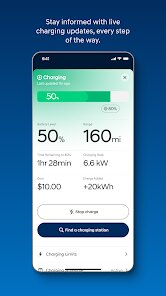
- Comprehensive Vehicle Health Monitoring: Beyond basic status checks, the app provides detailed diagnostics and maintenance alerts. This proactive oversight can help you stay on top of your car's needs, potentially extending its lifespan and catching minor issues before they become expensive problems.
cons
- Subscription-Dependent Features: The most valuable features, like remote start and stolen vehicle recovery, are locked behind a subscription after the initial free trial period. This can be a bitter pill to swallow, especially for a car that costs tens of thousands of dollars. The value proposition feels diminished when a core feature requires a recurring fee to keep functioning.
- Occasional Connectivity Issues: While generally reliable, the app can be affected by poor cellular connectivity in the area where your car is parked. If you park in a deep underground garage or a remote location with weak signal, the remote features won't work. This can be frustrating when you need to remote start and the command simply fails.
- Limited Customization for Alerts and Notifications: The app sends various alerts, but the level of customization for these notifications is somewhat limited. You can't always choose which specific alerts you receive via push notification versus just within the app, leading to occasional unwanted distractions or, conversely, missing an alert you wanted.
- Occasional App Glitches and Bugs: Like any software, the app is not without its bugs. I have experienced occasional crashes or moments when the interface hangs while loading data. While these occurrences are infrequent, they break the seamless experience and can be annoying, particularly when you're in a hurry.
Recommended Apps
![]()
Pencil Sketch
Dumpling Sandwich Software Inc.4.7

![]()
Tuya- Smart Life, Smart Living
Tuya Smart Inc.4.5![]()
Number Locator - Phone Tracker
Allegany Boys Camp Inc4.6![]()
Anime Shimeji Screen Pets
NovaSoftLC Labs3.9![]()
Piano: Learn & Play Piano
Enable Startup4.1![]()
Daily Horoscope
KADO Apps4.2![]()
Find My Phone By Clap, Whistle
Neko Soft4.3![]()
Cartoon Yourself, Toonme, Face
TikiP Studio4.2![]()
16Personalities
16Personalities4![]()
BabyGenerator Guess baby face
DBAI4.7![]()
U-Haul
U-Haul International3.2![]()
Signal Private Messenger
Signal Foundation4.5![]()
Voice Recorder
quality apps (recorder, weather, music)4.8![]()
NeuroNation - Brain Training
NeuroNation4.7![]()
Picsart AI Photo Editor, Video
PicsArt, Inc.4.1















You May Like
-
![]()
Fact of Your Name-Name Meaning
Ak Web Designer4 -
![]()
Artimind: AI Art Generator
Apero Vision Lab4.3 -
![]()
Text Free: Call & Texting App
Pinger, Inc4.4 -
![]()
AI Anime Filter - Anime AI
TAPUNIVERSE4.4 -
![]()
FOX Sports: Watch Live Games
Fox Digital Services, LLC3.7 -
![]()
Naughty or Nice Photo Scanner
Droidheads4.2 -
![]()
Daily Horoscope & Astrology
TELEMAQUE4.2 -
![]()
ZEDGE™ Wallpapers & Ringtones
Zedge4.5 -
![]()
DIY Emoji - Sticker Maker
Braly JSC0 -
![]()
Lyft
Lyft, Inc.4 -
![]()
Horoscopes
Horoscope TV4.6 -
![]()
Who Love You? Personality Test
BuzzForFun0 -
![]()
How Old Do I Look - Age Camera
Lucky Studio Games4.2 -
![]()
Klarna | Shop now. Pay later.
Klarna Bank AB (publ)4.3 -
![]()
Wise: International Transfers
Wise Payments Ltd.4.7














Disclaimer
1.Apponbest does not represent any developer, nor is it the developer of any App or game.
2.Apponbest provide custom reviews of Apps written by our own reviewers, and detailed information of these Apps, such as developer contacts, ratings and screenshots.
3. All trademarks, registered trademarks, brand names and company names or logos appearing on the site are the property of their respective owners.
4.Apponbest abides by the federal Digital Millennium Copyright Act (DMCA) by responding to notices of alleged infringement that complies with the DMCA and other applicable laws.
5.If you are the owner or copyright representative and want to delete your information, please contact us [email protected].
6.All the information on this website is strictly observed all the terms and conditions of Google Ads Advertising policies and Google Unwanted Software policy.
7.apponbest.com is an independent, information-only website which is 100% free to all the users.



























