

Seekee - Ai Search & Assistant

50M+
Installs
Seekee Ltd
Developer
-
Generative AI
Category
-
Teen
Content Rating
-
https://h5.seekee.ai/in/art/Seekeeai_Android_Privacy_Policy
Privacy Policy
Screenshots

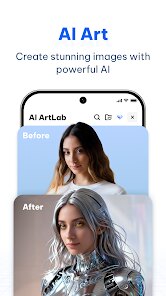
editor reviews
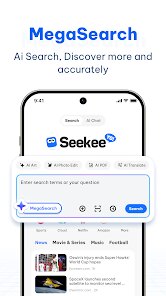
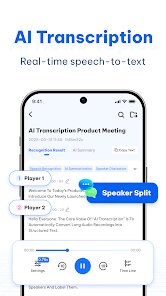
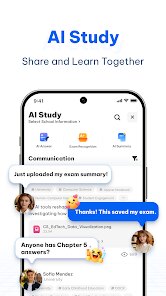
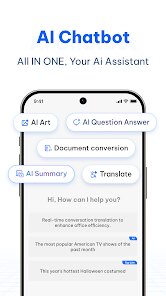
Seekee tries to carve out its own corner in the crowded AI assistant market by packaging together a few different utilities that usually live in separate apps. Instead of just being a chatbot that answers questions, it combines web search, an image generator, and a document analysis tool all under one roof. The core idea is simple enough: you don't have to jump between three different services to look something up, create an image to go with it, and then ask questions about a PDF you've been sent. For people like students juggling research projects or professionals who need to quickly summarize reports and visualize concepts, this integrated approach could save quite a bit of friction.
After using Seekee for a while, I found the web search feature to be the most solid piece of the package. It pulls from current sources and presents information in a clear, conversational way, which is useful when you're trying to get a quick overview of a topic without sifting through ad-ridden pages. The document analysis side worked better than I expected on straightforward PDFs and text files, managing to extract key points and answer specific questions about the content without too much hallucination. On a personal level, it helped me get through a stack of product reviews and spec sheets when I was researching a new laptop — I just fed the documents into the app and asked direct questions about battery life and processor specs. It didn't replace reading everything myself, but it cut the time by a noticeable margin.
However, the image generation feels a bit like an afterthought compared to dedicated AI art platforms, and there is a noticeable learning curve with the app's interface. Some of the menus are not the most intuitive, and it occasionally takes a second too long to load between features. I would recommend Seekee to students, researchers, or anyone who regularly handles a mix of web research and document reading. It is less suited for people who already have a workflow with specialized tools, and the image gen is not going to wow anyone who uses Midjourney. For its target niche of getting quick, synthesized information from multiple sources, it does the job. It's a practical assistant, not a flashy one, and that is exactly what it needs to be.
features
- 🤖 The app lets you pick from a few different AI models to handle your queries, which gives you some flexibility depending on the task. For example, you can switch to a faster model for simple Q&A and a more detailed one for complex research. The settings tab keeps this option tucked away, but once you know it's there, you can fine-tune the responses to match your preference for speed or depth.
- 🔍 The real highlight is how it handles search within uploaded documents. Instead of just scanning the text, it indexes the content and lets you ask follow-up questions that build on each other. You can start by asking for a summary of a contract, then ask about specific clauses, and then ask how those clauses relate to each other. This conversational thread makes it feel less like a keyword search and more like a conversation about the material.
- 🎨 For image creation, the app supports multiple styles and aspect ratios, and it can interpret descriptive prompts surprisingly well. I tested it with a request for a “watercolor painting of a futuristic city at sunset with flying cars” and the results were decent for a free tier offering. The resolution is not going to win any awards, but for quick mockups or social media visuals, it works without pushing you to a premium subscription right away.
- 📊 A less obvious feature is its ability to compare data across different documents simultaneously. You can upload two PDFs and ask the app to find differences or similarities between them. In my testing, this worked smoothly with short reports but started to stumble with heavily formatted tables or scanned pages that had low image quality.
pros
- ⭐ The ability to run web searches directly inside the chat is a massive time-saver. You do not have to manually copy and paste information from a browser.
- ⭐ It handles multiple file types consistently, including text files, PDFs, and images with embedded text. This reduces the need to convert documents before analysis.
- ⭐ The interface stays clean and uncluttered despite having three main functions. The layout is simple enough that you are never lost between search, chat, and image tools.
cons
- ⚠️ The image generator is noticeably slower than standalone tools and the quality drops significantly if you push for complex compositions. It gets the job done but it is not impressive.
- ⚠️ There is no dedicated mobile widget or quick access shortcut. You have to open the app fully each time, which undermines the "assistant" premise where you want fast access.
- ⚠️ Document analysis occasionally misses text from non-standard fonts or poorly scanned pages. If your PDFs are not pristine, expect some gaps in the extraction.
- ⚠️ The free tier has a daily query limit that feels a bit restrictive for heavy users. Power users will likely feel the need to upgrade sooner than expected.
Recommended Apps
![]()
Astrotalk - Talk to Astrologer
Astrology & Horoscope4.7

![]()
Famous Birthdays
Famous Birthdays4.1![]()
Secret Crush Detector App
Hopeitz Software4.8![]()
Glam AI: Video & Photo Editor
Glam Labs, Inc.4.6![]()
Elf Cam : Santa's elf tracker
Scibble LLC3.7![]()
Halloween Call: Monster
TeH Software0![]()
Fake Police Prank Call & Chat
Pear Soft3.6![]()
Animal Call&Chat: Music Prank
JUMBO GAMES Studio4.8![]()
EasyPark - Parking made easy
EasyPark AS4.8![]()
Prank App - Funny Prank Sounds
Trusted Apps & Utilities Tools 20244.4![]()
Fruit Doctor ASMR Surgery Game
SandBox Games Studios0![]()
Bikii Cloud Game
Bikii Game Dev3.5![]()
Galaxy Tarot
Galaxy Tone Software4.3![]()
My Name Meaning - Name Facts
DroidX Studio0![]()
My Prediction Future Wedding
Now Tech3.3














You May Like
-
![]()
Toilet Call : Prank Video Call
Prank Calling4.3 -
![]()
Ghost Photo Prank
Nachosware Prank Games4 -
![]()
Photo Editor by BeFunky
BeFunky4.2 -
![]()
Christmas Photo Frames
PhotoFramesApps4.6 -
![]()
MyHyundai with Bluelink
Hyundai Motor America4.6 -
![]()
Crafty Craft: Mcpe mods maker
Bejan Alexandru2.3 -
![]()
My Cartoon Character
Andromeda App4.1 -
![]()
Secret Crush Detector App
Hopeitz Software4.8 -
![]()
Emoji Battery Widget
MIA Studio Inc0 -
![]()
Anime AI - Photo Maker
Brilliant Games Private Ltd.4.3 -
![]()
Kpop Demon Draw and Coloring
Youssoft LTD0 -
![]()
Face Live Camera: Face Filters
Lyrebird Studio4.1 -
![]()
Wonder - AI Art Generator
Codeway Dijital3.7 -
![]()
Bikii Cloud Game
Bikii Game Dev3.5 -
![]()
Future Self Face Aging Changer
AMOBEAR TECHNOLOGY GROUP4











Disclaimer
1.Apponbest does not represent any developer, nor is it the developer of any App or game.
2.Apponbest provide custom reviews of Apps written by our own reviewers, and detailed information of these Apps, such as developer contacts, ratings and screenshots.
3. All trademarks, registered trademarks, brand names and company names or logos appearing on the site are the property of their respective owners.
4.Apponbest abides by the federal Digital Millennium Copyright Act (DMCA) by responding to notices of alleged infringement that complies with the DMCA and other applicable laws.
5.If you are the owner or copyright representative and want to delete your information, please contact us [email protected].
6.All the information on this website is strictly observed all the terms and conditions of Google Ads Advertising policies and Google Unwanted Software policy.
7.apponbest.com is an independent, information-only website which is 100% free to all the users.





























