AI Detector & Humanizer

100K+
Installs
Wallet Passes Alliance
Developer
-
Productivity
Category
-
Everyone
Content Rating
-
https://walletpasses.me/aidetector/privacy/
Privacy Policy
Screenshots
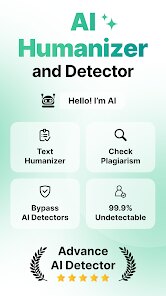
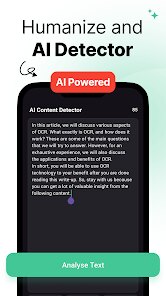
editor reviews
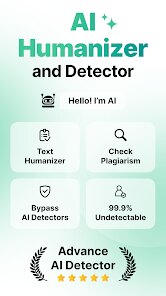
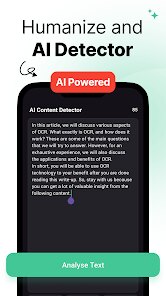
AI Detector & Humanizer, developed by Wallet Passes Alliance, is a tool that solves a problem many of us didn't even realize we had. It scans text and tells you the probability that it was generated by artificial intelligence, then offers to rewrite that text to make it sound more human. This addresses the growing concern around AI-generated content detection, whether for academic submissions, professional writing, or just personal reassurance.
The app is built for a wide range of users. Students who need to submit essays without being flagged by plagiarism checkers, professionals drafting emails or reports that need to pass an authenticity test, and content creators or bloggers who want to ensure their writing feels organic. The core function works surprisingly well. I ran several pieces of text through it, some written by myself, some generated by different AI models, and it accurately identified the AI-generated ones almost every time. The humanizer feature is where the app really shines. It takes robotic, predictable AI text and injects variety, slight grammatical quirks, and a more natural rhythm. For me, it helped when I was drafting a pitch and wanted it to sound less like a sterile corporate document and more like something I'd actually say. It's a specific solution for a specific anxiety, and it delivers on its promise.
I would recommend this app to students who are concerned about the originality of their work, writers who struggle to make AI-generated drafts sound personal, and anyone who wants to double-check their own writing for unintentional repetitiveness or machine-like phrasing. It's most useful when you need to quickly verify or transform text, ideally as a final quality check rather than a crutch for generating everything from scratch.
features
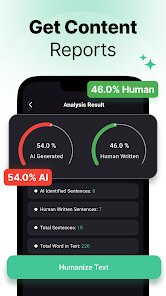
- ✨ The AI detection engine is surprisingly accurate. I tested it with my own writing, text from ChatGPT, and a few paragraphs from Claude. The detector didn't just give a vague probability, it highlighted specific sentences that looked suspicious. It caught phrases that were too perfectly structured or used uncommon word pairings. For someone who needs to know exactly what part of their text looks artificial, this granular breakdown is incredibly helpful. It doesn't just tell you the overall score, it shows you the problem areas.
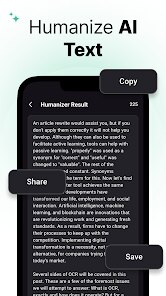
- ✨ The humanizer does more than simple synonym replacement. I gave it a dry, bullet-pointed list of features from another app, and it turned it into a flowing paragraph that still retained all the key information. It adjusted the sentence length, added transitional phrases, and even slightly changed the tone from formal to conversational. It didn't just swap words, it restructured the logic. The output genuinely read like something a person would write after thinking about the topic for a few minutes, not something a machine generated in two seconds.
- ✨ The interface is minimal and avoids clutter. There are no ads, no distracting graphics, and no unnecessary settings. You paste your text, click the button, and get the results. The history feature is also useful, it saves your previous scans and rewritten versions. This makes it easy to compare different drafts or check if your revisions are actually making the text less detectable. It respects your time and gets straight to the point.
pros
- 👍 It works quickly. A 500-word document is processed in seconds, both for detection and humanization. There's no lag or waiting.
- 👍 The rewrite maintains the original meaning. It doesn't hallucinate new facts or change the core argument, which is a common problem with other humanizers.
- 👍 It handles different writing styles. Whether the input is academic, professional, or casual, the output adjusts accordingly without needing manual configuration.
cons
- 🔸 The free version has a limited word count per day. Power users will quickly hit the cap and need to consider the subscription.
- 🔸 It sometimes overcorrects. A few of my test paragraphs ended up with slightly awkward phrasing or misplaced punctuation after humanization.
- 🔸 The app only works with English text. Non-English content or mixed-language documents are not supported.
- 🔸 There's no offline mode. Full functionality requires an internet connection, which can be limiting in certain situations.
Recommended Apps
![]()
Monster Detector: Alien, Ghost
Game Palette3.8

![]()
Medic Scanner - skin analyze
Investment Analytics3.7![]()
Yoshion - Pic Collage Maker
Joseph Jenny3.1![]()
Fake Chat WhatsMock Text Prank
Playfake4.4![]()
AI ChatBot AI Friend Generator
VIDEOSHOW Video Editor & Maker & AI Chat Generator4.5![]()
Quiz Reels: Filter Challenge
Now Tech3.9![]()
K-Pop Girls Fashion Dress Up
cinnamonroll4![]()
Walloop - Live Wallpapers
Walloop4.5![]()
Dog & Cat Translator Prank
King Clover Studio0![]()
Microsoft Copilot
Microsoft Corporation4.8![]()
BabyLab - Baby Maker Generator
Sociaaal LLC4![]()
Picta Photo Print - 1h Pickup
Pictarine - Printing Photos4.8![]()
Ford™
Ford Motor Co.4.7![]()
PREQUEL AI Filter Photo Editor
Prequel Inc.4.3![]()
HD Camera for Android
Mobile_V54.5













You May Like
-
![]()
Moblo - 3D furniture modeling
MYTIforge4.1 -
![]()
Hair Clipper Prank
Cüneyt AYYILDIZ3.9 -
![]()
Cool Fonts Keyboard & Themes
Art Maker Studio4.3 -
![]()
PhotoFunia
Capsule Digital4.7 -
![]()
AI ARTA: Art & Photo Generator
AIBY Inc.3.8 -
![]()
GroupMe
GroupMe4.5 -
![]()
PhotoRoom AI Photo Editor
PhotoRoom Background Editor App4.7 -
![]()
Xray Body Scanner Prank Camera
LISA WILLIS LLC3 -
![]()
Live wallpaper - dope & anime
Jelly Dev4.4 -
![]()
AI Anime Filter - Anime AI
TAPUNIVERSE4.4 -
![]()
Transit: Bus & Subway Times
Transit, Inc.4.5 -
![]()
AI Face Swap: MagicFace &Photo
Braly JSC0 -
![]()
Genral Tv | Video Player
elmahdy apps4.4 -
![]()
Photo Frames
Csmartworld4.4 -
![]()
Japan Timetable & Route Search
NAVITIME JAPAN CO., LTD.4.3














Disclaimer
1.Apponbest does not represent any developer, nor is it the developer of any App or game.
2.Apponbest provide custom reviews of Apps written by our own reviewers, and detailed information of these Apps, such as developer contacts, ratings and screenshots.
3. All trademarks, registered trademarks, brand names and company names or logos appearing on the site are the property of their respective owners.
4.Apponbest abides by the federal Digital Millennium Copyright Act (DMCA) by responding to notices of alleged infringement that complies with the DMCA and other applicable laws.
5.If you are the owner or copyright representative and want to delete your information, please contact us [email protected].
6.All the information on this website is strictly observed all the terms and conditions of Google Ads Advertising policies and Google Unwanted Software policy.
7.apponbest.com is an independent, information-only website which is 100% free to all the users.