Blood Pressure Log

1M+
Installs
Sharon Evans
Developer
-
Health & Fitness
Category
-
Everyone
Content Rating
-
https://www.sharon-apps.com/privacy_policy.html
Privacy Policy
Screenshots
editor reviews
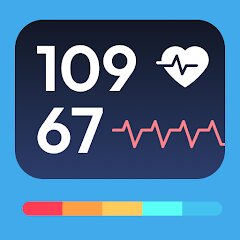
Blood Pressure Log is a focused health tracking tool designed for individuals who need to monitor their blood pressure readings regularly. Unlike bloated health apps that try to do everything, this one sticks to its core purpose: recording, organizing, and presenting your blood pressure data in a way that actually makes sense. It targets people managing hypertension, those with family history of heart conditions, or anyone whose doctor recommended keeping tabs on their numbers. The app solves the real problem of scattered paper records or forgotten readings that make it hard to spot trends or share meaningful data with healthcare providers.
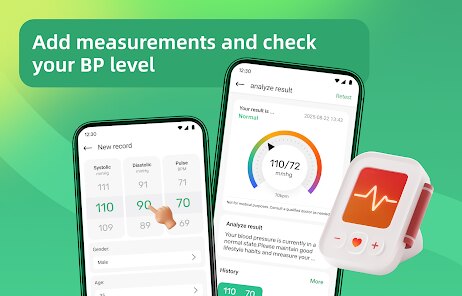
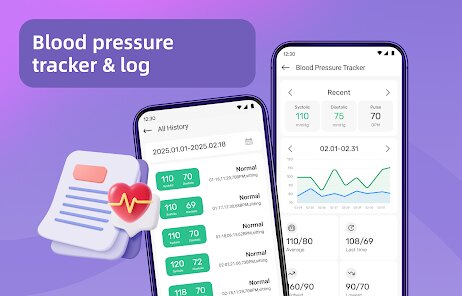
I've been using this app for about six weeks now, and it has genuinely helped me stay consistent with monitoring. The core logging function works seamlessly - just punch in your systolic and diastolic numbers, heart rate if you want, add a quick note, and you're done. What surprised me was how the app's simple categorization system helped me identify patterns I would have missed otherwise. I noticed my readings tend to spike mid-afternoon, which led me to discuss stress management with my doctor. The charting feature transforms raw numbers into visual trends that make spotting red flags much easier than scanning through a notebook.
I would recommend Blood Pressure Log to anyone who needs a no-fuss way to track their numbers over time. If you're seeing a cardiologist or managing a condition where blood pressure consistency matters, this tool earns its place on your phone. It works best for people who want straightforward logging without all the distracting wellness fluff. If you need guided meditation features or meal trackers, look elsewhere. But if you need clean, reliable blood pressure tracking that you can actually commit to using daily, this delivers exactly that without the overhead.
features
- ⚠️ One-touch logging with customizable fields. The app makes recording a reading feel almost effortless. Tap the plus button, enter your numbers using the numeric keypad, add optional notes like "after morning walk" or "before medication," and save. The whole process takes maybe fifteen seconds. You can also enter the time manually if you're back-filling earlier readings, which saves me when I forget to log right after measuring. The interface keeps distraction to a minimum - no ads screaming for attention, no pop-ups asking you to upgrade.
- ⚠️ Trend visualization through clean charting. Rather than throwing a bunch of confusing graphs at you, the app offers a straightforward line chart that plots your systolic and diastolic readings over time. You can toggle between day, week, month, and custom date ranges. What I find particularly useful is the color-coded zones that highlight when readings fall into normal, elevated, or hypertensive ranges according to standard medical guidelines. This visual approach helps me explain my situation to my doctor without fumbling through a list of numbers.
- ⚠️ Export functionality for sharing with healthcare providers. When my doctor asked for my recent readings, I expected to spend an hour typing everything into a spreadsheet. Instead, I hit the export button and generated a clean PDF summary organized by date. The report includes average readings for each time period, and highlights any concerning patterns. This feature alone might justify the app's existence for anyone whose physician wants regular updates between visits.
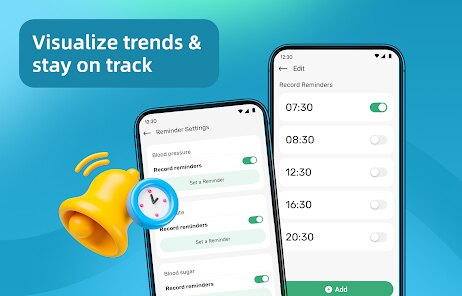
- ⚠️ Medication tracking with timing reminders. You can log which medications you took and when, and the app keeps this information linked to your readings. This helped me discover that my numbers actually look better when I take my beta blocker at night rather than in the morning. Small detail that made a real difference in my treatment plan. The reminder system works reliably without being annoying - one gentle notification, not the kind that spams you until you respond.
pros
- ✅ Clean, uncluttered interface that respects your time. No gamification, no badges, no social sharing features that pressure you into performing for an audience. The app treats blood pressure logging as the serious health task it actually is.
- ✅ Reliable data persistence. I've force-closed the app, switched phones, and even reinstalled after a factory reset. Every single reading survived intact. Cloud backup works quietly in the background without asking for unnecessary permissions or access to your contacts.
- ✅ No subscription model or hidden paywalls. You pay once and the app works fully. In a market where every health app seems to want monthly rent from its users, this straightforward purchase model feels almost revolutionary.
cons
- ❌ Limited customization for graph presentation. You cannot adjust the Y-axis scale or change the color scheme for better readability. Users with visual impairments might struggle with the default contrast settings.
- ❌ No direct integration with smart blood pressure monitors. If you use a Bluetooth-enabled cuff, you will still need to enter readings manually. This feels like a missed opportunity in 2024 when many cuffs automatically sync with other platforms.
- ❌ The note field remains quite basic. You get plain text only with no tagging system, no voice input, and no way to attach photos of your food or activity logs. For someone who likes keeping detailed context around each reading, this limitation becomes frustrating over time.
- ❌ Lack of multi-user support. If you are tracking readings for an elderly parent or spouse, you cannot switch profiles within the same installation. You would need separate devices or constantly overwrite data, which defeats the purpose of consistent logging.
Recommended Apps
![]()
Astrotalk - Talk to Astrologer
Astrology & Horoscope4.7

![]()
Famous Birthdays
Famous Birthdays4.1![]()
Secret Crush Detector App
Hopeitz Software4.8![]()
Glam AI: Video & Photo Editor
Glam Labs, Inc.4.6![]()
Elf Cam : Santa's elf tracker
Scibble LLC3.7![]()
Halloween Call: Monster
TeH Software0![]()
Fake Police Prank Call & Chat
Pear Soft3.6![]()
Animal Call&Chat: Music Prank
JUMBO GAMES Studio4.8![]()
EasyPark - Parking made easy
EasyPark AS4.8![]()
Prank App - Funny Prank Sounds
Trusted Apps & Utilities Tools 20244.4![]()
Fruit Doctor ASMR Surgery Game
SandBox Games Studios0![]()
Bikii Cloud Game
Bikii Game Dev3.5![]()
Galaxy Tarot
Galaxy Tone Software4.3![]()
My Name Meaning - Name Facts
DroidX Studio0![]()
My Prediction Future Wedding
Now Tech3.3










You May Like
-
![]()
Toilet Call : Prank Video Call
Prank Calling4.3 -
![]()
Ghost Photo Prank
Nachosware Prank Games4 -
![]()
Photo Editor by BeFunky
BeFunky4.2 -
![]()
Christmas Photo Frames
PhotoFramesApps4.6 -
![]()
MyHyundai with Bluelink
Hyundai Motor America4.6 -
![]()
Crafty Craft: Mcpe mods maker
Bejan Alexandru2.3 -
![]()
My Cartoon Character
Andromeda App4.1 -
![]()
Secret Crush Detector App
Hopeitz Software4.8 -
![]()
Emoji Battery Widget
MIA Studio Inc0 -
![]()
Anime AI - Photo Maker
Brilliant Games Private Ltd.4.3 -
![]()
Kpop Demon Draw and Coloring
Youssoft LTD0 -
![]()
Face Live Camera: Face Filters
Lyrebird Studio4.1 -
![]()
Wonder - AI Art Generator
Codeway Dijital3.7 -
![]()
Bikii Cloud Game
Bikii Game Dev3.5 -
![]()
Future Self Face Aging Changer
AMOBEAR TECHNOLOGY GROUP4








Disclaimer
1.Apponbest does not represent any developer, nor is it the developer of any App or game.
2.Apponbest provide custom reviews of Apps written by our own reviewers, and detailed information of these Apps, such as developer contacts, ratings and screenshots.
3. All trademarks, registered trademarks, brand names and company names or logos appearing on the site are the property of their respective owners.
4.Apponbest abides by the federal Digital Millennium Copyright Act (DMCA) by responding to notices of alleged infringement that complies with the DMCA and other applicable laws.
5.If you are the owner or copyright representative and want to delete your information, please contact us [email protected].
6.All the information on this website is strictly observed all the terms and conditions of Google Ads Advertising policies and Google Unwanted Software policy.
7.apponbest.com is an independent, information-only website which is 100% free to all the users.