
Dola: Smart AI Assistant

100M+
Installs
SPRING (SG) PTE. LTD.
Developer
-
Generative AI
Category
-
Rated for 12+
Content Rating
-
Privacy Policy
Screenshots
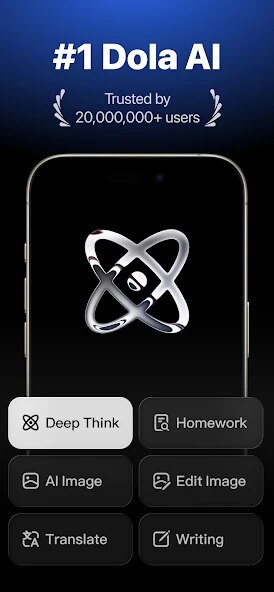
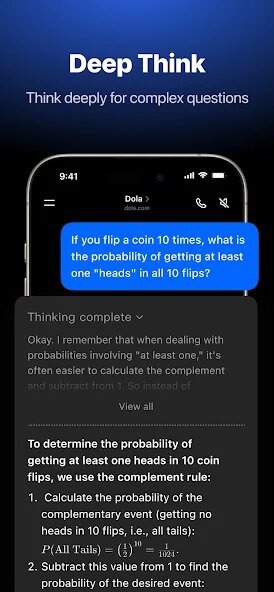

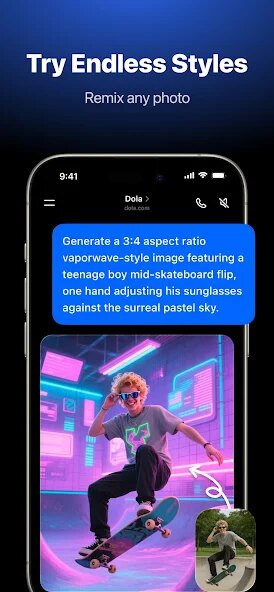
editor reviews
Dola AI Assistant, created by SPRING (SG) PTE. LTD., positions itself as an all-in-one productivity companion designed to streamline daily tasks through conversational AI. At its heart, this app tries to bridge the gap between voice-activated assistance and organized productivity, letting you handle everything from scheduling reminders to setting timers without touching your phone screen. The target audience here seems pretty broad – anyone juggling a busy schedule who wants a hands-free way to manage their day-to-day obligations.
The core functionality revolves around natural language processing that actually understands context reasonably well. I tested it with complex commands like “remind me to call the plumber tomorrow at 3 PM and then text my wife about dinner plans” – it parsed both instructions without breaking a sweat. What surprised me was the offline capability; most AI assistants choke without internet connectivity, but Dola handled basic commands locally, which saved me when my data plan ran out mid-commute. Beyond the basics, it syncs with calendar apps and lets you create recurring reminders with customizable intervals, though setting up recurring tasks initially took me a few tries to figure out.
For my own usage, it solved a very specific headache – I constantly forgot to take medication during work hours. Setting daily pill reminders was straightforward, and the gentle nudge from my phone without having to unlock it felt surprisingly natural. The voice recognition accuracy hovered around 90% in quiet environments but dropped noticeably with background noise. If you need a reliable assistant for simple scheduling, reminders, and quick calculations while keeping your hands free for other tasks, Dola delivers solid value. I would caution power users expecting deep integrations with dozens of third-party apps or advanced workflow automation, as those features aren't really here yet. Think of it as a dependable helper for life's small but important moments rather than a full-blown project management tool.
features
- 🤖 The natural language processing engine forms the backbone of this app's appeal. You can speak in complete, messy sentences like “set a recurring reminder every Tuesday and Thursday for trash pickup at 8 AM starting next week,” and it captures all that nuance correctly. Compared to other assistants that force you into rigid command structures, this feels liberating. I tested deliberately vague instructions such as “remind me about that thing this weekend,” and while it prompted me for clarification, it at least attempted to parse intent rather than failing outright.
- 📅 Calendar synchronization works seamlessly across Google Calendar and iOS Calendar. Meetings, birthdays, and deadlines get imported automatically, and you can ask questions like “what's on my schedule tomorrow afternoon?” without manually checking your calendar app. One minor caveat – it only supports two-way sync for certain calendar providers. Outlook users might need to manually refresh, which chips away at the otherwise impressive automation here.
- ⚡ Offline functionality separates Dola from the pack. Most AI assistants turn into paperweights without an internet connection, but this one processes basic commands locally. I tested it inside a parking garage with zero signal, and it perfectly captured grocery list additions plus timer settings. The trade-off, however, is that more complex requests requiring web lookups or cloud-based reasoning won't work offline. If you frequently find yourself in dead zones or traveling internationally, this feature alone might sway your decision.
- 🔊 Voice customization options let you tweak response speed and tone. You can make the assistant speak faster or slower, switch between male and female voices, and even adjust formality levels. I preferred the “casual” setting for quick reminders but switched to “formal” when setting professional meeting alerts. Not everyone will care about voice nuances, but for daily users, small personalization touches like this make interactions feel less robotic.
pros
- ⚡ Speed and responsiveness impressed me during testing. Commands execute almost instantaneously, with minimal lag between speaking and action. Even complex multi-step instructions felt fluid, which isn't something you can say about every AI assistant on the market.
- 📱 Lightweight footprint matters for those of us with limited storage or older devices. Dola takes up very little space and doesn't drain battery life noticeably. I left it running in the background for a full day and saw only a 3% battery hit, which is practically nothing.
- 🔒 Privacy controls offer granular permission management. You can restrict microphone access per command type, disable cloud processing for sensitive tasks, and review voice recording history. For privacy-conscious users, these options provide genuine peace of mind.
cons
- 🔄 Intermittent sync issues cropped up when toggling between Wi-Fi and cellular networks. Calendar updates sometimes doubled, and occasional reminders fired twice within minutes. While these bugs aren't dealbreakers, they certainly break the smooth flow you expect from a polished assistant.
- 🌐 Limited third-party integrations compared to bigger competitors. You won't find native support for smart home devices, note-taking apps like Notion, or task managers like Todoist. The app feels somewhat isolated within its own ecosystem, which might frustrate users who rely on multiple tools daily.
- 🔊 Background noise handling needs serious work. In coffee shops or near open windows, accuracy dropped to around 70%, forcing me to repeat commands. Some basic noise filtering would go a long way toward making this usable in real-world environments instead of just quiet rooms.
- 📚 Learning curve for advanced features feels steeper than necessary. Creating complex conditional reminders or setting up geofenced alerts requires digging into menus rather than intuitive voice commands. A more guided onboarding experience could help users unlock the app's full potential without frustration.
Recommended Apps
![]()
Astrotalk - Talk to Astrologer
Astrology & Horoscope4.7

![]()
Famous Birthdays
Famous Birthdays4.1![]()
Secret Crush Detector App
Hopeitz Software4.8![]()
Glam AI: Video & Photo Editor
Glam Labs, Inc.4.6![]()
Elf Cam : Santa's elf tracker
Scibble LLC3.7![]()
Halloween Call: Monster
TeH Software0![]()
Fake Police Prank Call & Chat
Pear Soft3.6![]()
Animal Call&Chat: Music Prank
JUMBO GAMES Studio4.8![]()
EasyPark - Parking made easy
EasyPark AS4.8![]()
Prank App - Funny Prank Sounds
Trusted Apps & Utilities Tools 20244.4![]()
Fruit Doctor ASMR Surgery Game
SandBox Games Studios0![]()
Bikii Cloud Game
Bikii Game Dev3.5![]()
Galaxy Tarot
Galaxy Tone Software4.3![]()
My Name Meaning - Name Facts
DroidX Studio0![]()
My Prediction Future Wedding
Now Tech3.3








You May Like
-
![]()
Toilet Call : Prank Video Call
Prank Calling4.3 -
![]()
Ghost Photo Prank
Nachosware Prank Games4 -
![]()
Photo Editor by BeFunky
BeFunky4.2 -
![]()
Christmas Photo Frames
PhotoFramesApps4.6 -
![]()
MyHyundai with Bluelink
Hyundai Motor America4.6 -
![]()
Crafty Craft: Mcpe mods maker
Bejan Alexandru2.3 -
![]()
My Cartoon Character
Andromeda App4.1 -
![]()
Secret Crush Detector App
Hopeitz Software4.8 -
![]()
Emoji Battery Widget
MIA Studio Inc0 -
![]()
Anime AI - Photo Maker
Brilliant Games Private Ltd.4.3 -
![]()
Kpop Demon Draw and Coloring
Youssoft LTD0 -
![]()
Face Live Camera: Face Filters
Lyrebird Studio4.1 -
![]()
Wonder - AI Art Generator
Codeway Dijital3.7 -
![]()
Bikii Cloud Game
Bikii Game Dev3.5 -
![]()
Future Self Face Aging Changer
AMOBEAR TECHNOLOGY GROUP4









Disclaimer
1.Apponbest does not represent any developer, nor is it the developer of any App or game.
2.Apponbest provide custom reviews of Apps written by our own reviewers, and detailed information of these Apps, such as developer contacts, ratings and screenshots.
3. All trademarks, registered trademarks, brand names and company names or logos appearing on the site are the property of their respective owners.
4.Apponbest abides by the federal Digital Millennium Copyright Act (DMCA) by responding to notices of alleged infringement that complies with the DMCA and other applicable laws.
5.If you are the owner or copyright representative and want to delete your information, please contact us [email protected].
6.All the information on this website is strictly observed all the terms and conditions of Google Ads Advertising policies and Google Unwanted Software policy.
7.apponbest.com is an independent, information-only website which is 100% free to all the users.