PND AI Photo Enhancer HD

100K+
Installs
PND AI 360
Developer
-
Generative AI
Category
-
Everyone
Content Rating
-
https://pndai.ai/en/privacy.html
Privacy Policy
Screenshots
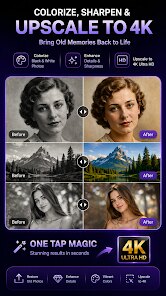


editor reviews
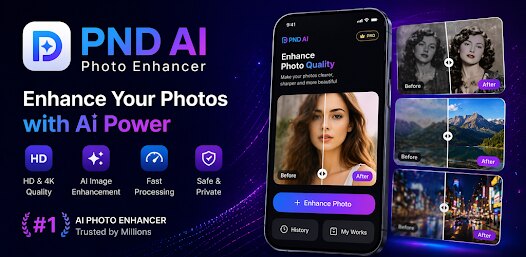
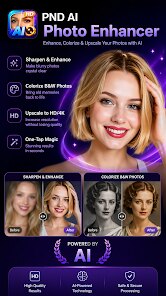
PND AI Photo Enhancer HD aims to breathe new life into old, blurry, or low-resolution images. The app uses machine learning models to upscale photos, sharpen details, and reduce unwanted noise or grain. It's designed for anyone who works with digital images, from casual users trying to restore old family photos to content creators or e-commerce sellers looking to improve product shots without heavy editing skills.
During my testing, I uploaded several pictures: a scanned 90s snapshot, a poorly lit night photo, and a compressed web image. The HD mode handled the scanned photo surprisingly well, smoothing out the paper texture without losing facial details. The noise reduction on the night shot was also effective, though it occasionally introduced a slight waxy look to skin tones. What stood out to me was the batch processing feature, letting me enhance multiple images at once instead of working one-by-one. For someone like me who often deals with batches of images for social media posts, this saved quite a bit of time.
However, not everything is smooth. The free version imposes strict limits on resolution and processing count, which can feel restrictive if you have many files to enhance. And while the app clearly states it uses AI, some results still show artifacts or oversharpening, especially on complex patterns like hair or foliage. I would recommend PND AI Photo Enhancer HD to users who need quick, automated fixes for their images, but not for professionals who require pixel-level control over output quality. It works best for casual to semi-professional needs where speed and convenience matter more than absolute perfection.
features
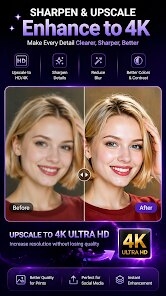
- One-click enhancement through the HD mode lets you upscale resolution up to 4x. I tried it on a 500x300 pixel thumbnail, and the result was usable for a small print. The algorithm fills in missing pixel data reasonably well, though edges can get a bit fuzzy if you push the upscale too far.
- Batch processing allows you to queue up to 20 images at once. This was a lifesaver when I had to quickly enhance a set of product images for an online listing. Each image took about 30 seconds to process, and I could leave the app running while doing other tasks.
- There is a dedicated face enhancement option that specifically targets facial features. It sharpens eyes and smooths skin texture, but be careful not to overdo it, as it can make faces look almost plastic if you apply it to already clear portraits.
- The app also includes a basic cropping and rotation tool for pre-processing, which is a nice addition. You can adjust composition before enhancing, so you don't waste processing power on unwanted background areas.
pros
- Processing speed is impressive for a mobile app. Most images finish enhancing in under a minute, even at higher resolution settings. This makes it practical for on-the-go edits without waiting around.
- The batch function sets it apart from many similar tools. Being able to apply the same enhancement to multiple images with one tap is convenient, especially for social media managers or small business owners.
- Results are consistent across different image types. Whether working on portraits, landscapes, or screenshots, the app seems to handle each category with reasonable accuracy, though it does favor portrait shots slightly more.
cons
- The free version's watermark is quite noticeable and cannot be removed without a subscription. It's placed at the bottom right corner and covers about 5% of the image, which can be intrusive for finished work.
- High-resolution processing sometimes introduces mild artifacts, particularly around edges of objects. You might notice a slight "painted" effect on straight lines or text after enhancement.
- Customer support is limited to email and there is no live chat or phone option. I waited about 24 hours for a reply to a simple question about subscription policies, which felt slow for a paid service.
Recommended Apps
![]()
QR & Barcode Scanner
Gamma Play4.7

![]()
LINE Camera - Photo editor
LINE (LY Corporation)4.4![]()
Google Voice
Google LLC4.3![]()
AI Chat・Ask Chatbot Assistant
AI Chat Studio4.5![]()
Rythmix: AI Music & Song Maker
PROMINENT FORTUNE PTE. LTD.4![]()
CapCut - Video Editor
Bytedance Pte. Ltd.4![]()
PND AI Photo Enhancer HD
PND AI 3604.8![]()
Firefox Fast & Private Browser
Mozilla4.5![]()
Smile Photo Editor
Hairstyle Photo Apps3![]()
Cat Language Keyboard Filter
SOKAR4.6![]()
Moonphase Filter: Love Test
Braly JSC0![]()
Truth or Dare Game - Party App
Chouic4.8![]()
Google Calendar
Google LLC4.5![]()
Pic Stitch: Collage Maker
Maple Media3.5![]()
AI ARTA: Art & Photo Generator
AIBY Inc.3.8










You May Like
-
![]()
Heaven: Gay & LGBT+ Dating
Paradiz Social Ltd3.2 -
![]()
Bugzz: Insect Prank Filters
Smart Utilities Hub3.8 -
![]()
TeraBox: 1TB Cloud & AI Space
Flextech Inc.4.4 -
![]()
Clue Cycle & Period Tracker
Clue Period Tracker by BioWink4.4 -
![]()
BFF Friendship Test
DH3 Games4.3 -
![]()
April Fools Pranks Funny Prank
Express Dev Inc4.7 -
![]()
My Name Meaning - Name Facts
DroidX Studio0 -
![]()
Love Tester Find Real Love App
Happy-verse4.6 -
![]()
Opera Mini: Fast Web Browser
Opera4.3 -
![]()
MyFace - Nationality by face
DLMT DEV2.4 -
![]()
Yoshion - Pic Collage Maker
Joseph Jenny3.1 -
![]()
Healthy Benefits+
Solutran, Inc.4.5 -
![]()
AI Chat Open Assistant Chatbot
Smart Widget Labs Co Ltd4.4 -
![]()
Make Me Bald Prank
AppTornado2.5 -
![]()
Haircut Prank, Air Horn & Fart
wister.stella3.4











Disclaimer
1.Apponbest does not represent any developer, nor is it the developer of any App or game.
2.Apponbest provide custom reviews of Apps written by our own reviewers, and detailed information of these Apps, such as developer contacts, ratings and screenshots.
3. All trademarks, registered trademarks, brand names and company names or logos appearing on the site are the property of their respective owners.
4.Apponbest abides by the federal Digital Millennium Copyright Act (DMCA) by responding to notices of alleged infringement that complies with the DMCA and other applicable laws.
5.If you are the owner or copyright representative and want to delete your information, please contact us [email protected].
6.All the information on this website is strictly observed all the terms and conditions of Google Ads Advertising policies and Google Unwanted Software policy.
7.apponbest.com is an independent, information-only website which is 100% free to all the users.