
Learn to Draw Cartoon

5M+
Installs
Creative APPS
Developer
-
Art & Design
Category
-
Rated for 3+
Content Rating
-
https://sites.google.com/view/draw-apps-for-free/
Privacy Policy
Screenshots
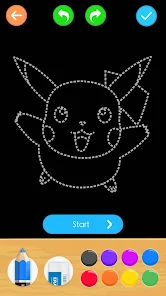
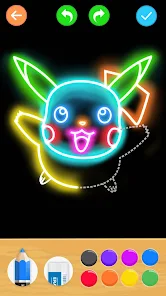
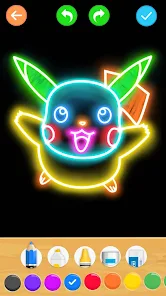
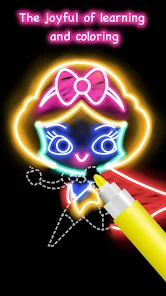
editor reviews
Learn to Draw Cartoon is a comprehensive mobile application designed to guide users through the process of creating cartoon characters and illustrations from scratch. Its core purpose is to demystify the art of cartooning, breaking down complex drawings into simple, manageable steps. The app serves as a digital art instructor, offering a structured curriculum that progresses from basic shapes and lines to full-fledged, expressive characters with personality.
The target user group is broad, encompassing absolute beginners with no prior drawing experience, hobbyists looking to improve their skills, parents seeking a creative activity for children, and even educators who can use it as a teaching aid. It specifically solves the problem of intimidation that often accompanies learning to draw. By providing clear, step-by-step visual instructions, it removes the guesswork and builds confidence incrementally. For someone like me, who always admired cartoon art but felt hindered by a lack of foundational skill, this app was a revelation. It helped me solve the personal problem of 'where to start' by giving me a clear, guided path. I went from hesitant scribbles to completing recognizable, charming characters within a few sessions, which was incredibly rewarding.
Based on my experience, I would highly recommend Learn to Draw Cartoon to visual learners and anyone who thrives on structured, achievable goals. It is most useful in casual learning scenarios—during a commute, as a relaxing evening activity, or as a fun, shared project with kids. It's perfect for building a new hobby from the ground up rather than for professional artists seeking advanced technique.
features
- 🎨 Step-by-Step Tutorial Library: The app features an extensive library of tutorials, each decomposing a cartoon character—like animals, people, or fantasy creatures—into a sequence of 6 to 10 simple steps. Each step adds only a few new lines, making the process feel effortless and logical. The tutorials often begin with basic geometric shapes as a foundation, teaching fundamental principles of construction that users can apply to their own original drawings later.
- ✏️ Interactive Drawing Canvas: A built-in drawing tool allows users to follow along directly on their screen. This canvas includes adjustable brush sizes, an eraser, and a layering function that lets you trace over a faint guide image. This interactive element is crucial for practice, as it provides immediate, hands-on experience without the need for separate paper and pencils, though using traditional tools alongside the app is also encouraged.
- 📚 Skill-Building Categories & Challenges: Lessons are organized into progressive categories such as 'Basics,' 'Funny Faces,' 'Action Poses,' and 'Scene Drawing.' This structured progression ensures skills are built cumulatively. Additionally, the app offers daily or weekly drawing challenges that prompt users to combine learned skills to create something new, fostering creativity beyond mere replication of the tutorials.
- 💾 Gallery & Progress Tracking: Users can save their completed drawings to a personal gallery within the app. This feature is excellent for visualizing progress over time, building a portfolio of work, and sharing results with friends. Watching your gallery fill up with increasingly complex drawings provides a strong sense of accomplishment and motivation to continue.
pros
- 👍 The foundational 'start with shapes' methodology is brilliantly executed, making complex drawings accessible and building essential artistic confidence from day one.
- 👍 The user interface is clean, intuitive, and distraction-free, allowing total focus on the drawing process without navigating complicated menus.
- 👍 The variety of characters and themes keeps the learning process fresh and engaging, appealing to a wide range of interests from cute animals to superheroes.
- 👍 The inclusion of a basic digital canvas within the app is a thoughtful touch, making it a truly self-contained learning studio for on-the-go practice.
cons
- 👎 The digital drawing tools, while convenient, are quite basic and lack pressure sensitivity, which can limit the expressiveness of lines compared to using a stylus on other apps or real paper.
- 👎 Some users might find the art style somewhat uniform; while great for consistency, it offers less exposure to diverse cartooning styles from different artists.
- 👎 Advanced users looking for lessons on animation, character design theory, or more sophisticated shading and coloring techniques will find the content too rudimentary.
- 👎 The app's motivational system is simple; incorporating more gamified elements like skill points or achievement badges could enhance engagement for some learners.
Recommended Apps
![]()
Astra - Life Advice
Vert Media Partners4.4
![]()
Question.AI - Chatbot&Math AI
D3 DIMENSION TECHNOLOGY PTE.LTD.4.5
![]()
Anima
ChristopherMoore03.2![]()
Suno - AI Music & Songs Maker
Suno, Inc4.8![]()
Name Meaning
Dexati4.1![]()
Reface: Face Swap & AI Videos
NEOCORTEXT, INC.4![]()
Astroscope: Astrology Guide
Astroscope App4.5![]()
Passport Parking
Passport Labs, Inc.2.5![]()
AXS Tickets
AXS, LLC4.2![]()
Call Santa Claus & Prank Call
WELLY GLOBAL PUBLISHING3.5![]()
PawAI: AI Cartoon Pet Filter
Now Tech3.1![]()
Waymo
Waymo LLC4.9![]()
Live football TV
Findy360 Software LLC3.7![]()
Pedometer - Step Counter
Simple Design Ltd.4.8![]()
Face Live Camera: Face Filters
Lyrebird Studio4.1














You May Like
-
![]()
FORCETELLER Astrology & Saju
Team UN7QI34.5 -
![]()
Daily Horoscope & Astrology
TELEMAQUE4.2 -
![]()
Yahoo Sports: Scores & News
Yahoo4.7 -
![]()
Uber Eats: Food Delivery
Uber Technologies, Inc.4.3 -
![]()
How I will die - Predict death
Bimdu3.2 -
![]()
Quiz Reels: Filter Challenge
Now Tech3.9 -
![]()
Broken Screen 4K Funny Pranks
Braly JSC4.1 -
![]()
Prisma3D - Animation, Modeling
Prisma3D2.8 -
![]()
Wonder - LGBTQ+ Dating App
Bumpy Inc.4.3 -
![]()
PicSo – Customize Your AI Girl
Meta Insight3.7 -
![]()
Plant App - Plant Identifier
ScaleUp4.6 -
![]()
Software Update for my phone
Art & Tool Studio4.1 -
![]()
Kling AI: AI Image&Video Maker
Lohas Games Pte. Ltd.4.4 -
![]()
Google Home
Google LLC4.2 -
![]()
Fingerprint Scan Simulator
Dream-Up3.6














Disclaimer
1.Apponbest does not represent any developer, nor is it the developer of any App or game.
2.Apponbest provide custom reviews of Apps written by our own reviewers, and detailed information of these Apps, such as developer contacts, ratings and screenshots.
3. All trademarks, registered trademarks, brand names and company names or logos appearing on the site are the property of their respective owners.
4.Apponbest abides by the federal Digital Millennium Copyright Act (DMCA) by responding to notices of alleged infringement that complies with the DMCA and other applicable laws.
5.If you are the owner or copyright representative and want to delete your information, please contact us [email protected].
6.All the information on this website is strictly observed all the terms and conditions of Google Ads Advertising policies and Google Unwanted Software policy.
7.apponbest.com is an independent, information-only website which is 100% free to all the users.



























