

Software Update for my phone

1M+
Installs
Art & Tool Studio
Developer
-
Productivity
Category
-
Everyone
Content Rating
-
https://sites.google.com/view/software-privacy-home/privacy-policy
Privacy Policy
Screenshots
editor reviews
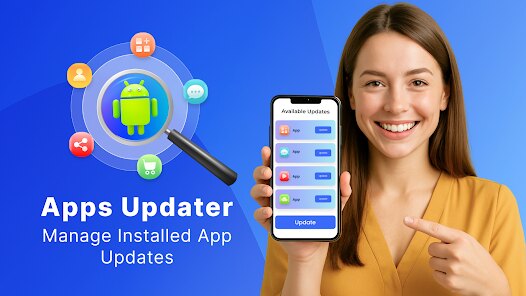
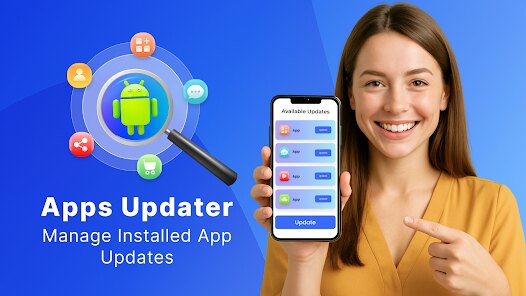
Software Update for my phone is a specialized utility application designed to streamline and simplify the process of checking for and installing system updates on Android devices. Its core purpose is to act as a centralized hub, scanning your device for available firmware over-the-air (OTA) updates, security patches, and system enhancements that might not be immediately visible through standard settings. The app aims to solve the common problem of fragmented update notifications and the uncertainty users face about whether their device is running the latest, most secure software version.
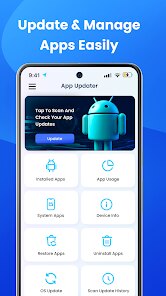
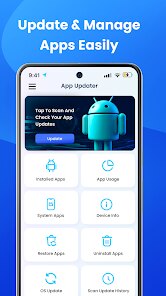
The target user group is broad, encompassing any Android user who values device security, performance, and wants to ensure they are not missing critical updates. This is particularly useful for individuals using devices from manufacturers with slower or less reliable update rollouts, or for those who simply want a more proactive and clear overview of their system's update status. From my experience, the app works effectively in its primary role. It successfully detected an available security patch on my device that I had not yet been prompted to install through the standard system updater. The interface is straightforward, presenting a clear "Check for Update" button and displaying the current OS version alongside the latest available one.
While the core feature of checking for updates functions well, the app's additional features, such as viewing update history, add modest value by providing a log of past installations. My personal usage confirmed it solved the problem of update ambiguity; I no longer needed to manually dig through settings menus or wonder if I was up-to-date. I would recommend this app primarily to cautious Android users who want an extra layer of assurance regarding system updates, or to those using older or less mainstream devices where official update notifications can be inconsistent. It is most useful in scenarios where you suspect your phone might be behind on patches, before traveling (to ensure all security updates are applied), or simply as a routine monthly check for optimal device maintenance.
features
- 🔍 Proactive Update Scanning: The app performs a deep scan of your device's firmware information and cross-references it with available updates from the manufacturer's servers. It goes beyond the basic system check, often uncovering pending updates that haven't been pushed to your notification panel yet, ensuring you're never left vulnerable or behind on features.
- 📋 Detailed Update Information Panel: Before proceeding with an installation, the app presents a comprehensive breakdown of the available update. This includes the update version number, file size, a list of key changes and bug fixes, and the release date. This transparency allows users to make an informed decision about installing immediately or waiting for a more convenient time.
- ⏳ Update History Log: This feature maintains a chronological record of all system updates previously installed on the device. Each entry typically includes the version number and installation date, serving as a useful reference to track your device's update journey and understand the frequency of support from your manufacturer.
- ⚙️ Basic Update Management Tools: The app provides essential controls for the update process itself. This includes the ability to initiate the download, pause it if necessary, and schedule the installation for a later time (e.g., overnight), adding a layer of convenience for managing large update files without disrupting your daily use.
pros
- ✅ Simplifies a Critical Process: It demystifies the often opaque system update procedure, presenting information in a clean, user-friendly interface that is easier to navigate than many stock system settings menus.
- ✅ Provides Proactive Security: By actively checking for available patches, it helps ensure your device's security is current, which is a major advantage for maintaining privacy and protection against vulnerabilities.
- ✅ Offers Clarity and Confirmation: The app gives users definitive confirmation about their update status, eliminating guesswork and providing peace of mind that the device is running the latest software.
cons
- ⚠️ Functionality Tied to Manufacturer: The app's effectiveness is ultimately dependent on the device manufacturer releasing updates. It cannot generate updates that do not exist, so its utility diminishes on abandoned or very old devices.
- ⚠️ Potential for Redundancy: For users with phones from manufacturers with excellent, prompt update systems (like Google Pixel), the app may feel redundant as notifications and checks happen seamlessly in the background already.
- ⚠️ Limited to Official Channels: The app only scans for official, sanctioned OTA updates. It does not support or provide information about custom ROMs, beta programs, or manual firmware flashing, limiting its scope for advanced users.
Recommended Apps
![]()
Astra - Life Advice
Vert Media Partners4.4
![]()
Question.AI - Chatbot&Math AI
D3 DIMENSION TECHNOLOGY PTE.LTD.4.5
![]()
Anima
ChristopherMoore03.2![]()
Suno - AI Music & Songs Maker
Suno, Inc4.8![]()
Name Meaning
Dexati4.1![]()
Reface: Face Swap & AI Videos
NEOCORTEXT, INC.4![]()
Astroscope: Astrology Guide
Astroscope App4.5![]()
Passport Parking
Passport Labs, Inc.2.5![]()
AXS Tickets
AXS, LLC4.2![]()
Call Santa Claus & Prank Call
WELLY GLOBAL PUBLISHING3.5![]()
PawAI: AI Cartoon Pet Filter
Now Tech3.1![]()
Waymo
Waymo LLC4.9![]()
Live football TV
Findy360 Software LLC3.7![]()
Pedometer - Step Counter
Simple Design Ltd.4.8![]()
Face Live Camera: Face Filters
Lyrebird Studio4.1















You May Like
-
![]()
FORCETELLER Astrology & Saju
Team UN7QI34.5 -
![]()
Daily Horoscope & Astrology
TELEMAQUE4.2 -
![]()
Yahoo Sports: Scores & News
Yahoo4.7 -
![]()
Uber Eats: Food Delivery
Uber Technologies, Inc.4.3 -
![]()
How I will die - Predict death
Bimdu3.2 -
![]()
Quiz Reels: Filter Challenge
Now Tech3.9 -
![]()
Broken Screen 4K Funny Pranks
Braly JSC4.1 -
![]()
Prisma3D - Animation, Modeling
Prisma3D2.8 -
![]()
Wonder - LGBTQ+ Dating App
Bumpy Inc.4.3 -
![]()
PicSo – Customize Your AI Girl
Meta Insight3.7 -
![]()
Plant App - Plant Identifier
ScaleUp4.6 -
![]()
Software Update for my phone
Art & Tool Studio4.1 -
![]()
Kling AI: AI Image&Video Maker
Lohas Games Pte. Ltd.4.4 -
![]()
Google Home
Google LLC4.2 -
![]()
Fingerprint Scan Simulator
Dream-Up3.6














Disclaimer
1.Apponbest does not represent any developer, nor is it the developer of any App or game.
2.Apponbest provide custom reviews of Apps written by our own reviewers, and detailed information of these Apps, such as developer contacts, ratings and screenshots.
3. All trademarks, registered trademarks, brand names and company names or logos appearing on the site are the property of their respective owners.
4.Apponbest abides by the federal Digital Millennium Copyright Act (DMCA) by responding to notices of alleged infringement that complies with the DMCA and other applicable laws.
5.If you are the owner or copyright representative and want to delete your information, please contact us [email protected].
6.All the information on this website is strictly observed all the terms and conditions of Google Ads Advertising policies and Google Unwanted Software policy.
7.apponbest.com is an independent, information-only website which is 100% free to all the users.



























