
Learn to Draw Flower

5M+
Installs
Creative APPS
Developer
-
Video Players & Editors
Category
-
Rated for 3+
Content Rating
-
https://sites.google.com/view/draw-apps-for-free/
Privacy Policy
Screenshots
editor reviews
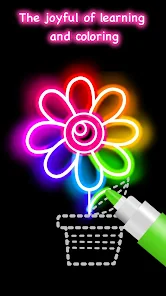
Learn to Draw Flower is a specialized mobile application designed to guide users through the process of creating botanical illustrations, from simple daisies to complex roses and lilies. Its core purpose is to demystify flower drawing by breaking it down into manageable, step-by-step tutorials, making the art form accessible to complete beginners and those looking to refine their skills. The app primarily targets hobbyists, aspiring artists, and anyone seeking a relaxing, creative outlet, effectively solving the problem of not knowing where to start or how to progress in botanical art.
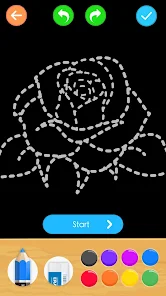
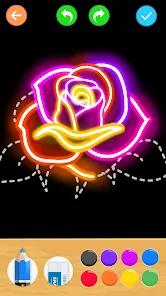
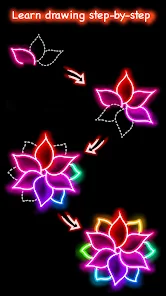
The core feature of guided, step-by-step drawing works exceptionally well. Each tutorial begins with basic shapes and gradually adds layers of detail, which builds confidence and ensures a solid foundation. Additional features, like the ability to draw directly on the screen with various virtual pencils and the option to view time-lapse replays of your work, add significant value. They transform a simple learning tool into an interactive studio. In my experience, the app was instrumental in helping me move from awkward, flat sketches to drawings with depth and recognizable form. It specifically solved my problem of understanding petal overlap and shading to create a three-dimensional effect, which I had always struggled with before.
I would highly recommend this app to absolute beginners who feel intimidated by a blank page, as well as to intermediate sketchers looking to add a new, beautiful subject to their repertoire. It is most useful for those seeking structured, bite-sized art lessons during commutes, breaks, or quiet evenings at home. The app is also perfect for individuals interested in mindful activities, as the focused, step-by-step process can be very meditative and rewarding.
features
- 🌸 Comprehensive Step-by-Step Library: The app boasts an extensive collection of flower tutorials, each meticulously broken down into 10-15 clear steps. You start with simple circles and lines to establish proportion and gradually add contours, details, and shading. This methodical approach removes the guesswork and makes complex subjects like orchids or sunflowers surprisingly achievable.
- 🌸 Interactive Drawing Canvas & Tools: Unlike passive video tutorials, this app provides a built-in canvas where you trace and practice each step directly. It offers a selection of virtual pencils with different opacities and thicknesses, simulating a real sketching experience. The undo/redo functions are forgiving, encouraging experimentation without fear of ruining your progress.
- 🌸 Skill-Building Progression & Categories: Tutorials are thoughtfully organized by difficulty (Beginner, Intermediate, Advanced) and by flower categories (Wildflowers, Garden Blooms, Exotic Plants). This structure allows for a clear learning path. You can systematically build your skills, starting with a basic tulip and eventually tackling a detailed hibiscus, ensuring continuous challenge and growth.
- 🌸 Offline Access & Personal Gallery: All tutorial content is available for download, enabling practice anywhere without an internet connection. Every completed drawing is automatically saved to a personal gallery within the app. This feature is fantastic for tracking your improvement over time and creating a portfolio of your floral artwork.
pros
- ✅ The foundational step-by-step methodology is brilliantly executed, making botanical art genuinely accessible to anyone regardless of prior experience.
- ✅ The offline functionality is a major strength, transforming it into a perfect companion for travel or areas with poor connectivity.
- ✅ The clean, intuitive interface keeps the focus entirely on drawing, with minimal distractions or confusing menus.
- ✅ The personal gallery provides tangible motivation by visually documenting the user's artistic journey and improvement.
cons
- ⚠️ The toolset, while functional, is somewhat basic. Advanced users might miss features like custom brush creation, layer support, or more sophisticated blending options for coloring.
- ⚠️ The app focuses almost exclusively on representational accuracy. There is little guidance on developing a personal style, creative composition, or using flowers in larger artistic works.
- ⚠️ Some users might find the progression linear. While categories exist, there is no adaptive learning path or personalized recommendation system based on completed work.
- ⚠️ The color palette provided for tutorials can be limited, and the shading instructions, while good, sometimes lack depth in explaining light source theory for more dynamic results.
Recommended Apps
![]()
Astra - Life Advice
Vert Media Partners4.4
![]()
Question.AI - Chatbot&Math AI
D3 DIMENSION TECHNOLOGY PTE.LTD.4.5
![]()
Anima
ChristopherMoore03.2![]()
Suno - AI Music & Songs Maker
Suno, Inc4.8![]()
Name Meaning
Dexati4.1![]()
Reface: Face Swap & AI Videos
NEOCORTEXT, INC.4![]()
Astroscope: Astrology Guide
Astroscope App4.5![]()
Passport Parking
Passport Labs, Inc.2.5![]()
AXS Tickets
AXS, LLC4.2![]()
Call Santa Claus & Prank Call
WELLY GLOBAL PUBLISHING3.5![]()
PawAI: AI Cartoon Pet Filter
Now Tech3.1![]()
Waymo
Waymo LLC4.9![]()
Live football TV
Findy360 Software LLC3.7![]()
Pedometer - Step Counter
Simple Design Ltd.4.8![]()
Face Live Camera: Face Filters
Lyrebird Studio4.1














You May Like
-
![]()
FORCETELLER Astrology & Saju
Team UN7QI34.5 -
![]()
Daily Horoscope & Astrology
TELEMAQUE4.2 -
![]()
Yahoo Sports: Scores & News
Yahoo4.7 -
![]()
Uber Eats: Food Delivery
Uber Technologies, Inc.4.3 -
![]()
How I will die - Predict death
Bimdu3.2 -
![]()
Quiz Reels: Filter Challenge
Now Tech3.9 -
![]()
Broken Screen 4K Funny Pranks
Braly JSC4.1 -
![]()
Prisma3D - Animation, Modeling
Prisma3D2.8 -
![]()
Wonder - LGBTQ+ Dating App
Bumpy Inc.4.3 -
![]()
PicSo – Customize Your AI Girl
Meta Insight3.7 -
![]()
Plant App - Plant Identifier
ScaleUp4.6 -
![]()
Software Update for my phone
Art & Tool Studio4.1 -
![]()
Kling AI: AI Image&Video Maker
Lohas Games Pte. Ltd.4.4 -
![]()
Google Home
Google LLC4.2 -
![]()
Fingerprint Scan Simulator
Dream-Up3.6














Disclaimer
1.Apponbest does not represent any developer, nor is it the developer of any App or game.
2.Apponbest provide custom reviews of Apps written by our own reviewers, and detailed information of these Apps, such as developer contacts, ratings and screenshots.
3. All trademarks, registered trademarks, brand names and company names or logos appearing on the site are the property of their respective owners.
4.Apponbest abides by the federal Digital Millennium Copyright Act (DMCA) by responding to notices of alleged infringement that complies with the DMCA and other applicable laws.
5.If you are the owner or copyright representative and want to delete your information, please contact us [email protected].
6.All the information on this website is strictly observed all the terms and conditions of Google Ads Advertising policies and Google Unwanted Software policy.
7.apponbest.com is an independent, information-only website which is 100% free to all the users.



























