

Notepad, Notes, Easy Notebook

10M+
Installs
Simple Design Ltd.
Developer
-
Productivity
Category
-
Everyone
Content Rating
-
https://simpledesign.ltd/privacypolicy.html?pkg=notes.notepad.checklist.calendar.todolist.notebook
Privacy Policy
Screenshots
editor reviews
Among the countless note-taking apps flooding the market, Notepad, Notes, Easy Notebook by Simple Design Ltd. positions itself as a straightforward digital notebook designed for people who just want to jot things down without dealing with layers of complex features and premium subscription walls. At its core, the app serves as a blank canvas for quick thoughts, to-do lists, shopping reminders, meeting notes, or even personal journal entries. This app is clearly aimed at students, busy professionals, elderly users, or anyone who feels overwhelmed by heavy-duty tools like Notion or Evernote and simply needs a reliable place to capture fleeting ideas.
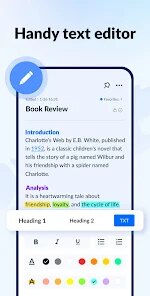
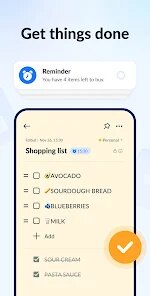
The application's core functionality revolves around creating, editing, and organizing text notes with basic formatting options. It does that job reasonably well. The editor is clean and responsive, with minimal lag when typing or scrolling through longer notes. You can toggle bold, italic, underline, and strike-through formatting, and there is support for checklists, which I found genuinely useful for tracking daily errands. What sets it apart from the default phone notepad is the inclusion of folders and a search bar for organization, though the search function could be snappier when handling dozens of notes. A personal issue I had was managing my scattered shopping lists and bookmarks across different apps. This tool let me consolidate everything in one place using color-coded folders, so I finally stopped forgetting ingredients at the grocery store. Speaking of value-adds, the dark mode and font size adjustment are nice touches that improve readability during late-night writing sessions.
For those who need a distraction-free, lightweight note-taking solution that syncs locally without cloud dependency concerns or subscription fees, this app is an excellent fit. I would recommend it especially to students for class notes, to professionals for quick meeting minutes, or to seniors who want something simpler than the pre-installed system notes. It's best used for everyday casual writing rather than complex project management or collaborative workflows.
features
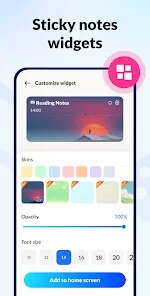
- 📝 Quick Capture & Floating Widget – The floating widget is an absolute lifesaver when you're browsing something on your phone and a random idea pops into your head. Instead of switching apps, you tap the floating icon and a miniature note pad appears right on your screen. I've used it countless times to jot down a phone number I saw on a website or to copy a recipe ingredient without losing my place in the browser. It stays visible even when you switch between apps, which makes multitasking feel effortless.
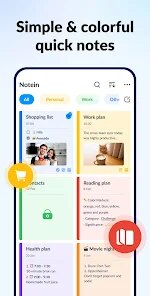
- 📝 Folder-Based Organization with Color Tags – Unlike the basic notes app on your phone that throws everything into one giant list, this app lets you create separate folders for different categories: work, personal, recipes, travel plans, you name it. You can assign distinct colors to each folder, so locating a specific note becomes an almost visual experience. I created separate folders for my freelance projects and my home renovation lists, and now I no longer waste time scrolling past irrelevant entries to find the one I need.
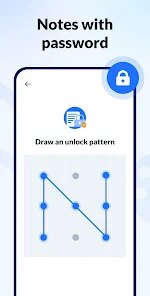
- 📝 Lock Protection for Sensitive Notes – Privacy is rarely a priority in free note apps, but here you can lock individual notes with a PIN or fingerprint unlock. This came in handy when I needed to store my Wi-Fi passwords, bank account numbers, and even a few personal diary entries. Knowing certain notes are shielded from prying eyes if someone borrows my phone gives me genuine peace of mind. The lock screen itself is simple and doesn't feel intrusive when you need quick access.
pros
- ✔️ Truly free with no annoying ads or forced subscriptions – you don't get bombarded with pop-ups or limited to a trial period, which is increasingly rare these days.
- ✔️ Offline functionality works perfectly – your notes remain accessible even without internet access, so plane rides or subway commutes never disrupt your workflow.
- ✔️ Simple and intuitive user interface that even first-time smartphone users can navigate without frustration or tutorials.
- ✔️ Lightweight file size that doesn't hog storage or drain your battery, making it ideal for older or budget devices with limited resources.
cons
- ✖️ No cloud sync or cross-device backup feature, meaning if you lose your phone or perform a factory reset, all your notes are gone forever unless you manually export them.
- ✖️ Limited formatting options when compared to rivals – there is no support for images, voice recordings, file attachments, or hyperlinks inside a note, which severely restricts advanced usage.
- ✖️ Basic search feature occasionally fails to find keywords from longer notes, and there is no filter by date or folder, which makes navigation tedious as your library grows.
- ✖️ The app has not received an update in several months, which raises concerns about future compatibility with newer Android or iOS versions and potential unpatched security issues.
Recommended Apps
![]()
Astra - Life Advice
Vert Media Partners4.4
![]()
Question.AI - Chatbot&Math AI
D3 DIMENSION TECHNOLOGY PTE.LTD.4.5
![]()
Anima
ChristopherMoore03.2![]()
Suno - AI Music & Songs Maker
Suno, Inc4.8![]()
Name Meaning
Dexati4.1![]()
Reface: Face Swap & AI Videos
NEOCORTEXT, INC.4![]()
Astroscope: Astrology Guide
Astroscope App4.5![]()
Passport Parking
Passport Labs, Inc.2.5![]()
AXS Tickets
AXS, LLC4.2![]()
Call Santa Claus & Prank Call
WELLY GLOBAL PUBLISHING3.5![]()
PawAI: AI Cartoon Pet Filter
Now Tech3.1![]()
Waymo
Waymo LLC4.9![]()
Live football TV
Findy360 Software LLC3.7![]()
Pedometer - Step Counter
Simple Design Ltd.4.8![]()
Face Live Camera: Face Filters
Lyrebird Studio4.1














You May Like
-
![]()
FORCETELLER Astrology & Saju
Team UN7QI34.5 -
![]()
Daily Horoscope & Astrology
TELEMAQUE4.2 -
![]()
Yahoo Sports: Scores & News
Yahoo4.7 -
![]()
Uber Eats: Food Delivery
Uber Technologies, Inc.4.3 -
![]()
How I will die - Predict death
Bimdu3.2 -
![]()
Quiz Reels: Filter Challenge
Now Tech3.9 -
![]()
Broken Screen 4K Funny Pranks
Braly JSC4.1 -
![]()
Prisma3D - Animation, Modeling
Prisma3D2.8 -
![]()
Wonder - LGBTQ+ Dating App
Bumpy Inc.4.3 -
![]()
PicSo – Customize Your AI Girl
Meta Insight3.7 -
![]()
Plant App - Plant Identifier
ScaleUp4.6 -
![]()
Software Update for my phone
Art & Tool Studio4.1 -
![]()
Kling AI: AI Image&Video Maker
Lohas Games Pte. Ltd.4.4 -
![]()
Google Home
Google LLC4.2 -
![]()
Fingerprint Scan Simulator
Dream-Up3.6














Disclaimer
1.Apponbest does not represent any developer, nor is it the developer of any App or game.
2.Apponbest provide custom reviews of Apps written by our own reviewers, and detailed information of these Apps, such as developer contacts, ratings and screenshots.
3. All trademarks, registered trademarks, brand names and company names or logos appearing on the site are the property of their respective owners.
4.Apponbest abides by the federal Digital Millennium Copyright Act (DMCA) by responding to notices of alleged infringement that complies with the DMCA and other applicable laws.
5.If you are the owner or copyright representative and want to delete your information, please contact us [email protected].
6.All the information on this website is strictly observed all the terms and conditions of Google Ads Advertising policies and Google Unwanted Software policy.
7.apponbest.com is an independent, information-only website which is 100% free to all the users.



























