

Notes - Notepad, Secure Notes

100K+
Installs
PANCHHI SOLUTION
Developer
-
Productivity
Category
-
Everyone
Content Rating
-
https://sites.google.com/view/panchhisolution-notes
Privacy Policy
Screenshots
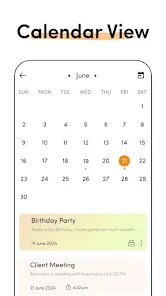
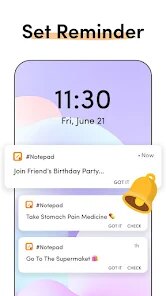
editor reviews
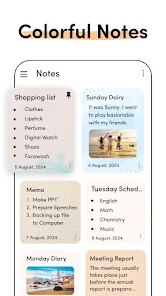
PANCHHI SOLUTION's Notes - Notepad, Secure Notes app presents itself as a straightforward digital note-taking tool designed for users who prioritize simplicity and security in their daily note management. The app's core functionality revolves around creating, organizing, and protecting personal notes, memos, and checklists. Its main purpose is to serve as a reliable, no-frills replacement for physical notepads, with the added benefit of encryption for sensitive information.
This app is primarily targeted at individuals who need a quick and secure way to jot down thoughts, meeting minutes, shopping lists, or private ideas without the complexity of feature-rich productivity suites. It solves the problem of scattered, unsecured notes by providing a centralized, password-protected vault. From my experience, the core note creation and editing features work reliably. The interface is minimal, which makes opening the app and starting a new note almost instantaneous. I found it particularly useful for securely storing login information snippets and confidential project ideas that I didn't want floating in my standard notes app. The additional feature of folder-based organization adds tangible value, allowing me to separate work notes from personal ones effectively.
I would recommend this app to students, professionals handling sensitive data, or anyone with a strong preference for minimalist, focused tools. It is most useful in scenarios requiring rapid capture of information with an assurance of privacy, such as during confidential calls, for storing personal passwords or PINs locally, or for maintaining a private journal. It's less suited for users needing advanced formatting, cloud sync across devices, or collaborative editing features.
features
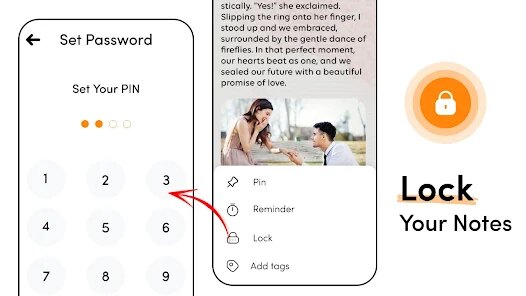
- 🔒 Secure Vault with PIN Protection: The app's standout feature is its encrypted secure notes section. You can move any note into this vault, which is protected by a custom PIN or password. This creates a separate, locked space within the app, ideal for financial details, private journals, or sensitive work information, ensuring they are not accessible during casual browsing of your regular notes.
- 📁 Intuitive Folder Organization: Beyond a linear list, the app allows you to create custom folders and subfolders. This feature brings order to note chaos, enabling you to categorize notes by project, topic, or context. I used this to maintain separate folders for 'Home Renovation,' 'Work Meetings,' and 'Travel Plans,' making retrieval much faster than scrolling through a single, lengthy list.
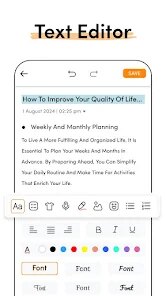
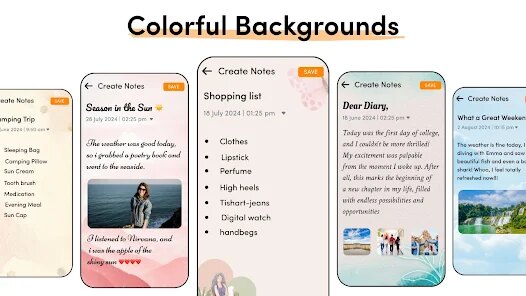
- ✏️ Clean & Fast Note Editor: The editing experience is purposefully basic and fast. It focuses on text input with essential options like text color change, bullet points, and a checklist format. The absence of complex formatting toolbars means there's no lag or distraction; you just open and write. It supports long-press for editing and deleting, which feels very responsive.
- 🔍 Instant Search Functionality: Finding old notes is effortless with the integrated search bar. It scans the titles and content of all your notes in real-time as you type. This proved invaluable when I needed to quickly locate a specific recipe note or a reference number I had saved weeks earlier without remembering which folder it was in.
pros
- 👍 Strong Focus on Core Privacy: The dedicated, PIN-locked vault is implemented well and feels genuinely secure for local storage, addressing a key pain point for users wary of storing private data in standard note apps.
- 👍 Excellent Performance and Simplicity: The app launches and operates with noticeable speed. Its minimalist design eliminates clutter, making it exceptionally easy to use for its intended purpose without a learning curve.
- 👍 Effective Basic Organization: The folder system, combined with reliable search, provides a robust enough structure for most personal and professional note-taking needs without becoming overcomplicated.
cons
- 👎 Lack of Cloud Sync or Backup: The most significant weakness is the absence of any cloud synchronization or export/import backup option. All notes are stored only on the device, risking permanent loss if the phone is damaged, lost, or replaced.
- 👎 Very Limited Formatting: The text editing capabilities are extremely basic. There's no support for bold, italics, underline, or images, which can be restrictive for users who need to emphasize text or create visually structured notes.
- 👎 No Web or Desktop Companion: The app is confined to the mobile device. There is no accompanying web interface or desktop application, which limits accessibility and makes it impractical for users who frequently switch between devices.
Recommended Apps
![]()
Astra - Life Advice
Vert Media Partners4.4
![]()
Question.AI - Chatbot&Math AI
D3 DIMENSION TECHNOLOGY PTE.LTD.4.5
![]()
Anima
ChristopherMoore03.2![]()
Suno - AI Music & Songs Maker
Suno, Inc4.8![]()
Name Meaning
Dexati4.1![]()
Reface: Face Swap & AI Videos
NEOCORTEXT, INC.4![]()
Astroscope: Astrology Guide
Astroscope App4.5![]()
Passport Parking
Passport Labs, Inc.2.5![]()
AXS Tickets
AXS, LLC4.2![]()
Call Santa Claus & Prank Call
WELLY GLOBAL PUBLISHING3.5![]()
PawAI: AI Cartoon Pet Filter
Now Tech3.1![]()
Waymo
Waymo LLC4.9![]()
Live football TV
Findy360 Software LLC3.7![]()
Pedometer - Step Counter
Simple Design Ltd.4.8![]()
Face Live Camera: Face Filters
Lyrebird Studio4.1














You May Like
-
![]()
FORCETELLER Astrology & Saju
Team UN7QI34.5 -
![]()
Daily Horoscope & Astrology
TELEMAQUE4.2 -
![]()
Yahoo Sports: Scores & News
Yahoo4.7 -
![]()
Uber Eats: Food Delivery
Uber Technologies, Inc.4.3 -
![]()
How I will die - Predict death
Bimdu3.2 -
![]()
Quiz Reels: Filter Challenge
Now Tech3.9 -
![]()
Broken Screen 4K Funny Pranks
Braly JSC4.1 -
![]()
Prisma3D - Animation, Modeling
Prisma3D2.8 -
![]()
Wonder - LGBTQ+ Dating App
Bumpy Inc.4.3 -
![]()
PicSo – Customize Your AI Girl
Meta Insight3.7 -
![]()
Plant App - Plant Identifier
ScaleUp4.6 -
![]()
Software Update for my phone
Art & Tool Studio4.1 -
![]()
Kling AI: AI Image&Video Maker
Lohas Games Pte. Ltd.4.4 -
![]()
Google Home
Google LLC4.2 -
![]()
Fingerprint Scan Simulator
Dream-Up3.6














Disclaimer
1.Apponbest does not represent any developer, nor is it the developer of any App or game.
2.Apponbest provide custom reviews of Apps written by our own reviewers, and detailed information of these Apps, such as developer contacts, ratings and screenshots.
3. All trademarks, registered trademarks, brand names and company names or logos appearing on the site are the property of their respective owners.
4.Apponbest abides by the federal Digital Millennium Copyright Act (DMCA) by responding to notices of alleged infringement that complies with the DMCA and other applicable laws.
5.If you are the owner or copyright representative and want to delete your information, please contact us [email protected].
6.All the information on this website is strictly observed all the terms and conditions of Google Ads Advertising policies and Google Unwanted Software policy.
7.apponbest.com is an independent, information-only website which is 100% free to all the users.



























