

iControl: Easy Widgets Themes

10M+
Installs
Fancy keyboard for theme apps
Developer
-
Productivity
Category
-
Teen
Content Rating
-
https://icontrol-themes.web.app/privacy-policy
Privacy Policy
Screenshots

editor reviews
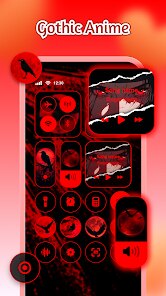
iControl: Easy Widgets Themes positions itself as a one-stop customization tool for iOS users who want to break free from the stock interface limitations without jailbreaking their devices. This app is specifically designed for iPhone and iPad owners who crave a more personalized home screen experience, offering everything from custom widgets to complete theme packs that transform the look and feel of your device. If you've ever felt frustrated by Apple's rigid grid layout or wished for more control over your app icons and widget styles, iControl steps in to bridge that gap between what iOS offers natively and what users actually want.
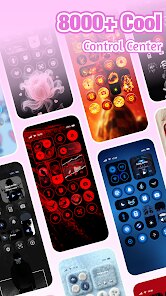
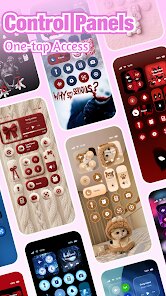
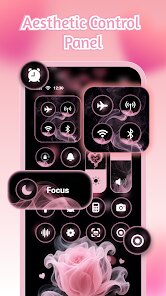
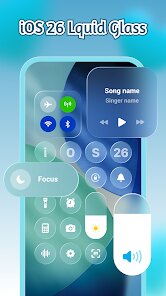
The core functionality revolves around creating and applying custom widgets that display everything from photos and weather data to calendar events and battery status, all wrapped in aesthetic designs that match your personal taste. What surprised me most during my testing was how seamlessly the widget system integrated with the iOS widget framework, meaning these custom creations actually update in real-time rather than requiring manual refreshes. The theme engine goes beyond simple icon packs, allowing you to change system fonts, wallpapers, and even the style of your control center to create a genuinely cohesive look across your device. I found myself spending an embarrassing amount of time just browsing through the community-created themes, discovering designs ranging from minimalist monochrome to vibrant cyberpunk aesthetics that completely transformed my home screen.
Where this app truly shines is its balance between power and accessibility. You don't need to be a designer to make something that looks professional, but there's enough depth here that creative users can push boundaries. The learning curve is surprisingly gentle, with clear tutorials built into the onboarding process. For someone like me who values both aesthetics and functionality, iControl solved the recurring problem of wanting my phone to feel like mine rather than like everyone else's device. I would recommend this app to anyone who considers their smartphone an extension of their personality, particularly social media users, creative professionals, or really anyone tired of looking at the same default icons day after day. It works best for users who enjoy tinkering and want that fresh phone feeling without the expense of buying new hardware.
features
- The widget customization engine gives you granular control over every element, from background gradients and font choices to transparency levels and border radius. You can stack multiple layers of information, resize elements independently, and even add animated elements that catch the eye without being distracting. What impressed me was how the live preview updates in real-time as you make adjustments, eliminating the guesswork of applying changes and then backing out to see if they look right.
- The theme marketplace operates like a curated gallery where designers upload complete visual packages. Each theme includes coordinated icon sets, matching widget designs, wallpaper suggestions, and even sound scheme modifications. The quality bar here is genuinely high, with most themes looking like they belong in an Apple keynote presentation. You can preview any theme fully applied to screenshots of your actual home screen layout before committing, which is a thoughtful touch that prevents buyer's remorse.
- The smart automation system lets you schedule theme changes based on time of day, location, or even your calendar events. Your phone can automatically switch to a dark, minimal theme during work hours, then transition to something more vibrant when you're off the clock. I set mine to match the weather, so gloomy days trigger warmer, cozier themes while sunny days bring out bright, energetic color schemes. This feature alone makes the app feel alive rather than just being a static customization tool.
- The community sharing platform allows you to publish your own creations and download what others have made, complete with rating systems and detailed categorization. You can follow specific designers whose style you admire, request custom themes, and even collaborate on multi-designer projects. The social element transforms what could be a solitary customization experience into something genuinely communal, with regular design challenges and featured artist spotlights keeping the content fresh and evolving.
pros
- The performance optimization is genuinely impressive, with widgets updating smoothly and theme changes happening in under two seconds even on older iPhone models. Battery impact remained minimal during my testing, which is often the Achilles' heel of customization apps.
- The design library offers exceptional variety, covering everything from corporate minimalism to elaborate artistic styles. New content drops weekly, and the featured curation system helps surface quality work rather than burying it under mediocre submissions.
- The export and backup functionality lets you save your complete setup as a shareable file, making it trivial to transfer your entire customized environment to a new device or share it with friends who want the exact same look.
cons
- Some premium themes require separate purchases, and the pricing can add up quickly if you want to collect multiple complete visual packs. The free selection is decent but limited compared to what's behind the paywall.
- The app occasionally conflicts with iOS updates, requiring a brief waiting period before compatibility patches arrive. This can be frustrating when you've updated your system and suddenly find widgets not rendering correctly.
- The onboarding process, while helpful, could be more streamlined for users who just want quick results. There are multiple confirmation screens and tutorial prompts that interrupt the flow for experienced users who already know what they're doing.
Recommended Apps
![]()
Astra - Life Advice
Vert Media Partners4.4
![]()
Question.AI - Chatbot&Math AI
D3 DIMENSION TECHNOLOGY PTE.LTD.4.5
![]()
Anima
ChristopherMoore03.2![]()
Suno - AI Music & Songs Maker
Suno, Inc4.8![]()
Name Meaning
Dexati4.1![]()
Reface: Face Swap & AI Videos
NEOCORTEXT, INC.4![]()
Astroscope: Astrology Guide
Astroscope App4.5![]()
Passport Parking
Passport Labs, Inc.2.5![]()
AXS Tickets
AXS, LLC4.2![]()
Call Santa Claus & Prank Call
WELLY GLOBAL PUBLISHING3.5![]()
PawAI: AI Cartoon Pet Filter
Now Tech3.1![]()
Waymo
Waymo LLC4.9![]()
Live football TV
Findy360 Software LLC3.7![]()
Pedometer - Step Counter
Simple Design Ltd.4.8![]()
Face Live Camera: Face Filters
Lyrebird Studio4.1














You May Like
-
![]()
FORCETELLER Astrology & Saju
Team UN7QI34.5 -
![]()
Daily Horoscope & Astrology
TELEMAQUE4.2 -
![]()
Yahoo Sports: Scores & News
Yahoo4.7 -
![]()
Uber Eats: Food Delivery
Uber Technologies, Inc.4.3 -
![]()
How I will die - Predict death
Bimdu3.2 -
![]()
Quiz Reels: Filter Challenge
Now Tech3.9 -
![]()
Broken Screen 4K Funny Pranks
Braly JSC4.1 -
![]()
Prisma3D - Animation, Modeling
Prisma3D2.8 -
![]()
Wonder - LGBTQ+ Dating App
Bumpy Inc.4.3 -
![]()
PicSo – Customize Your AI Girl
Meta Insight3.7 -
![]()
Plant App - Plant Identifier
ScaleUp4.6 -
![]()
Software Update for my phone
Art & Tool Studio4.1 -
![]()
Kling AI: AI Image&Video Maker
Lohas Games Pte. Ltd.4.4 -
![]()
Google Home
Google LLC4.2 -
![]()
Fingerprint Scan Simulator
Dream-Up3.6















Disclaimer
1.Apponbest does not represent any developer, nor is it the developer of any App or game.
2.Apponbest provide custom reviews of Apps written by our own reviewers, and detailed information of these Apps, such as developer contacts, ratings and screenshots.
3. All trademarks, registered trademarks, brand names and company names or logos appearing on the site are the property of their respective owners.
4.Apponbest abides by the federal Digital Millennium Copyright Act (DMCA) by responding to notices of alleged infringement that complies with the DMCA and other applicable laws.
5.If you are the owner or copyright representative and want to delete your information, please contact us [email protected].
6.All the information on this website is strictly observed all the terms and conditions of Google Ads Advertising policies and Google Unwanted Software policy.
7.apponbest.com is an independent, information-only website which is 100% free to all the users.



























