
AR Draw Sketch - Trace & Paint

5K+
Installs
MØ Studios
Developer
-
Art & Design
Category
-
Everyone
Content Rating
-
https://sites.google.com/view/mostudios/privacy-policy
Privacy Policy
Screenshots
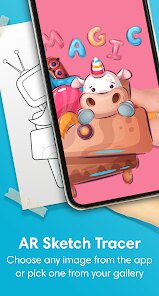
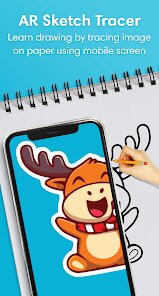
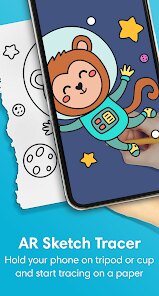
editor reviews
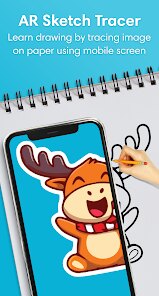
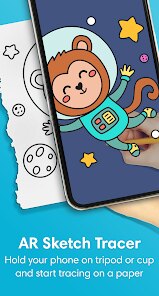
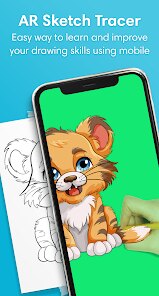
AR Draw Sketch - Trace & Paint is a fascinating mobile app that leverages augmented reality technology to help users create drawings by tracing real-world images projected onto their device screen. The core concept is simple yet clever: you point your camera at any subject, and the app overlays a semi-transparent version of that image onto your screen, allowing you to trace the outlines and details directly. This transforms the often intimidating process of drawing into an accessible, guided activity. The app is designed for a wide range of users, from complete beginners who have always wanted to draw but felt they lacked natural talent, to more experienced artists looking for a quick way to capture proportions and compositions accurately. It solves the fundamental problem of translating a three-dimensional scene onto a two-dimensional surface, handling perspective, scale, and complex details with ease.
In terms of functionality, the core tracing feature works surprisingly well. The AR tracking is responsive, and the app manages to keep the overlay aligned with the real-world object even as you move your phone or change your angle slightly. Beyond basic tracing, the app includes some genuinely helpful extras. There are adjustable transparency levels for the reference image, a built-in flashlight to illuminate darker subjects, and a grid overlay option to help with proportion. You can also import photos from your gallery to trace, which is great for working with reference images you've collected. Personally, I found this app to be a game-changer for my own sketching practice. I've always struggled with getting facial proportions right in portraits, but using this app to trace over a photo of a friend allowed me to understand exactly where the eyes, nose, and mouth sit in relation to each other. It felt less like cheating and more like a learning tool, as I could see how the lines connected and how shapes formed the bigger picture.
I would recommend this app to anyone who wants to improve their drawing skills without the frustration of starting from a blank page. It's particularly useful for hobbyists, students learning art fundamentals, and even professionals who need to quickly block out a scene or check their perspective. If you're someone who gets discouraged by the gap between your vision and your skill, this app bridges that gap in a tangible, rewarding way. It's not a substitute for learning to draw freehand, but it is an excellent training tool and a confidence booster for anyone willing to give it a try.
features
- 🖼️ The AR-based real-time tracing system is the app's standout feature. You simply hold your device up to any subject, and the app captures the image and displays it as a faint outline on your screen. The technology works smoothly, maintaining alignment between the virtual overlay and the real-world object, even with slight movements. This allows you to place a physical paper next to your device and trace directly, making the drawing process feel natural and intuitive. The responsiveness of the tracking is impressive, rarely losing the reference point or causing noticeable lag.
- 📷 The ability to import images from your gallery is another key feature that expands the app's versatility significantly. This means you don't have to be physically present with an object to draw it. You can use any photo you have saved, whether it's a landscape shot from a vacation, a portrait of a family member, or a reference image you downloaded for a project. The app handles various image formats well and allows you to adjust the opacity of the imported image, making it easier to see your own pencil strokes as you work.
- ⚙️ The customization options are thoughtful and genuinely useful for different drawing scenarios. You can adjust the brightness of the overlay to suit different lighting conditions, toggle a grid to help with composition and proportions, and use a built-in flashlight to illuminate your subject in darker environments. These aren't just gimmicks; they are practical tools that address real challenges artists face. The grid overlay, for example, is a classic technique used in traditional art education, and having it integrated into the app makes it incredibly convenient.
- 🎨 The app supports multiple artistic mediums, which is a nice touch. Whether you prefer pencil, pen, charcoal, or markers, the tracing functionality works with any tool. The app doesn't try to simulate digital drawing but instead stays focused on its core purpose: helping you create physical, hand-drawn artwork. This focus on the analog experience, enhanced by digital tools, sets it apart from many other drawing apps that push you toward purely digital creation.
pros
- ✅ It dramatically lowers the barrier to entry for drawing. Anyone can pick it up and create a recognizable sketch within minutes, which is incredibly motivating for beginners.
- ✅ The AR tracking is surprisingly stable and accurate, which is the make-or-break feature for this type of app. It works reliably in various lighting conditions.
- ✅ The interface is clean and minimal, with no cluttered menus or confusing settings. You can start tracing almost immediately after opening the app.
- ✅ It's an excellent educational tool. By tracing, you naturally learn about proportions, shapes, and how complex images break down into simple lines.
cons
- ❌ The app requires a steady hand and a stable setup to get the best results. Holding the phone with one hand while drawing with the other can be awkward and tiring, especially for longer sessions. A stand or mount is almost necessary.
- ❌ It can be quite battery-intensive. The constant use of the camera and AR processing drains the phone battery noticeably faster than most standard apps.
- ❌ The free version includes watermarks on saved images, which feels restrictive. The full version unlocks the feature, but the cost might be a deterrent for casual users who just want to try it out.
- ❌ The app doesn't include any built-in tutorials or guidance on drawing techniques. It assumes you know how to trace, which is fine, but beginners might benefit from tips on shading or line work within the app itself.
Recommended Apps
![]()
Astra - Life Advice
Vert Media Partners4.4
![]()
Question.AI - Chatbot&Math AI
D3 DIMENSION TECHNOLOGY PTE.LTD.4.5
![]()
Anima
ChristopherMoore03.2![]()
Suno - AI Music & Songs Maker
Suno, Inc4.8![]()
Name Meaning
Dexati4.1![]()
Reface: Face Swap & AI Videos
NEOCORTEXT, INC.4![]()
Astroscope: Astrology Guide
Astroscope App4.5![]()
Passport Parking
Passport Labs, Inc.2.5![]()
AXS Tickets
AXS, LLC4.2![]()
Call Santa Claus & Prank Call
WELLY GLOBAL PUBLISHING3.5![]()
PawAI: AI Cartoon Pet Filter
Now Tech3.1![]()
Waymo
Waymo LLC4.9![]()
Live football TV
Findy360 Software LLC3.7![]()
Pedometer - Step Counter
Simple Design Ltd.4.8![]()
Face Live Camera: Face Filters
Lyrebird Studio4.1














You May Like
-
![]()
FORCETELLER Astrology & Saju
Team UN7QI34.5 -
![]()
Daily Horoscope & Astrology
TELEMAQUE4.2 -
![]()
Yahoo Sports: Scores & News
Yahoo4.7 -
![]()
Uber Eats: Food Delivery
Uber Technologies, Inc.4.3 -
![]()
How I will die - Predict death
Bimdu3.2 -
![]()
Quiz Reels: Filter Challenge
Now Tech3.9 -
![]()
Broken Screen 4K Funny Pranks
Braly JSC4.1 -
![]()
Prisma3D - Animation, Modeling
Prisma3D2.8 -
![]()
Wonder - LGBTQ+ Dating App
Bumpy Inc.4.3 -
![]()
PicSo – Customize Your AI Girl
Meta Insight3.7 -
![]()
Plant App - Plant Identifier
ScaleUp4.6 -
![]()
Software Update for my phone
Art & Tool Studio4.1 -
![]()
Kling AI: AI Image&Video Maker
Lohas Games Pte. Ltd.4.4 -
![]()
Google Home
Google LLC4.2 -
![]()
Fingerprint Scan Simulator
Dream-Up3.6














Disclaimer
1.Apponbest does not represent any developer, nor is it the developer of any App or game.
2.Apponbest provide custom reviews of Apps written by our own reviewers, and detailed information of these Apps, such as developer contacts, ratings and screenshots.
3. All trademarks, registered trademarks, brand names and company names or logos appearing on the site are the property of their respective owners.
4.Apponbest abides by the federal Digital Millennium Copyright Act (DMCA) by responding to notices of alleged infringement that complies with the DMCA and other applicable laws.
5.If you are the owner or copyright representative and want to delete your information, please contact us [email protected].
6.All the information on this website is strictly observed all the terms and conditions of Google Ads Advertising policies and Google Unwanted Software policy.
7.apponbest.com is an independent, information-only website which is 100% free to all the users.



























