
Cloud Backup : Cloud Storage

100K+
Installs
MAPIDIRECTIONS STUDIOS
Developer
-
Productivity
Category
-
Everyone
Content Rating
-
https://sites.google.com/view/cloudbackupcloudstorageapp/privacypolicy
Privacy Policy
Screenshots
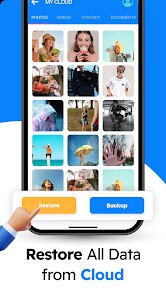
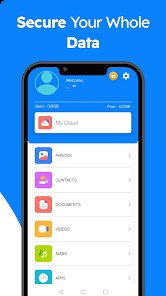
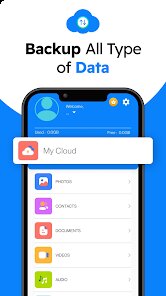
editor reviews
Cloud Backup by MAPIDIRECTIONS STUDIOS attempts to solve a problem many of us face: running out of phone storage or losing precious photos and documents. The idea is simple enough — give you a private, secure space in the cloud where you can stash your files and free up room on your device without having to delete anything forever. It is primarily designed for everyday smartphone users who don't want to mess with complicated tech setups but still need reliable data preservation. The target audience seems to be folks who regularly snap photos, download documents, or receive large attachments through messaging apps, and who don't want to rely solely on free-tier storage from big names that might feel intrusive or limited.
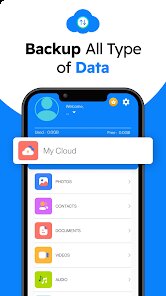
Core functionality does deliver on the basic promise: you can upload images, videos, and documents with relative ease. The app presents a minimalistic interface that doesn't overwhelm you with menus or confusing settings. All key actions live one or two taps away, which I appreciate. The auto-backup feature works in the background, so once you set it up, it just ticks along without demanding attention. However, I did notice that backups sometimes pause for no clear reason, and you need to reopen the app to get them going again. That nagging behavior slightly undermines the “set and forget” convenience. On the plus side, the additional file encryption feature provides a real sense of security, especially if you're storing sensitive personal documents like scanned IDs or financial records.
Personally, I found Cloud Backup most useful during a recent cleanup of my phone gallery. I was able to free up several gigabytes of space by moving old screenshots and redundant photos into the cloud, all while still being able to preview and download them whenever necessary. That said, I would caution that this app really shines only for casual personal use. If you need to manage team collaborations or handle very large files frequently, you might bump against its speed or reliability limits. I would recommend Cloud Backup to anyone who has a relatively straightforward need to archive their personal media and wants a no-fuss, privacy-focused solution. It fits best for those who don't require constant syncing across multiple devices but just want a safe second home for their digital memories.
features
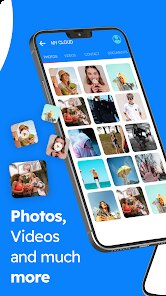
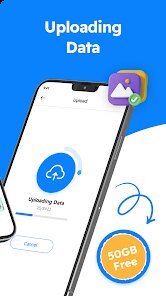
- 📂 Straightforward cloud uploads: You can toss almost any standard file format — photos, videos, PDFs, Word documents — into the cloud with just a couple taps. The upload manager clearly shows progress and any failed items, which helps you keep track without guesswork. It might not support exotic file types, but the common ones all work without headache.
- 🔒 Client-side encryption: Before anything leaves your phone, the app locks your files with encryption that even the developers cannot decrypt. This is a huge comfort if you are paranoid about privacy or if you intend to store sensitive stuff like scanned passports, contracts, or personal notes. You never have to trust blindly that your data is safe.
- ⏰ Background auto-backup: Once you toggle scheduled backups on, the app quietly works in the background daily, weekly, or at your chosen interval to copy new files from selected folders. The advantage is obvious: you don't have to remember to manually protect your latest vacation photos or work snapshots. It just happens, assuming the app stays alive in memory.
pros
- 👍 Easy to set up: From account creation to your first upload, the entire onboarding process is smooth. You are not bombarded with unnecessary steps or permissions requests all at once, which is refreshing compared to many other cloud tools.
- 👍 Clean, minimal design: The interface avoids clutter and keeps focus on what matters — uploading, browsing, and managing your files. The learning curve is almost nonexistent.
- 👍 Strong privacy focus: Encryption is not just a gimmick here. It actually protects your content from the start, and the developers have stated that they cannot access your files, which builds genuine trust.
cons
- 👎 Occasional backup stalling: The auto-backup sometimes just stops without warning. You might think your files are safe when they are not synced. Opening the app manually tends to wake it up, but that defeats the purpose of automation.
- 👎 Limited file management tools: Once your files are uploaded, there is no way to rename, move, or organize them into custom folders within the app. You only get a flat list sorted by date, which becomes messy quickly if you upload a lot.
- 👎 No web access: You cannot view or download your backed-up files from a desktop browser. This restricts your access to only the mobile app, which can be inconvenient if you want to retrieve something on a larger screen or share it from a computer.
Recommended Apps
![]()
Astra - Life Advice
Vert Media Partners4.4
![]()
Question.AI - Chatbot&Math AI
D3 DIMENSION TECHNOLOGY PTE.LTD.4.5
![]()
Anima
ChristopherMoore03.2![]()
Suno - AI Music & Songs Maker
Suno, Inc4.8![]()
Name Meaning
Dexati4.1![]()
Reface: Face Swap & AI Videos
NEOCORTEXT, INC.4![]()
Astroscope: Astrology Guide
Astroscope App4.5![]()
Passport Parking
Passport Labs, Inc.2.5![]()
AXS Tickets
AXS, LLC4.2![]()
Call Santa Claus & Prank Call
WELLY GLOBAL PUBLISHING3.5![]()
PawAI: AI Cartoon Pet Filter
Now Tech3.1![]()
Waymo
Waymo LLC4.9![]()
Live football TV
Findy360 Software LLC3.7![]()
Pedometer - Step Counter
Simple Design Ltd.4.8![]()
Face Live Camera: Face Filters
Lyrebird Studio4.1














You May Like
-
![]()
FORCETELLER Astrology & Saju
Team UN7QI34.5 -
![]()
Daily Horoscope & Astrology
TELEMAQUE4.2 -
![]()
Yahoo Sports: Scores & News
Yahoo4.7 -
![]()
Uber Eats: Food Delivery
Uber Technologies, Inc.4.3 -
![]()
How I will die - Predict death
Bimdu3.2 -
![]()
Quiz Reels: Filter Challenge
Now Tech3.9 -
![]()
Broken Screen 4K Funny Pranks
Braly JSC4.1 -
![]()
Prisma3D - Animation, Modeling
Prisma3D2.8 -
![]()
Wonder - LGBTQ+ Dating App
Bumpy Inc.4.3 -
![]()
PicSo – Customize Your AI Girl
Meta Insight3.7 -
![]()
Plant App - Plant Identifier
ScaleUp4.6 -
![]()
Software Update for my phone
Art & Tool Studio4.1 -
![]()
Kling AI: AI Image&Video Maker
Lohas Games Pte. Ltd.4.4 -
![]()
Google Home
Google LLC4.2 -
![]()
Fingerprint Scan Simulator
Dream-Up3.6















Disclaimer
1.Apponbest does not represent any developer, nor is it the developer of any App or game.
2.Apponbest provide custom reviews of Apps written by our own reviewers, and detailed information of these Apps, such as developer contacts, ratings and screenshots.
3. All trademarks, registered trademarks, brand names and company names or logos appearing on the site are the property of their respective owners.
4.Apponbest abides by the federal Digital Millennium Copyright Act (DMCA) by responding to notices of alleged infringement that complies with the DMCA and other applicable laws.
5.If you are the owner or copyright representative and want to delete your information, please contact us [email protected].
6.All the information on this website is strictly observed all the terms and conditions of Google Ads Advertising policies and Google Unwanted Software policy.
7.apponbest.com is an independent, information-only website which is 100% free to all the users.



























