Call From Princess Elsa video

500K+
Installs
dev riad saoud Apps
Developer
-
Video Players & Editors
Category
-
Teen
Content Rating
-
https://sites.google.com/view/dev-riad-saoud/accueil
Privacy Policy
Screenshots
editor reviews
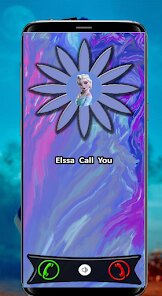
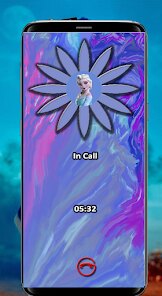
Princess Elsa is a video calling app that lets children simulate a real-time video conversation with the beloved Frozen character. The app creates the illusion that Elsa is calling you, complete with her familiar voice, animated responses, and even a few surprise moments that feel personal. It is clearly aimed at young children, likely between three and eight years old, who are still deeply engaged in pretend play and whose parents are looking for a safe, screen-based alternative to actual video calls with costumed characters.
The core experience revolves around receiving a call from Elsa. After the initial greeting, she asks simple questions and reacts to the child's answers. The app uses a mix of pre-recorded clips and a basic voice recognition system that listens for keywords to steer the conversation. While it is not artificial intelligence in any advanced sense, the handoff between clips is smooth enough that a young child will almost certainly be fooled. The app also includes a set of interactive features, such as the ability to sprinkle "magic snow" on the screen by touching it, and a few simple games like matching snowflakes or helping Olaf find his carrot. These additions do elevate the illusion, since they allow the child to actively participate rather than just watch.
In my own testing, I found that the app performs best exactly as intended: in short, supervised bursts. My niece, who is five, was completely captivated for about fifteen minutes. She answered Elsa's questions, laughed at the "magic snow," and demanded to call again the next day. The app does have limitations. The voice recognition is rudimentary, and if a child speaks too softly or answers with an unexpected word, Elsa will respond with a generic, slightly off-topic line. This can break the spell for an older child. Also, the pacing is quite slow. There are long pauses while the app loads the next clip, which can feel awkward for adults but fortunately goes unnoticed by younger fans.
I would recommend this app to parents of children who are obsessed with Frozen and who are not yet too cynical to believe in a bit of video-call magic. It is a perfect tool for a rainy afternoon, a long car ride (with headphones), or a special treat after a good day at school. If your child is over seven or particularly observant about how technology works, they will likely see through the trick quickly, so the window of perfect enjoyment is fairly narrow. For the right age group, though, it provides a delightful and harmless dose of enchantment.
features
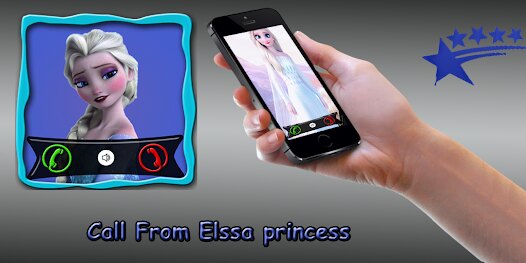
- 📞 Seamless Call Simulation: The app does an excellent job of recreating the visual and audio elements of a real video call. You see Elsa on a mock video interface with a poor connection signal, slight buffering delays, and a "connecting" screen at the start. This attention to detail is crucial because it sells the illusion to children. The voice acting is spot-on, matching the character's tone and cadence from the films, which further immerses the child in the scenario. The background also subtly shifts from a castle hall to a snowy forest, keeping the visual experience dynamic.
- ❄️ Interactive Magic Effects: Beyond just talking, the app lets children interact with the screen. Touching the display causes snowflakes to fall, and swiping your finger creates a frost pattern that follows your movement. There is also a "freeze" button that makes Elsa stop mid-sentence and then start laughing, which my niece found endlessly amusing. These simple touch gestures give a sense of agency and control, making the child feel like they are part of the story rather than just a viewer. It is a clever way to use the touchscreen as a prop for imaginative play.
- 🎤 Basic Conversational Branching: The app uses a keyword detection system to guide the conversation down different paths. When Elsa asks "What is your favorite color?" and the child says "blue," the next clip will be a response referencing blue. While it is limited to a handful of predefined topics (animals, food, toys), this branching creates an illusion of real dialogue. It is enough to keep a child engaged and feeling heard, which is the primary goal. The system is forgiving, and even a wrong answer will just loop back to a generic question, ensuring that the flow rarely fully breaks down.
- 🎁 Surprise Cameo Appearances: As the call progresses, other characters from the Frozen universe make brief appearances. Olaf might pop in to wave, or Sven's antlers might appear at the edge of the screen. These little guest spots are rare and unexpected, which makes them feel like special bonuses. They add variety to what could otherwise become a monotonous one-person conversation, and they offer parents a moment of delight as well since they are charming and well-animated. This feature significantly extends the app's replay value.
pros
- 🎯 Perfect Illusion for Young Kids: The combination of authentic voice, believable interface, and slow pacing is tailored precisely for the attention span and perception of a preschooler. It successfully creates a moment of genuine wonder.
- 🧼 Clean and Safe Design: There are no third-party ads, no external links, and no in-app purchases that a child could accidentally trigger. The parental gate is simple and effective, giving peace of mind during unsupervised play.
- 🎨 Charming Visuals and Animation: The graphics are colorful, polished, and reminiscent of the movie's aesthetic without being overly complex. The subtle animations during conversation keep the child's eyes engaged without being distracting.
cons
- 🐢 Slow Pacing for Adults: The deliberate loading times and pauses between conversational branches, while necessary for a child, are painfully slow for any adult watching. It can feel tedious during repeated sessions.
- 🎤 Limited Speech Recognition: The keyword system is fragile. It fails with soft speech, strong accents, or unexpected phrasing, leading to generic responses that quickly break the fantasy for slightly older or more astute children.
- 📶 Requires Stable Connection: The app needs a consistent internet connection to stream the video clips. Any buffering or drop in connectivity will cause the call to freeze or abruptly end, which can lead to a very tearful meltdown from a disappointed fan.
Recommended Apps
![]()
Microsoft Copilot
Microsoft Corporation4.8

![]()
Wise: International Transfers
Wise Payments Ltd.4.7![]()
YouTube
Google LLC4.1![]()
Prank Zone - Hilarious Call
Allegany Boys Camp Inc4.1![]()
Silly Smiley Live Wallpaper
LuX GLOBAL3.7![]()
Anime Shimeji Screen Pets
NovaSoftLC Labs3.9![]()
Codes for grow a garden
PetarApps0![]()
Call From Princess Elsa video
dev riad saoud Apps3.5![]()
Perfect365 Video Makeup Editor
Perfect365, Inc.4.7![]()
Lips App - Know your Lip type
Simple App Creator2.3![]()
Boom Chip Blast: 2-Player
Black Pyramid 3D Games Studio0![]()
Shazam: Find Music & Concerts
Apple Inc.4.8![]()
DeepArtEffects AI Photo Editor
Deep Art AI GmbH4.6![]()
Rolling Icon: 3D Wallpaper
Maxlabs Personalization Tools4.4![]()
DogTok - Dog Translator
Ai Apps SRL3.1











You May Like
-
![]()
Allergy Plus by Pollen.com
IQVIA Inc.3.9 -
![]()
Blood Pressure Log
Sharon Evans4.1 -
![]()
Love Detector - Fingerprints
KOSHINA APPS0 -
![]()
Razor Prank (Hair Trimmer Joke
RRM Jokes, Pranks and fun apps3.6 -
![]()
SuperMe - Avatar Maker Creator
THE.DEMON3.7 -
![]()
PolyBuzz: Chat with AI Friends
CLOUD WHALE INTERACTIVE TECHNOLOGY LLC.3.8 -
![]()
Photo Frames
Csmartworld4.4 -
![]()
Picta Photo Print - 1h Pickup
Pictarine - Printing Photos4.8 -
![]()
Lethal Love: a Yandere game
AniByte!4.4 -
![]()
CatTranslator - Cat to Human
Tripti4.1 -
![]()
Prank Call Voice Changer App
Ownage Labs Apps3.3 -
![]()
Simple Calendar - easy planner
Komorebi Inc.4.7 -
![]()
PixVerse: AI Video Generator
PixVerse4.5 -
![]()
Live football TV
Findy360 Software LLC3.7 -
![]()
Wednesday Addams Prank Call
Prank Calling4









Disclaimer
1.Apponbest does not represent any developer, nor is it the developer of any App or game.
2.Apponbest provide custom reviews of Apps written by our own reviewers, and detailed information of these Apps, such as developer contacts, ratings and screenshots.
3. All trademarks, registered trademarks, brand names and company names or logos appearing on the site are the property of their respective owners.
4.Apponbest abides by the federal Digital Millennium Copyright Act (DMCA) by responding to notices of alleged infringement that complies with the DMCA and other applicable laws.
5.If you are the owner or copyright representative and want to delete your information, please contact us [email protected].
6.All the information on this website is strictly observed all the terms and conditions of Google Ads Advertising policies and Google Unwanted Software policy.
7.apponbest.com is an independent, information-only website which is 100% free to all the users.