Hailuo Al: Image&Video Maker

Installs
MiniMax AI
Developer
-
Generative AI
Category
-
Teen
Content Rating
-
https://hailuoai.video/doc/privacy-policy.html
Privacy Policy
Screenshots




editor reviews
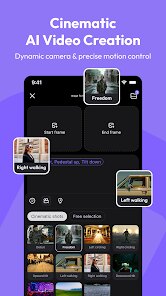
Hailuo AI: Image&Video Maker is a creative tool developed by MiniMax AI that aims to transform static imagery and text prompts into dynamic video content through artificial intelligence. The app sits at the intersection of generative AI and content creation, serving users who want to produce short-form visual media without traditional video editing skills. Its core functionality revolves around taking either an uploaded image or a text description and generating a short video clip that brings those inputs to life. The target audience spans social media content creators, small business owners needing promotional materials, digital artists experimenting with new mediums, and everyday users who want to make eye-catching posts for their personal channels.
After spending considerable time with the tool, I can report that its core feature—video generation—works impressively well for simple prompts and straightforward scenes. The technology behind it handles motion synthesis with surprising fluidity. However, the additional features that were clearly meant to broaden the app's utility feel more like placeholders. Basic editing capabilities are there, but they lack the precision and depth you would find in even a free mobile video editor. I used this app to turn some personal vacation photos into short looping videos for social media. The first few generations were genuinely impressive—waves moving, clouds drifting, people smiling naturally. But when I tried to generate anything more complex, like a scene with multiple moving elements, the results became disjointed and sometimes unintentionally comedic.
I would recommend this app to casual content creators who want quick, visually interesting assets without fussing over timelines or keyframes. It is particularly useful for social media managers who need a steady stream of short video content, or for bloggers who want to add motion to otherwise static travel or lifestyle photos. If you need full control over the final output or are working on anything with commercial production value, this is not the right tool. It excels at accessibility and surprise rather than precision. For someone who just wants to see what happens when you feed a picture into an AI and ask for motion, Hailuo delivers real magic within a constrained scope.
features
- 🎥 The core video generation engine is where Hailuo clearly receives the bulk of the development focus. You can start with either an image or a text prompt, and the AI outputs a video of variable length. The results range from uncanny to stunning depending on the input complexity. Single-subject shots with clear foregrounds and backgrounds tend to produce the most cohesive motion. When the AI works well, it truly feels like watching a scene come alive.
- 🖼️ There is a library system for storing your creations, which includes generation history and the ability to revisit past prompts. This sounds minor, but when you are iterating on an idea, being able to quickly scroll back through outputs, compare versions, and remix earlier successes saves a lot of time. It prevents the frustration of losing a good generation because you forgot to save it locally.
- ✂️ Basic editing tools are available for trimming and adjusting your generated video. You can cut the beginning and end of clips, which is helpful for removing awkward lead-in frames where the AI is still stabilizing the scene. There are also simple filter overlays and text addition features, though these feel bolted on rather than thoughtfully integrated. The text options are particularly limited, offering only a few fonts and no animation timing controls.
- 📤 Export and sharing options include direct posting to several social media platforms, which reflects the app's intended use case as a content creation tool. The export resolution is acceptable for social feeds, though videographers will notice compression artifacts and a cap on file size. For its target audience of casual sharers, the quality meets expectations.
pros
- ⚡ The speed of generation is genuinely impressive. Most clips render within thirty seconds to a minute, making iteration feel fluid rather than frustrating.
- 🔄 The interface is clean and intuitive for first-time users. The two-step process of choosing input type and hitting generate removes barriers to entry.
- 🎨 The visual quality on simple prompts is frequently beautiful. Landscapes, portraits, and subjects with clear motion cues come out sharable right away.
- 🔁 The library feature encourages experimentation without fear of losing work, which is essential for a creative tool.
cons
- ⚠️ Complex prompts with multiple subjects or detailed movement often produce glitchy, distorted results. The AI struggles with physics and logic—arms bend unnaturally, objects appear and disappear.
- 🔧 Editing capabilities are surface-level. There is no timeline, no layer support, and no ability to fine-tune motion parameters. You get what the AI gives you.
- 📐 Resolution and export options are limited. Power users will be frustrated by the lack of customization around aspect ratios, frame rates, and file formats.
- 💰 The free tier runs out quickly, and the subscription pricing feels high given the inconsistency in output quality for anything beyond simple inputs.
Recommended Apps
![]()
GPS Speedometer: Speed Tracker
SM Infotech3.2
![]()
Link to Windows
Microsoft Corporation4.2![]()
Smile Photo Editor
Hairstyle Photo Apps3![]()
+1 Super Anime Wallpaper
ThichTruyenTranh4.2![]()
Hair Clipper Prank, Fart Sound
duff hl studio4.1![]()
Notes - Notepad, Secure Notes
PANCHHI SOLUTION3.9
![]()
Diamond Live Wallpaper HD
Live Wallpapers and Emoji Keyboard Themes4.4![]()
Themes - App icons, Wallpapers
Lutech Ltd4.6![]()
Persona: Beauty Camera
TICKET TO THE MOON, INC.4.5![]()
Cartoon Photo Editor
AZ Mobile Software4.5![]()
Truth or Dare Game - Party App
Chouic4.8![]()
AI Chatbot - Nova
ScaleUp4.7![]()
Peacock TV: Stream TV & Movies
Peacock TV LLC4.5![]()
Face Live Camera: Face Filters
Lyrebird Studio4.1![]()
Clap To Find My Phone
Vasundhara Infotech LLC4.3















You May Like
-
![]()
BFF Friendship Test
DH3 Games4.3 -
![]()
Pride Quiz LGBTIQ+
Alvaro Quintana Palacios3.9 -
![]()
Bible Chat - Holy Bible Study
Book Vitals Inc.4.8 -
![]()
Talkie: Soulful Character AI
SUBSUP4.2 -
![]()
AI Face Swap: MagicFace &Photo
Braly JSC0 -
![]()
Lime - #RideGreen
Neutron Holdings, Inc.4.8 -
![]()
PayPal - Send, Shop, Manage
PayPal Mobile4.3 -
![]()
Fazee - Funny Face Filter
Vibe Filter Club0 -
![]()
Deepcheck AI Search Assistant
rohe.ai4 -
![]()
Silly Sounds: Prank Sounds App
Zenspin by Mindscape Applab llc0 -
![]()
Emoji Battery Widget
MIA Studio Inc0 -
![]()
Tarot
Vázquez Software4.8 -
![]()
TextNow: Call + Text Unlimited
TextNow, Inc.4.5 -
![]()
Skins for Roblox
Masterblox Skins and Clothings4.2 -
![]()
Scan My Teeth
Tabica Group1.8















Disclaimer
1.Apponbest does not represent any developer, nor is it the developer of any App or game.
2.Apponbest provide custom reviews of Apps written by our own reviewers, and detailed information of these Apps, such as developer contacts, ratings and screenshots.
3. All trademarks, registered trademarks, brand names and company names or logos appearing on the site are the property of their respective owners.
4.Apponbest abides by the federal Digital Millennium Copyright Act (DMCA) by responding to notices of alleged infringement that complies with the DMCA and other applicable laws.
5.If you are the owner or copyright representative and want to delete your information, please contact us [email protected].
6.All the information on this website is strictly observed all the terms and conditions of Google Ads Advertising policies and Google Unwanted Software policy.
7.apponbest.com is an independent, information-only website which is 100% free to all the users.