
GigaBody: AI Muscle filter

100K+
Installs
Bellential Inc.
Developer
-
Video Players & Editors
Category
-
Everyone
Content Rating
-
+15145531615
Developer Email
-
https://www.gigabody.app/privacy
Privacy Policy
Screenshots
editor reviews
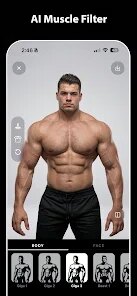
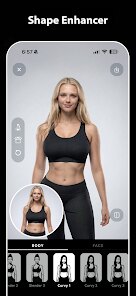
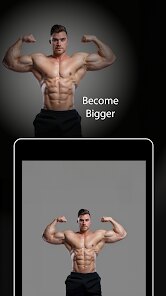
GigaBody is a clever little utility that uses AI to map your physique into a heavily muscled version of yourself, essentially letting you preview what years of dedicated gym work might look like without actually putting in the effort. I tested it on a few photos, and the results are surprisingly convincing. The app identifies your body outline and then overlays a hyper-muscular physique that stays true to your general shape, posture, and even lighting conditions. It is not just a cheap filter that slaps a generic bodybuilder onto your frame; rather, it adjusts the muscle mass in a way that feels personalized to your specific body type.
The main audience here seems to be fitness enthusiasts who want a motivational snapshot, social media users looking for a fun twist on their posts, or perhaps someone considering a body transformation and curious about the potential outcome. I found myself using it more for entertainment than anything else, but I can see how someone on a strict training program might use this as a visual goal. The app handles different angles reasonably well, though it works best with full-body shots in good lighting. It struggled a bit with photos where I was wearing loose clothing, as the AI had less to work with when defining my natural silhouette.
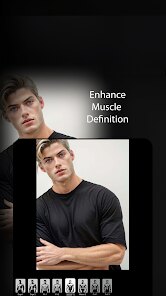
Beyond the core muscle filter, there are a few extra adjustments like muscle definition and size sliders, which add a layer of control that I appreciated. You can dial the intensity from a subtle "I work out sometimes" look to a full-on "competitive bodybuilder" appearance. Honestly, it solved the very specific problem of me wondering what I would look like at a higher muscle mass without having to commit to years of lifting. For anyone curious about their potential physique or looking for a way to create engaging, slightly intimidating fitness content, this is a fun tool to have in your pocket. It is not a serious fitness tracker or a health app, but as a novelty and visualization tool, it delivers exactly what it promises.
features
- 💪 Realistic AI mapping: The algorithm does not just paste muscles on top of your photo; it analyzes your body shape, bone structure, and posture to build a physique that looks like a believable, heavier version of you. I took a photo of myself in a tank top and the result looked like a photo of my older, more dedicated brother. The muscle insertions and proportions respect your natural frame, which makes the entire effect far less cartoonish than similar tools I have tried.
- 🎛 Adjustable intensity: You have granular control over how much muscle is added. I started with a modest 30% increase that just made me look like I had been hitting the gym consistently, then pushed it to 100% just to see the extremes. The sliders for definition and size work independently, so you can keep a more natural look with increased size or go for a dryer, more shredded appearance. This flexibility lets you fine-tune the image to match what you are trying to visualize.
- 📱 Fast processing and simple interface: There is no steep learning curve here. You pick a photo, wait a couple of seconds, and the app does its magic. The interface is clean and uncluttered, with no confusing menus or hidden settings. I appreciated that I could quickly generate a few different versions of the same photo without the app bogging down or crashing. The entire process takes under thirty seconds, which makes it easy to experiment with different pictures and angles until you get a shot you like.
pros
- ⚡ Instant results with no technical hassle; the AI works quickly and is clearly optimized for mobile processors, offering a seamless experience.
- 🎯 Impressive accuracy in preserving your identity; the app maintains facial features and natural skin texture, avoiding the uncanny valley effect that plagues many similar filters.
- 🔒 Privacy-conscious design; the app processes photos without requiring an account or uploading images to a public gallery, which I found respectful of user data.
cons
- ⚙ Limited by input photo quality; if you upload a picture with poor lighting or baggy clothing, the results can look fake or distorted, demanding a decent amount of effort to get a good shot.
- 🔋 No batch processing; you have to generate each image individually, which becomes tedious when you want to compare multiple poses or experiment with different intensity settings in one session.
- 💰 The premium features, like higher resolution exports and watermark removal, sit behind a subscription, making it less appealing for someone who only wants an occasional novelty use.
Recommended Apps
![]()
Photoleap: AI Photo Generator
Lightricks Ltd.4
![]()
4D Parallax Wallpaper 3D HD 4K
Wallpapers by Vinwap4.5
![]()
Cat Language Keyboard Filter
SOKAR4.6![]()
LinkedIn: Jobs & Business News
LinkedIn4.2![]()
LINE Camera - Photo editor
LINE (LY Corporation)4.4![]()
Tuya- Smart Life, Smart Living
Tuya Smart Inc.4.5![]()
Crush Love Finder: Fun Filter
Braly JSC0![]()
ToonArt: Cartoon Yourself
Lyrebird Studio4.7![]()
Draw Glow Comics
ColorJoy4.3![]()
Google Voice
Google LLC4.3![]()
Zodiac & Horoscope: CosmicVibe
Mysterious Apps LLC4.7![]()
Blush: AI Dating Simulator
Blush AI4.3![]()
Microsoft Edge: Browse with AI
Microsoft Corporation4.6![]()
DramaBox - Stream Drama Shorts
STORYMATRIX4.6![]()
Future Face - See Your Future
Face Magician Tech Studio4.6







You May Like
-
![]()
PREQUEL AI Filter Photo Editor
Prequel Inc.4.3 -
![]()
Cartoon Yourself, Toonme, Face
TikiP Studio4.2 -
![]()
LastSeen
Web-Source Ltd3.4 -
![]()
Hair Color Changer Real
itsmyapps3.2 -
![]()
GPS Map Camera - Timestamp
Sliver AI Photo Editor0 -
![]()
Monster High Fangtastic Life
Budge Studios4.1 -
![]()
AstroBella Astrology & Healing
Moonphase Apps GmbH4.7 -
![]()
Transit: Bus & Subway Times
Transit, Inc.4.5 -
![]()
Hair Color & Hairstyle Try On
Toon Tech Ltd4.3 -
![]()
PlantSnap plant identification
PlantSnap, Inc.3.1 -
![]()
Horoscope of Birth
Denimaks4.4 -
![]()
To Do List
Splend Apps4.7 -
![]()
Funny Gay Test
Test Master Lab4.2 -
![]()
Blood Pressure Log
Sharon Evans4.1 -
![]()
Live wallpaper - dope & anime
Jelly Dev4.4









Disclaimer
1.Apponbest does not represent any developer, nor is it the developer of any App or game.
2.Apponbest provide custom reviews of Apps written by our own reviewers, and detailed information of these Apps, such as developer contacts, ratings and screenshots.
3. All trademarks, registered trademarks, brand names and company names or logos appearing on the site are the property of their respective owners.
4.Apponbest abides by the federal Digital Millennium Copyright Act (DMCA) by responding to notices of alleged infringement that complies with the DMCA and other applicable laws.
5.If you are the owner or copyright representative and want to delete your information, please contact us [email protected].
6.All the information on this website is strictly observed all the terms and conditions of Google Ads Advertising policies and Google Unwanted Software policy.
7.apponbest.com is an independent, information-only website which is 100% free to all the users.