
GPS Map Camera - Timestamp

5M+
Installs
Sliver AI Photo Editor
Developer
-
Productivity
Category
-
Everyone
Content Rating
-
https://docs.google.com/document/d/e/2PACX-1vQ7Y9FW4r7ixX1mzXahMPH2gEliZwbNP9lmCBaryzyflmmX83TJ96Q8h7VOcuhPtFSOe4g0RuXxk8-l/pub
Privacy Policy
Screenshots


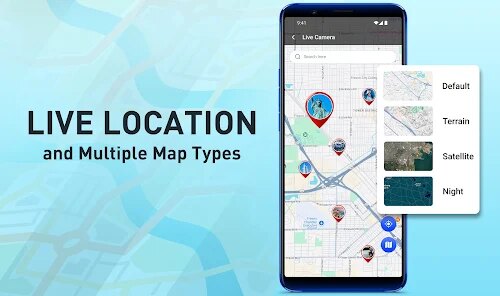
editor reviews
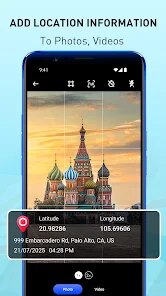
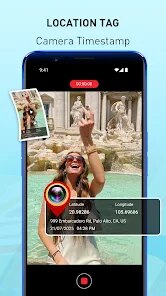
Tired of not remembering exactly when and where you snapped a particular shot? GPS Map Camera – Timestamp by Sliver AI Photo Editor is essentially a location and date stamp overlay tool built right into a camera app. Its main job is to embed current GPS coordinates, detailed map info, street addresses, and the precise date and time directly onto your photos as you capture them. At its core, this app is designed for travelers, real estate agents, field workers, delivery drivers, and anyone who needs photographic proof of location and time for documentation, organization, or memory recall.
I started using this out of frustration during a road trip. I had hundreds of breathtaking scenic photos but zero memory of which mountain range or rest stop they belonged to. This app solved exactly that. The core feature – stamping the location – works smoothly. You snap a picture, and the data is immediately baked in. You can customize the stamp's style, font, and layout, though some options feel a bit buried. The extra features, like a built-in basic photo editor for filters and cropping, are OK but not spectacular. They add a slight bonus without hindering the main purpose. For me, the app solved the practical problem of sorting travel photos weeks later, saving me hours of geotagging manually.
I would recommend this app to frequent travelers who want a visual log, construction site supervisors needing timestamped progress photos, and social media content creators who like to showcase locations in their images. It is most useful when you are on the go and need immediate, accurate location data embedded into your camera roll without resorting to a separate editing step. If organization through visual metadata is your priority, this is a solid tool.
features
- 🗺️ GPS Coordinate and Address Overlay: This is the heart of the app. When you take a photo, it uses your phone's GPS to retrieve latitude and longitude, then reverse-geocodes it into a readable street address or a more general location name. You can toggle between showing just 'Lat, Long' or a full address with state and zip code. The utility here is massive for creating a visual timeline of exactly where you stood. On my recent hike, I could look back and see not just a mountain shot, but the name of the trailhead and the nearest town, making sharing with friends far more interesting.
- ⏰ Time and Date Customization: Beyond just location, you can stamp the exact second, minute, hour, day, month, and year. This goes far beyond the typical meta-data timestamp. You can choose from various formats and positions on the image. For someone like me tracking project milestones, having “10:35 AM, June 15, 2024” clearly in the corner of a site photo is worth its weight in gold. It's not just a number in a file's properties; it is visible proof.
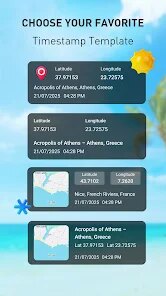
- 🎨 Stamp Style and Templates: You aren't locked into a boring black-on-white text. The app includes multiple fonts, colors, and pre-made templates like 'Date Only' or 'Classic Stamp.' You can resize and reposition the overlay. My favorite is the 'Map View' template that shows a small embedded map next to the text, which gives a neat aesthetic for travel blogs. The variety is nice, but the interface for editing is a little packed and could be more smoothly designed for quick access to presets.
- 🖼️ Basic Photo Editing Suite: This is a secondary layer. Before saving, you can apply filters, adjust brightness/contrast, crop, and rotate the image. It's not a professional editor, but it's more than just a stamp tool. I used it to darken an overexposed sky so the stamp text was still readable. It's a welcome bonus, turning what could be a one-trick app into a quick all-in-one capture and touch-up tool for non-professionals.
pros
- ✅ It provides genuinely accurate GPS data. In dozens of tests, the address matched my actual location within a few meters. This is crucial for this type of app and rarely fails.
- ✅ The stamp customization options are extensive. You can truly tailor the overlay to not look like a cheap watermark, thanks to adjustable fonts, colors, and opacity – making the photo still look professional.
- ✅ Saving time is a huge plus. No more opening Gallery, checking details, and then manually typing out location info. Snap and done – the data is inseparable from the image itself.
- ✅ The bulk of the stamping process feels instantaneous. Even when processing high-resolution images, there's hardly any lag, which makes for a smooth shooting experience.
cons
- ❌ The user interface for customizing the stamp is somewhat clunky. Menus feel nested, and a beginner may not easily discover all font and position options. The workflow feels like it could use a more intuitive drag-and-drop approach.
- ❌ The free version includes a watermark from the app on the bottom, which can be an eyesore. Unlocking the full experience requires a one-time purchase, which feels stiff compared to other similar tools that operate with fewer ads.
- ❌ Battery consumption is noticeable, as expected when using continuous GPS. If you are capturing for over an hour, your battery will drop faster than using the standard camera app. It's a trade-off for the convenience of the stamp.
- ❌ Edit non-destructively? No. Once the stamp is baked into the image file and saved, it is permanent. You cannot later remove the date or location from the picture without using an external photo editor, which limits flexibility if you decide you want a cleaner shot later.
Recommended Apps
![]()
AI Video Art Creator - Livensa
FERASET4.5

![]()
Voice Changer - Voice Effects
Dairy App & Notes & Audio Editor & Voice Recorder4.4![]()
TeraBox: 1TB Cloud & AI Space
Flextech Inc.4.4![]()
Suno - AI Music & Songs Maker
Suno, Inc4.8![]()
Live wallpaper - dope & anime
Jelly Dev4.4![]()
starryai - AI Art Generator
starryai Inc.3.7![]()
PicSo – Customize Your AI Girl
Meta Insight3.7![]()
Notes - Notepad, Secure Notes
PANCHHI SOLUTION3.9![]()
Spider Hero Video Prank Call
Game Dot Studio3.9![]()
Track stock for grow a garden
PetarApps1.4![]()
Google Translate
Google LLC4.2![]()
MyHyundai with Bluelink
Hyundai Motor America4.6![]()
Chat AI - Ask AI anything
AI Chat Bot, Ask AI4.4![]()
Snapmint: Buy Now, Pay in EMIs
Snapmint4.5![]()
4K Wallpaper & HD Background
MobWally5














You May Like
-
![]()
Dog & Cat Translator Prank
King Clover Studio0 -
![]()
Prisma Art Effect Photo Editor
Prisma Labs, Inc.4.5 -
![]()
AI Art Generator - AI Yearbook
Smart AI DEV3.9 -
![]()
Zodiac Signs Compatibility
IVR3.9 -
![]()
Flipped:Chat with AI Character
First Group pte ltd4.1 -
![]()
Future Self - Old Age Filter
Vidler Koiter1.6 -
![]()
ZEPETO: Avatar, Connect & Play
Naver Z Corporation4.3 -
![]()
Home AI - AI Interior Design
HubX4.6 -
![]()
FaceLab: Face Editor, Aging
Lyrebird Studio4.4 -
![]()
Pinterest
Pinterest4.5 -
![]()
To Do List
Splend Apps4.7 -
![]()
Crafty Craft: Mcpe mods maker
Bejan Alexandru2.3 -
![]()
FaceMagic - AI Face Editor
Apero Vision Lab3.9 -
![]()
FIFA Player App
FIFA3 -
![]()
Netflix
Netflix, Inc.3.9















Disclaimer
1.Apponbest does not represent any developer, nor is it the developer of any App or game.
2.Apponbest provide custom reviews of Apps written by our own reviewers, and detailed information of these Apps, such as developer contacts, ratings and screenshots.
3. All trademarks, registered trademarks, brand names and company names or logos appearing on the site are the property of their respective owners.
4.Apponbest abides by the federal Digital Millennium Copyright Act (DMCA) by responding to notices of alleged infringement that complies with the DMCA and other applicable laws.
5.If you are the owner or copyright representative and want to delete your information, please contact us [email protected].
6.All the information on this website is strictly observed all the terms and conditions of Google Ads Advertising policies and Google Unwanted Software policy.
7.apponbest.com is an independent, information-only website which is 100% free to all the users.





























